







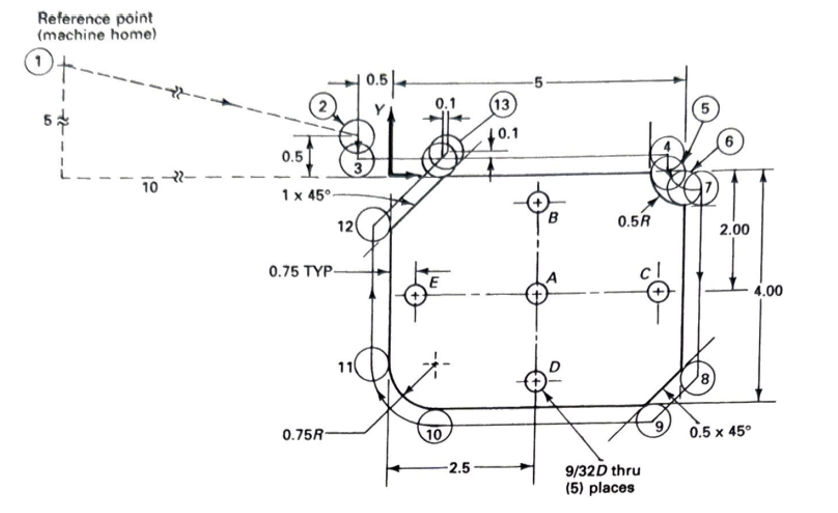
Question: Need help creating a G - Code using cutter compensation for this assignment, Please help. 1 Provided: 1 . 2 Haas 0 3 - 2
Need help creating a GCode using cutter compensation for this assignment, Please help.
Provided:
Haas in Dia. HSS End Mill
Speeds and Feeds to
Given:
Workpiece Material: Aluminum
The radial depth of cut:
Use Haas PN as the end mill for all milling operations
The Part Reference Zero PRZ is:
Part #: indicated on the drawing as the center of the part
Part #: in dictated on the drawing as the upper left corner of the part, not the Machine Home position point
Use Haas PN as the end mill for all milling operations data sheet and speed and feed tables provided
Assume:
Aluminum is in VDI Group
Part production rate is more important than surface finish. Use the fz factor to adjust for chip thinning.
Instructions
Use the part drawing shown to create a Gcode part program.
For this part drawing, write a GCode part program which incorporates cutter compensation: G G G
Circular Interpolations: For G and G use I,JK syntax, not R syntax.
Insert or delete rows in the GCode below as required to complete this assignment.
For the drawing provided:
Mill the periphery of the workpiece.
Use end mill specification sheet provided Tool #
Create a new point to follow point and ramp off cutter compensation.
Calculate the speed and feed rates.
Perform sample calculations below.
Position a drill bit Tool #; No specifications provided over the holes but do not drill them.
Rapid to above the part
Use G and G as desired to position the drill bit above the holes.
Cutter compensation is not used for this drilling operation
Use the GCode table below to record your GCode.
To the right of your GCode record the function of every word within the block.
Fill out the G Code table:
O;
N M T End Mill;
N G G G X Y M S ;
N G H Z;
N M;
N G Z F
N
N
N
N
N
N
N
N
N
N
N
N
N G G Z M;
N M;
N G Z;
N G X Y;
N M;
Step by Step Solution
There are 3 Steps involved in it
1 Expert Approved Answer
Step: 1 Unlock

Question Has Been Solved by an Expert!
Get step-by-step solutions from verified subject matter experts
Step: 2 Unlock
Step: 3 Unlock
 Study Help