







Question: NEED HELP FORMATTING MY HTML TABLE INSTRUCTIONS: Add an embedded style section to the head element of this document and add style declarations to do
NEED HELP FORMATTING MY HTML TABLE
INSTRUCTIONS:
Add an embedded style section to the head element of this document and add style declarations to do the following:
- Center the content in the h1 element.
- Center the table within the section element.
- Format the cells in the table header to be left-aligned and maroon.
- Set the width of the table cells to 20%.
- Vertically align the content of the first-column cells to top, and left align. Do not use classes for this step.
- Right align the cells in the last column using the pseudo-class :last-child(n) .
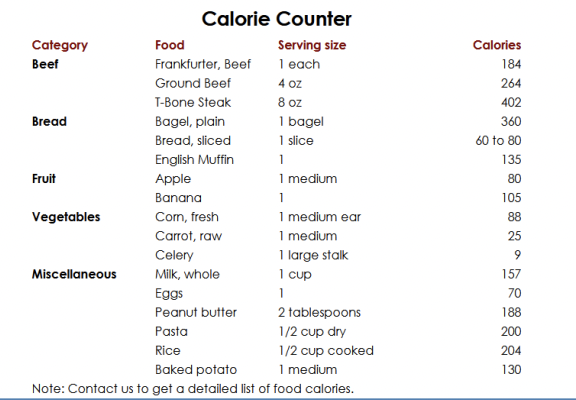
EMBEDDED STYLE IN HEAD ELEMENT OF HTML CODE (INCORRECT/ NEED HELP):
TABLE CONTENTS HTML CODE:
Category Food Serving size Calories Beef Frankfurter, Beef 1 each 184 Ground Beef 4 oz 264 T-bone Steak 8 oz 402 Bread Bagel, plain 1 bagel 360 Bread, sliced 1 slice 60 to 80 English Muffin 1 135 Fruit Apple 1 medium 80 Banana 1 105 Vegetables Corn, fresh 1 medium ear 88 Carrot, raw 1 medium 25 Celery 1 large stalk 9 Miscellaneous Milk, whole 1 cup 157 Eggs 1 70 Peanut Butter 2 tablespoons 188 Pasta 1/2 cup dry 200 Rice 1/2 cup cooked 204 Baked potato 1 medium 130 Note: Contact us to get a detailed list of food calories
Calorie Counter Note: Contact us to get a detailed list of food calories
Step by Step Solution
There are 3 Steps involved in it

Get step-by-step solutions from verified subject matter experts
 Study Help