







Question: Need help in C Programming 3. Proton Edar has organized a year-end sale to clear out their stock with special rebate 2.5% for every car
Need help in C Programming
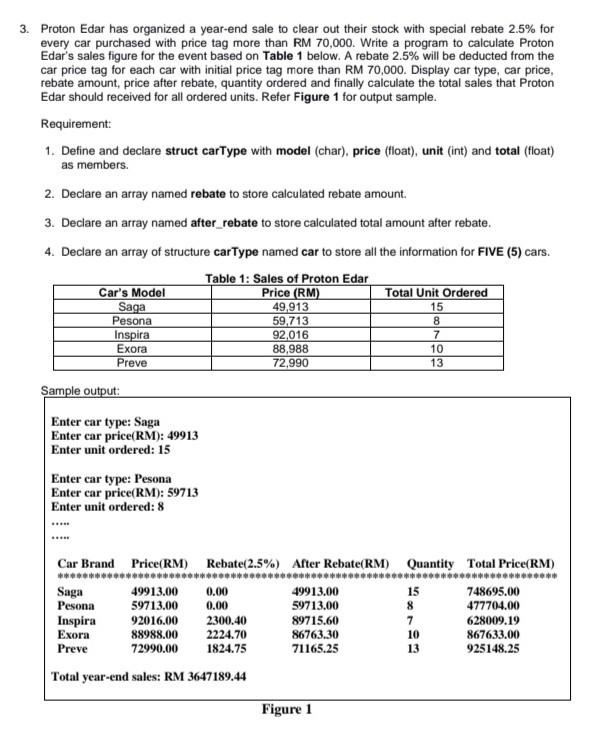
3. Proton Edar has organized a year-end sale to clear out their stock with special rebate 2.5% for every car purchased with price tag more than RM 70,000. Write a program to calculate Proton Edar's sales figure for the event based on Table 1 below. A rebate 2.5% will be deducted from the car price tag for each car with initial price tag more than RM 70,000. Display car type, car price, rebate amount, price after rebate, quantity ordered and finally calculate the total sales that Proton Edar should received for all ordered units. Refer Figure 1 for output sample. Requirement: 1. Define and declare struct carType with model (char), price (float), unit (int) and total (float) as members. 2. Declare an array named rebate to store calculated rebate amount 3. Declare an array named after_rebate to store calculated total amount after rebate. 4. Declare an array of structure carType named car to store all the information for FIVE (5) cars. Table 1: Sales of Proton Edar Car's Model Price (RM) Total Unit Ordered Saga 49,913 15 Pesona 59,713 Inspira 92,016 Exora 88,988 10 Preve 72,990 13 Sample output: 8 7 Enter car type: Saga Enter car price(RM): 49913 Enter unit ordered: 15 Enter car type: Pesona Enter car price(RM): 59713 Enter unit ordered: 8 Car Brand Price(RM) Rebate(2.5%) After Rebate(RM) Quantity Total Price(RM) Saga 49913.00 0.00 49913.00 15 748695.00 Pesona 59713.00 0.00 59713.00 8 477704.00 Inspira 92016.00 2300.40 89715.60 7 628009.19 Exora 88988.00 2224.70 86763.30 10 867633.00 Preve 72990.00 1824.75 71165.25 13 925148.25 Total year-end sales: RM 3647189.44 Figure 1
Step by Step Solution
There are 3 Steps involved in it

Get step-by-step solutions from verified subject matter experts
 Study Help