







Question: Need help with C++ Program InterestCalculator2.0 COMMANDS v - View all loans and interest a - Add a loan r - Remove a loan Command:
Need help with C++ Program
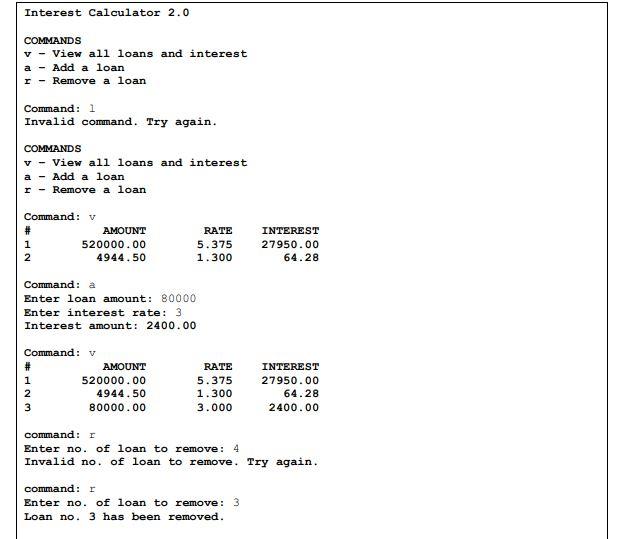
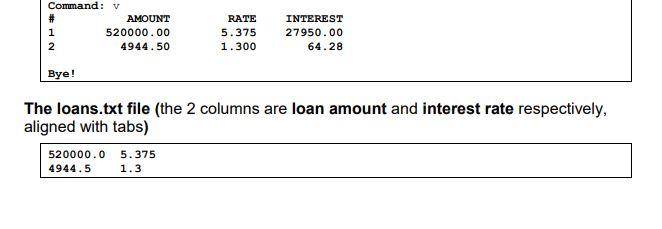
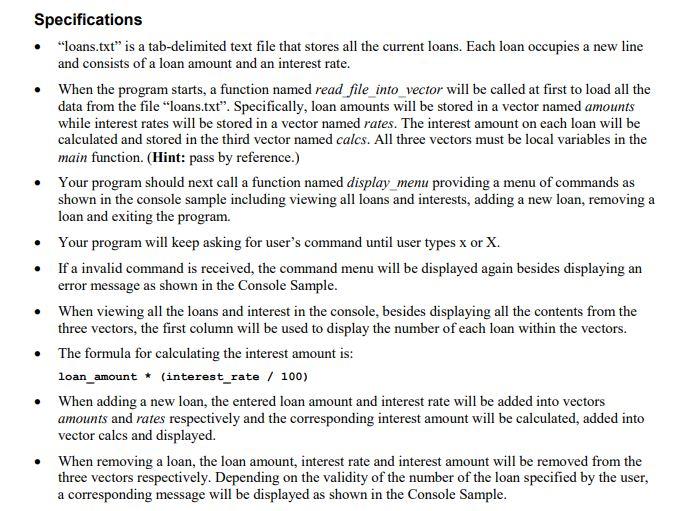
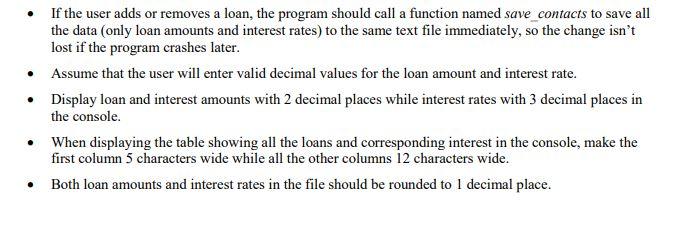
InterestCalculator2.0 COMMANDS v - View all loans and interest a - Add a loan r - Remove a loan Command: 1 Invalid command. Try again. COMMANDS v - View all loans and interest a - Add a loan r - Remove a loan Command: V #12AMOUNT520000.004944.50RATE5.3751.300INTEREST27950.0064.28 Command: a Enter loan amount: 80000 Enter interest rate: 3 Interest amount: 2400.00 command: I Enter no. of loan to remove: 4 Invalid no. of loan to remove. Try again. command: r Enter no. of loan to remove: 3 Loan no. 3 has been removed. The loans.txt file (the 2 columns are loan amount and interest rate respectively, aligned with tabs) Specifications - "loans.txt" is a tab-delimited text file that stores all the current loans. Each loan occupies a new line and consists of a loan amount and an interest rate. - When the program starts, a function named read file_into_vector will be called at first to load all the data from the file "loans.txt". Specifically, loan amounts will be stored in a vector named amounts while interest rates will be stored in a vector named rates. The interest amount on each loan will be calculated and stored in the third vector named calcs. All three vectors must be local variables in the main function. (Hint: pass by reference.) - Your program should next call a function named display_menu providing a menu of commands as shown in the console sample including viewing all loans and interests, adding a new loan, removing a loan and exiting the program. - Your program will keep asking for user's command until user types x or X. - If a invalid command is received, the command menu will be displayed again besides displaying an error message as shown in the Console Sample. - When viewing all the loans and interest in the console, besides displaying all the contents from the three vectors, the first column will be used to display the number of each loan within the vectors. - The formula for calculating the interest amount is: loan_amount * (interest_rate / 100) - When adding a new loan, the entered loan amount and interest rate will be added into vectors amounts and rates respectively and the corresponding interest amount will be calculated, added into vector calcs and displayed. - When removing a loan, the loan amount, interest rate and interest amount will be removed from the three vectors respectively. Depending on the validity of the number of the loan specified by the user, a corresponding message will be displayed as shown in the Console Sample. - If the user adds or removes a loan, the program should call a function named save contacts to save all the data (only loan amounts and interest rates) to the same text file immediately, so the change isn't lost if the program crashes later. - Assume that the user will enter valid decimal values for the loan amount and interest rate. - Display loan and interest amounts with 2 decimal places while interest rates with 3 decimal places in the console. - When displaying the table showing all the loans and corresponding interest in the console, make the first column 5 characters wide while all the other columns 12 characters wide. - Both loan amounts and interest rates in the file should be rounded to 1 decimal place
Step by Step Solution
There are 3 Steps involved in it

Get step-by-step solutions from verified subject matter experts
 Study Help