







Question: Need help with Computer Science MIPS Assignment Introduction Bomberman is a famous series of games first released in the 1980s! There have been many versions,
Need help with Computer Science MIPS Assignment
Introduction
Bomberman is a famous series of games first released in the 1980s! There have been many versions, but in its core the game has remained the same. And thats what our project will look like.
The game is played in an arena composed of a grid of indestructible and destructible blocks. Also in the arena, enemies (usually monsters that have some evil purpose) roam trying to stop the player.
The objective, clear the arena of all enemies. The means, (this will come as a surprise!) BOMBS!
Destructible blocks often block Bomberpixels path, so the player must place bombs next to them to clear a path to the enemies. Bombs explode some time after they are placed, and have limited range. But be careful, they can also kill Bomberpixel!
Game elements
The board
The level arena will be a 31x31 arena, which means there will be an unused row and column on the display! The arena will contain two different types of obstacles: a) a grid of indestructible blocks (green in the picture), and b) destructible blocks (yellow in the picture). As the name suggests, indestructible blocks cannot be destroyed by any means, and destructible blocks, on the other hand, can be destroyed by placing a bomb near them (more on bombs later).
Indestructible blocks should be placed in odd coordinates, i.e. coordinates (x, y) where both x and y are odd. For example (1,1), (1, 3), (1, 5), etc.. Destructible blocks should be placed randomly in such a way that:
-They are not placed on top of indestructible blocks.
-They are not placed in the 3x3 area on the corners (otherwise Bomberpixel can be stuck).
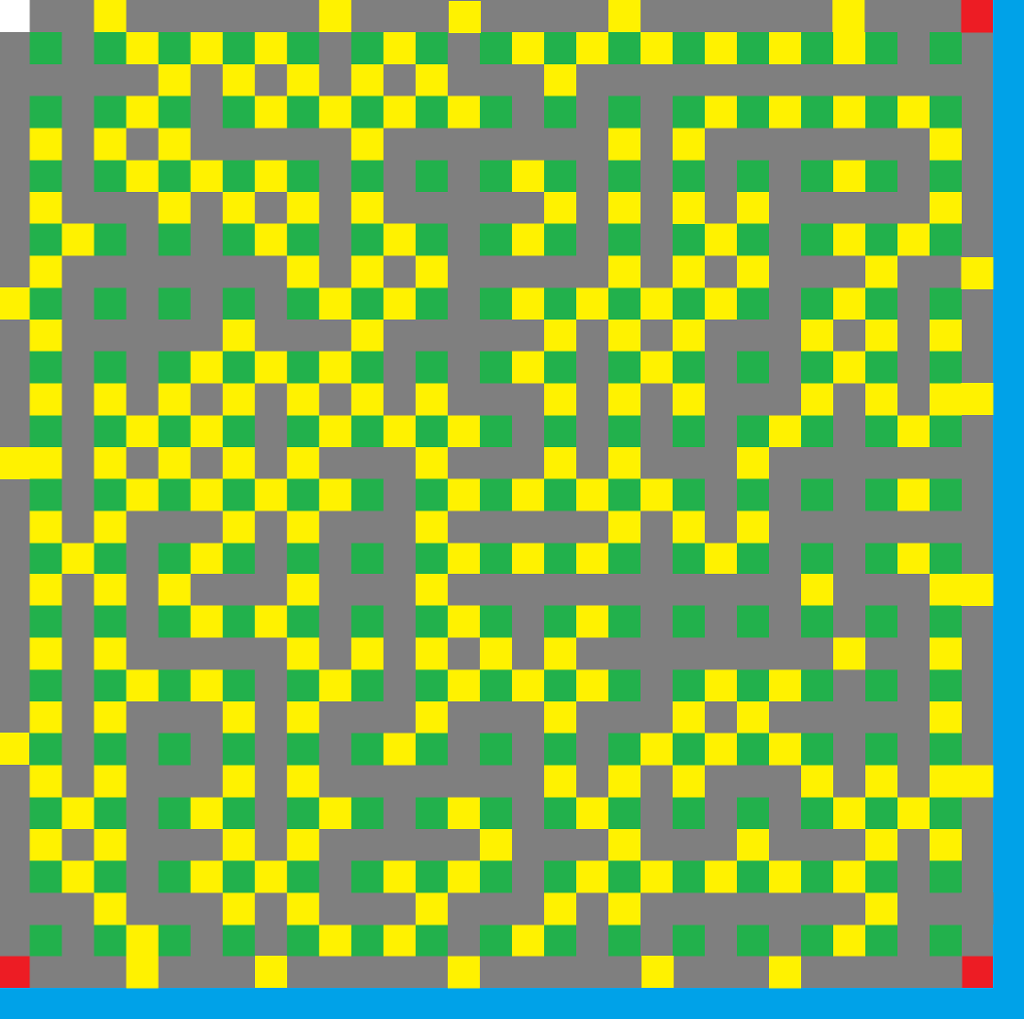
The player
The player starts the game in position (0,0), the top-left corner. The player is a single pixel that can be controlled with the keyboard arrows (up, left, down, right), and places a bomb when the b key is pressed.
The player cannot move though any other blocks (destructible/indestructible arena blocks, or bombs). The player cannot leave the board, so you must check for edge collisions. If the player is caught in a bomb explosion, or it collides with an enemy it loses the game.
The enemies
Each enemy moves randomly in the arena. Your game should have three enemies spawned in each of the remaining corners. The actual speed of the enemies, I leave up to you; you can make them all move at the same speed, or at different speeds. Just keep the game playable :).
Enemies shall also be killed by bombs, and shall not pass through a bomb or walls. If a bomb explosion hits an enemy, the enemy is removed from the game.
Bombs
The player can place a bomb at a time. When a player places a bomb, it will appear in the same block as the player. Then, the bomb will countdown a specified amount of time, and explode. The explosion will propagate 3 tiles in every direction, but not instantaneously! Instead, the explosion will expand one tile in each direction every at a slow-ish rate.
You can choose both the countdown for the explosion and the rate at which the explosion propagates, as long as it is noticeable.
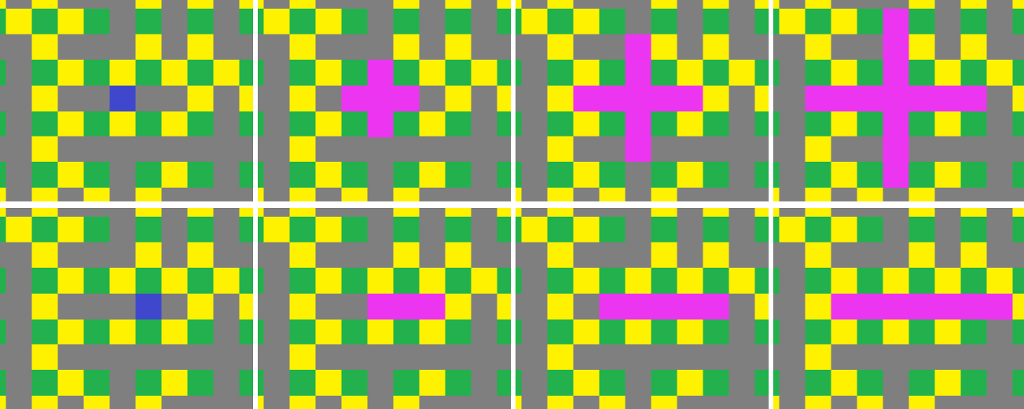
When the explosion encounters (see image):
an indestructible block, it stops propagating in that direction
a destructible block, it destroys it
an enemy, it removes it from the game
the player, its game over
Helpful Tidbits
Block colours
You can use any colour you like, as long as elements are distinguishable (yellow and orange look the same). Choosing different colours will also help you check for collisions and deaths.
The schema I used in my implementation (which I think it looks good :) ) makes the indestructible blocks green, destructible blocks yellow, the player white, the enemy red, the bomb blue, and the explosion magenta. However, feel free to do your own thing! As long as the game is playable!
Losing and winning the game
The player loses the game when it collides with an enemy, or is caught in an explosion.
The player wins the game when all enemies are defeated.
Game Loop
The game loop will be an infinite loop that periodically checks for updated inputs (button presses) and also periodically updates the games state.
Every 100ms (1 tenth of a second), it will adjust the current frame. It will move characters and projectiles around and check for win or loss conditions. Our update function likely calls several other updatefunctions for each game object (millipede, player, projectile, etc.)
last = getSystemTime() while true handleInput() time = getSystemTime() # Get elapsed time since our last update in milliseconds elapsed = time - last # Each of our frames will be 100ms # That means, we are running at 10 frames per second # (more or less) if elapsed > 100 # We won't worry too much about missed # frames or elongated frames last = time update() end end
Input Handling
Our game loop has a handleInput function. Here, we will look at our hardware to detect whether or not an input was pressed. For this type of game, we can simply modify a variable for each direction and the one action button.
Submission
Submit a single ZIP file with your project named username_proj1.zip (e.g. lun8_proj1.zip). In the zip file, there should be no folder!, just the following file:
Your bomberpixel.asm file
Step by Step Solution
There are 3 Steps involved in it

Get step-by-step solutions from verified subject matter experts
 Study Help