







Question: Need help with this code it's not working and I keep getting errors while trying to Add Student B1 is the ADD Student Code private
Need help with this code it's not working and I keep getting errors while trying to Add Student B1 is the ADD Student Code
private void B3ActionPerformed(java.awt.event.ActionEvent evt) { // TODO add your handling code here: try{ PrintWriter output = new PrintWriter(TF3.getText()); String value = TA.getText(); output.print(value); output.close(); }catch(FileNotFoundException FNF){ MSGLBL.setText("Status: Incorrect file name"); } }
private void B1ActionPerformed(java.awt.event.ActionEvent evt) { String input = TF1.getText().trim(); String[] parts = input.split(";"); if (parts.length != 3) { MSGLBL.setText("Error: Invalid input. Expected format: name;id;gpa"); return; }
String name = parts[0].trim(); String id = parts[1].trim(); double gpa = 0.0; try { gpa = Double.parseDouble(parts[2].trim()); } catch (NumberFormatException ex) { MSGLBL.setText("Error: Invalid GPA value. Expected a number."); return; }
Student student = new Student(name, id, gpa); TA.append(student.toString() + " "); TF2.setText(""); MSGLBL.setText("Student added successfully."); }
private void B2ActionPerformed(java.awt.event.ActionEvent evt) { // TODO add your handling code here: // TODO add your handling code here: try{ Scanner input = new Scanner(new FileReader(TF2.getText())); TA.setText(""); while(input.hasNext()){ String line = input.nextLine(); TA.append(line+" "); } } catch(FileNotFoundException FNF){ MSGLBL.setText("Status: File not found"); } }
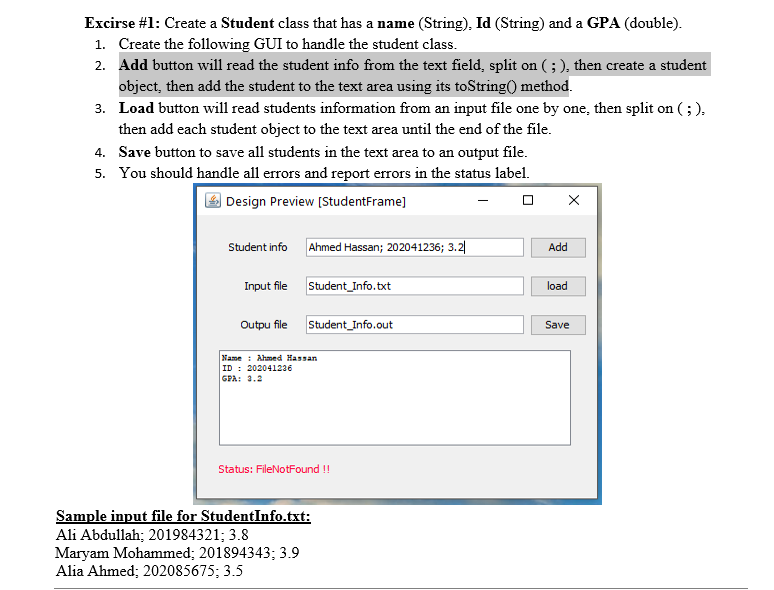
Excirse \#1: Create a Student class that has a name (String), Id (String) and a GPA (double). 1. Create the following GUI to handle the student class. 2. Add button will read the student info from the text field, split on (; ), then create a student object, then add the student to the text area using its toString() method. 3. Load button will read students information from an input file one by one, then split on (;), then add each student object to the text area until the end of the file. 4. Save button to save all students in the text area to an output file. 5. You should handle all errors and report errors in the status label. Design Preview [StudentFrame] Student info Input file Outpu file Status: FileNotFound !! Sample input file for StudentInfo.txt: Ali Abdullah; 201984321; 3.8 Maryam Mohammed; 201894343; 3.9 Alia Ahmed; 202085675;3.5
Step by Step Solution
There are 3 Steps involved in it

Get step-by-step solutions from verified subject matter experts
 Study Help