







Question: Need help with this coding,only need explain the first raw for the chart. 15:13 docs.google.com Activity 2.2 import java.util.Scanner public class BasicCalculator l public static
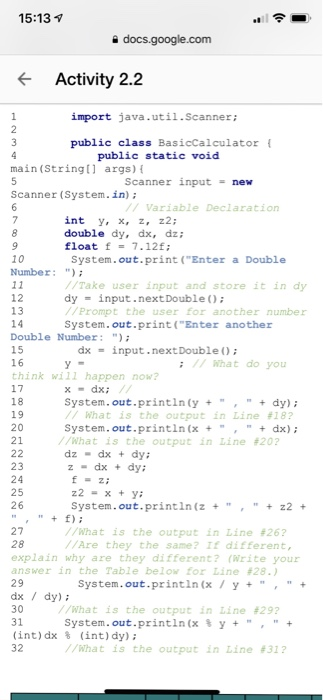
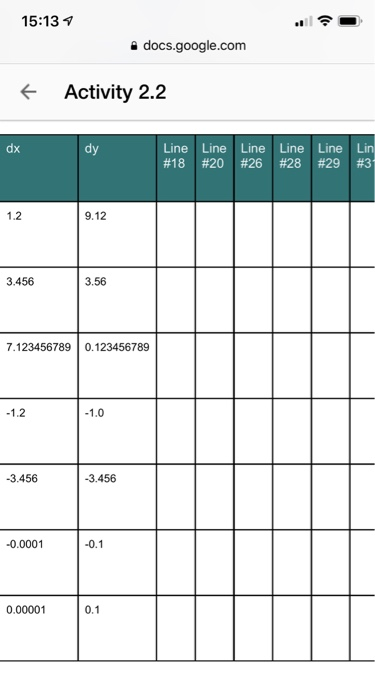
15:13 docs.google.com Activity 2.2 import java.util.Scanner public class BasicCalculator l public static void main (Stringl args) ( Scanner input-n Scanner (System.in) ; Variable Declaration int y, x, z, z2; double dy, dx, dz; float f = 7.12f; 10 Number:") System.out.print ("Enter a Double //Take user input and store it in dy dyinput.nextDouble) //Prompt the user for another number System.out.print ("Enter another 12 13 14 Double Number:") 15 16 think will happen now? 17 18 19 20 21 dx-input.nextDoubleO / What do you System.out.printin(ydy) // What is the output in Line #18? System.out.printin(x dx) //What is the output in Line #20? dz dx +dy zdx + dy: 23 24 25 26 fzi z2-xy: System.out.println (z +"" + z2 + 27 28 explain why are they di fferent? (Write your answer in the Table below for Line #28.) 29 //What is the output in Line #26? //Are they the same? If different, System.out.printin(x y+ dx / dy) 30 31 (int)dx 32 //What is the output in Line #29? System.out.println(x % y + " , " + % (int)dy) ; //What is the output in Line #31? 15:13 e docs.google.com Activity 2.2 Line Line Line Line Line Lin #18 #20 #26 #28 #29 #3 dx dy 1.2 9.12 3.456 3.56 7.123456789 0.123456789 3.456 3.456 0.0001 -0.1 0.00001 0.1
Step by Step Solution
There are 3 Steps involved in it

Get step-by-step solutions from verified subject matter experts
 Study Help