







Question: need help with this in Bash script ________________________________________________ Take user input Test input with conditional statements Call functions Command line arguments. It also introduces running
need help with this in Bash script
________________________________________________
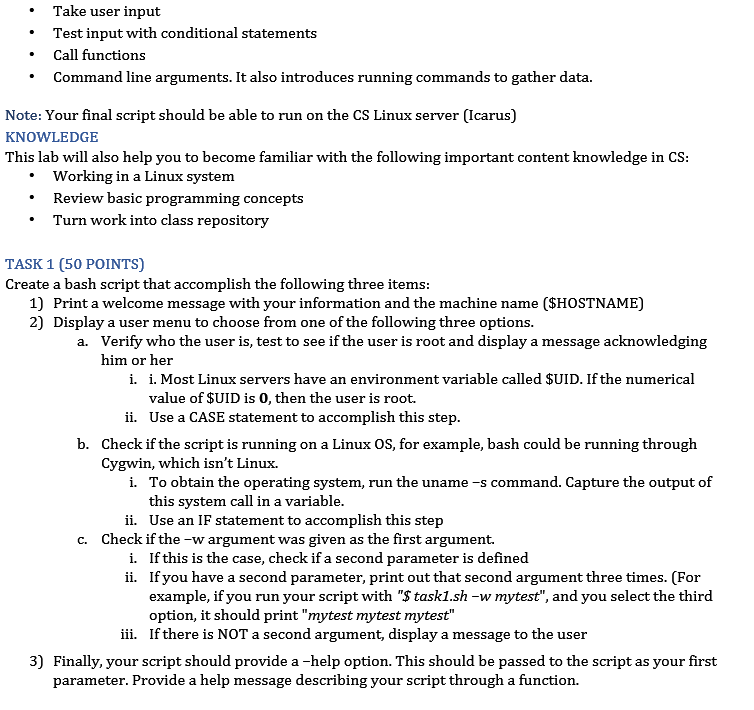
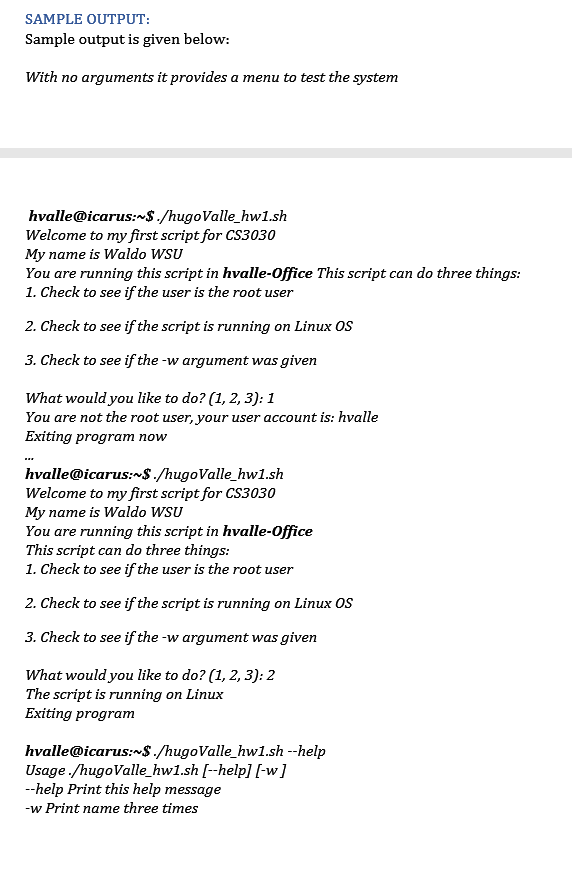
Take user input Test input with conditional statements Call functions Command line arguments. It also introduces running commands to gather data. Note: Your final script should be able to run on the CS Linux server (Icarus) KNOWLEDGE This lab will also help you to become familiar with the following important content knowledge in CS: Working in a Linux system Review basic programming concepts Turn work into class repository TASK 1 (50 POINTS) Create a bash script that accomplish the following three items: 1) Print a welcome message with your information and the machine name ($HOSTNAME) 2) Display a user menu to choose from one of the following three options. a. Verify who the user is, test to see if the user is root and display a message acknowledging him or her i. i. Most Linux servers have an environment variable called $UID. If the numerical value of $UID is 0, then the user is root. ii. Use a CASE statement to accomplish this step. b. Check if the script is running on a Linux OS, for example, bash could be running through Cygwin, which isn't Linux. i. To obtain the operating system, run the uname-s command. Capture the output of this system call in a variable. ii. Use an IF statement to accomplish this step C. Check if the -w argument was given as the first argument. i. If this is the case, check if a second parameter is defined ii. If you have a second parameter, print out that second argument three times. (For example, if you run your script with "$ task1.sh -w mytest", and you select the third option, it should print "mytest mytest mytest" iii. If there is NOT a second argument, display a message to the user 3) Finally, your script should provide a -help option. This should be passed to the script as your first parameter. Provide a help message describing your script through a function. SAMPLE OUTPUT: Sample output is given below: With no arguments it provides a menu to test the system hvalle@icarus:~$ ./hugoValle_hw1.sh Welcome to my first script for CS3030 My name is Waldo WSU You are running this script in hvalle-Office This script can do three things: 1. Check to see if the user is the root user 2. Check to see if the script is running on Linux OS 3. Check to see if the-w argument was given What would you like to do? (1,2,3): 1 You are not the root user, your user account is: hvalle Exiting program now hvalle@icarus:~$ ./hugoValle_hw1.sh Welcome to my first script for CS3030 My name is Waldo WSU You are running this script in hvalle-Office This script can do three things: 1. Check to see if the user is the root user 2. Check to see if the script is running on Linux OS 3. Check to see if the-w argument was given What would you like to do? (1, 2, 3): 2 The script is running on Linux Exiting program hvalle@icarus:~$ ./hugoValle_hw1.sh --help Usage./hugoValle_hw1.sh [--help] [-w] --help Print this help message -w Print name three times Take user input Test input with conditional statements Call functions Command line arguments. It also introduces running commands to gather data. Note: Your final script should be able to run on the CS Linux server (Icarus) KNOWLEDGE This lab will also help you to become familiar with the following important content knowledge in CS: Working in a Linux system Review basic programming concepts Turn work into class repository TASK 1 (50 POINTS) Create a bash script that accomplish the following three items: 1) Print a welcome message with your information and the machine name ($HOSTNAME) 2) Display a user menu to choose from one of the following three options. a. Verify who the user is, test to see if the user is root and display a message acknowledging him or her i. i. Most Linux servers have an environment variable called $UID. If the numerical value of $UID is 0, then the user is root. ii. Use a CASE statement to accomplish this step. b. Check if the script is running on a Linux OS, for example, bash could be running through Cygwin, which isn't Linux. i. To obtain the operating system, run the uname-s command. Capture the output of this system call in a variable. ii. Use an IF statement to accomplish this step C. Check if the -w argument was given as the first argument. i. If this is the case, check if a second parameter is defined ii. If you have a second parameter, print out that second argument three times. (For example, if you run your script with "$ task1.sh -w mytest", and you select the third option, it should print "mytest mytest mytest" iii. If there is NOT a second argument, display a message to the user 3) Finally, your script should provide a -help option. This should be passed to the script as your first parameter. Provide a help message describing your script through a function. SAMPLE OUTPUT: Sample output is given below: With no arguments it provides a menu to test the system hvalle@icarus:~$ ./hugoValle_hw1.sh Welcome to my first script for CS3030 My name is Waldo WSU You are running this script in hvalle-Office This script can do three things: 1. Check to see if the user is the root user 2. Check to see if the script is running on Linux OS 3. Check to see if the-w argument was given What would you like to do? (1,2,3): 1 You are not the root user, your user account is: hvalle Exiting program now hvalle@icarus:~$ ./hugoValle_hw1.sh Welcome to my first script for CS3030 My name is Waldo WSU You are running this script in hvalle-Office This script can do three things: 1. Check to see if the user is the root user 2. Check to see if the script is running on Linux OS 3. Check to see if the-w argument was given What would you like to do? (1, 2, 3): 2 The script is running on Linux Exiting program hvalle@icarus:~$ ./hugoValle_hw1.sh --help Usage./hugoValle_hw1.sh [--help] [-w] --help Print this help message -w Print name three times
Step by Step Solution
There are 3 Steps involved in it

Get step-by-step solutions from verified subject matter experts
 Study Help