



Question: Need help with this. this is suppose to be done in Command Prompt. 1. Switch to the drive that holds your 1171_DataFiles directory. 2. (2
Need help with this. this is suppose to be done in Command Prompt.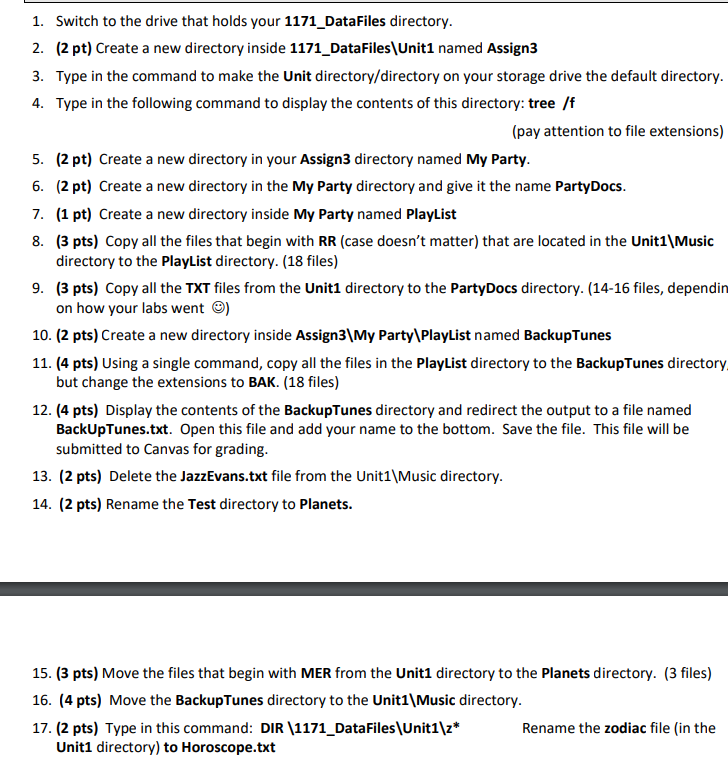
1. Switch to the drive that holds your 1171_DataFiles directory. 2. (2 pt) Create a new directory inside 1171_DataFiles\Unit1 named Assign3 3. Type in the command to make the Unit directory/directory on your storage drive the default directory. 4. Type in the following command to display the contents of this directory: tree /f (pay attention to file extensions) 5. (2 pt) Create a new directory in your Assign3 directory named My Party. 6. (2 pt) Create a new directory in the My Party directory and give it the name PartyDocs. 7. (1 pt) Create a new directory inside My Party named Playlist 8. (3 pts) Copy all the files that begin with RR (case doesn't matter) that are located in the Unit1\Music directory to the PlayList directory. (18 files) 9. (3 pts) Copy all the TXT files from the Unit1 directory to the PartyDocs directory. (14-16 files, dependin on how your labs went ) 10. (2 pts) Create a new directory inside Assign3\My Party\PlayList named BackupTunes 11. (4 pts) Using a single command, copy all the files in the PlayList directory to the BackupTunes directory but change the extensions to BAK. (18 files) 12. (4 pts) Display the contents of the BackupTunes directory and redirect the output to a file named BackUpTunes.txt. Open this file and add your name to the bottom. Save the file. This file will be submitted to Canvas for grading. 13. (2 pts) Delete the JazzEvans.txt file from the Unit1\Music directory. 14. (2 pts) Rename the Test directory to Planets. 15. (3 pts) Move the files that begin with MER from the Unit1 directory to the Planets directory. (3 files) 16. (4 pts) Move the BackupTunes directory to the Unit1\Music directory. 17. (2 pts) Type in this command: DIR (1171_DataFiles\Unit1\z* Rename the zodiac file (in the Unit1 directory) to Horoscope.txt
Step by Step Solution
There are 3 Steps involved in it

Get step-by-step solutions from verified subject matter experts