







Question: Need help writing Java Code . import javax.swing.JFrame; import javax.swing.JPanel; import javax.swing.JButton; import java.awt.BorderLayout; import java.awt.FlowLayout; import java.awt.Graphics; import java.awt.event.ActionListener; import java.awt.event.ActionEvent; public class ThreadedFillDemo
Need help writing Java Code .
import javax.swing.JFrame;
import javax.swing.JPanel;
import javax.swing.JButton;
import java.awt.BorderLayout;
import java.awt.FlowLayout;
import java.awt.Graphics;
import java.awt.event.ActionListener;
import java.awt.event.ActionEvent;
public class ThreadedFillDemo extends JFrame implements ActionListener
{
public static final int WIDTH = 300;
public static final int HEIGHT = 200;
public static final int FILL_WIDTH = 300;
public static final int FILL_HEIGHT = 100;
public static final int CIRCLE_SIZE = 10;
public static final int PAUSE = 100; //milliseconds
private JPanel box;
public static void main(String[] args)
{
ThreadedFillDemo gui = new ThreadedFillDemo( );
gui.setVisible(true);
}
public ThreadedFillDemo( )
{
setSize(WIDTH, HEIGHT);
setTitle("Threaded Fill Demo");
setDefaultCloseOperation(JFrame.EXIT_ON_CLOSE);
setLayout(new BorderLayout( ));
box = new JPanel( );
add(box, BorderLayout.CENTER);
JPanel buttonPanel = new JPanel( );
buttonPanel.setLayout(new FlowLayout( ));
JButton startButton = new JButton("Start");
startButton.addActionListener(this);
buttonPanel.add(startButton);
add(buttonPanel, BorderLayout.SOUTH);
}
public void actionPerformed(ActionEvent e)
{
Packer packerThread = new Packer( );
packerThread.start( );
}
private class Packer extends Thread
{
public void run( )
{
Graphics g = box.getGraphics( );
for (int y = 0; y
for (int x = 0; x
{
g.fillOval(x, y, CIRCLE_SIZE, CIRCLE_SIZE);
doNothing(PAUSE);
}
}
public void doNothing(int milliseconds)
{
try
{
Thread.sleep(milliseconds);
}
catch(InterruptedException e)
{
System.out.println("Unexpected interrupt");
System.exit(0);
}
}
} //End Packer inner class
}
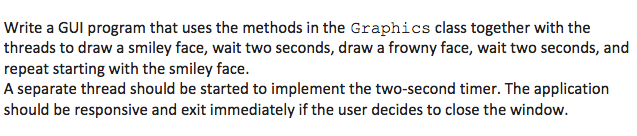
Write a GUI program that uses the methods in the Graphics class together with the threads to draw a smiley face, wait two seconds, draw a frowny face, wait two seconds, and repeat starting with the smiley face. A separate thread should be started to implement the two-second timer. The application should be responsive and exit immediately if the user decides to close the window
Step by Step Solution
There are 3 Steps involved in it

Get step-by-step solutions from verified subject matter experts
 Study Help