







Question: Need help writing this code in python. This what I have so far. def display_menu(): print(======================================================================) print( Baseball Team Manager) print(MENU OPTIONS) print(1 - Calculate
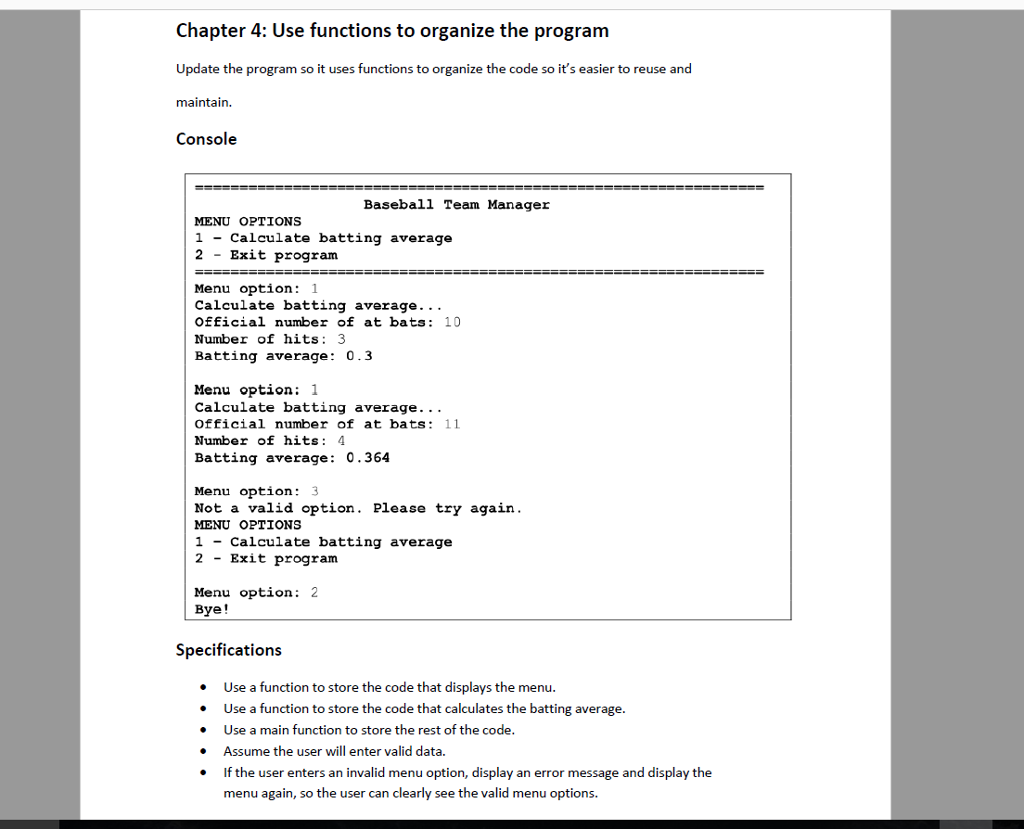
Need help writing this code in python.
This what I have so far.
def display_menu(): print("======================================================================") print(" Baseball Team Manager") print("MENU OPTIONS") print("1 - Calculate batting average") print("2 - Exit program") print("=====================================================================")
def convert_bat(): option = int(input("Menu option: ")) while option!=2: if option ==1: print("Calculate batting average...") num_at_bats = int(input("Enter official number of at bats: ")) num_hits = int(input("Enter number of hits: ")) average = num_hitsum_at_bats print("batting average: ", average) elif option !=1 and option !=2: print("Not a valid option. Please try again.") convert_bat() def main(): display_menu() convert_bat() convert_bat() main()
Chapter 4: Use functions to organize the program Update the program so it uses functions to organize the code so it's easier to reuse and maintain. Console Baseball Team Mana MENU OPTIONS 1 - Calculate batting average 2 - Exit program Menu option: 1 Calculate batting average. . . Official number f at bats : 10 Number of hits: 3 Batting average: 0.3 Menu option: 1 Calculate batting average.. . Official number of at bats: 11 Number of hits 4 Batting average: 0.364 Menu option: 3 Not a valid option. Please try again MENU OPTIONS 1 - Calculate batting average 2 - Exit program Menu option:2 Bye! Specifications Use a function to store the code that displays the menu. . Use a function to store the code that calculates the batting average . Use a main function to store the rest of the code Assume the user will enter valid data. f the user enters an invalid menu option, display an error message and display the menu again, so the user can clearly see the valid menu options
Step by Step Solution
There are 3 Steps involved in it

Get step-by-step solutions from verified subject matter experts
 Study Help