







Question: NEED SQL QUERIES TO DO THE FOLLOWING: NOTE: PLEASE USE TABLE ALIASES AND DOT NOTATION ONLY. INNER JOIN SHOULD NOT BE USED TO DO THIS
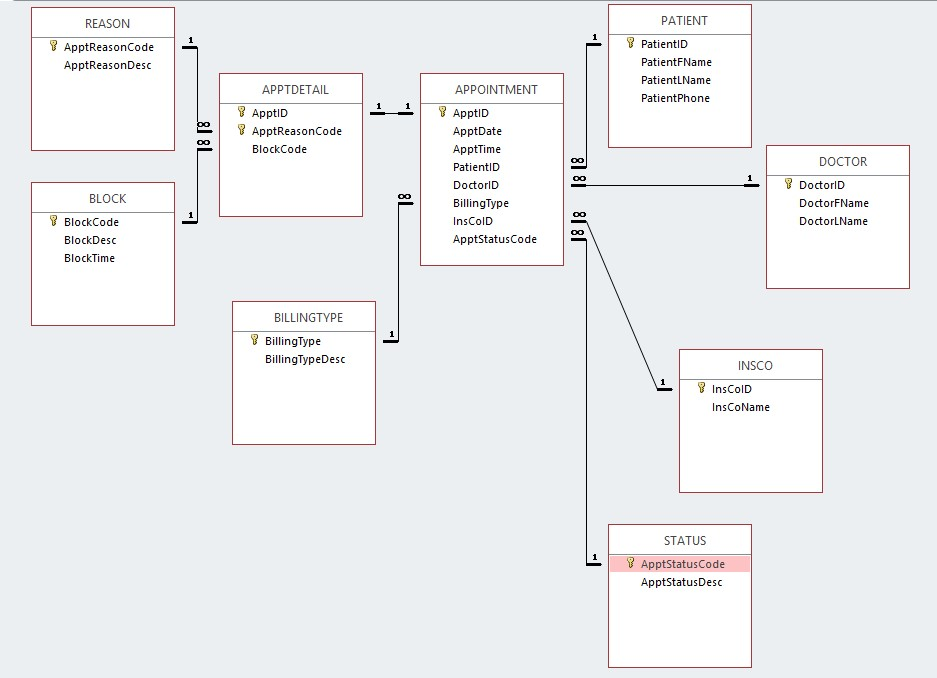
NEED SQL QUERIES TO DO THE FOLLOWING:
NOTE: PLEASE USE TABLE ALIASES AND DOT NOTATION ONLY.
INNER JOIN SHOULD NOT BE USED TO DO THIS PROJECT.
For each appointment, list the appt ID, date, patient ID, patient first name, patient last name, doctor ID, doctor last name, and count of reason codes; combine the patient first and last name into one column, and sort by count of reason codes in descending order, then by appt ID in ascending order. Show the date formatted as mm-dd-yyyy. Use the following column headings: Appt, Date, Patient ID, Patient Name, Dr ID, Dr Name, Code Count. Hint: use a GROUP BY clause.
List the appt ID, appt date, appt time, and total number of minutes for the appointment(s) with the highest total minutes. Sort by appt ID. Use the following column headings: ApptID, Date, Time, TotalMinutes. Hint: use a GROUP BY clause and a nested SELECT or HAVING.
List the doctor ID, first name, last name, and count of appointments for the doctor with the least number of appointments. Combine the first and last names into one column, use the following column headings: Dr ID, Name, Appt Count. Hint: use a GROUP BY clause and a nested SELECT or HAVING.
List the appt ID, Date, patient ID, patient last name, doctor ID, and doctor last name for all appointments with a total number of minutes greater than or equal to 30 minutes. Sort by total minutes in descending order, then by appt ID in ascending order. Use the following column headings: Appt ID, Date, Patient ID, Patient Name, Doctor ID, Doctor Name.
PATIENT REASON ApptReasonCode ApptReasonDesc PatientlD PatientFName PatientLName PatientPhone APPTDETAIL APPOINTMENT ApptID ApptDate ApptTime PatientID DoctorID BillingType InsColD ApptStatusCode ApptID ApptReasonCode BlockCode DOCTOR BLOCK DoctorFName BlockCode BlockDesc BlockTime DoctorLName BILLINGTYPE BillingType BillingTypeDesc INSCO InsColD InsCoName STATUS ApptstatusCode ApptStatusDesc PATIENT REASON ApptReasonCode ApptReasonDesc PatientlD PatientFName PatientLName PatientPhone APPTDETAIL APPOINTMENT ApptID ApptDate ApptTime PatientID DoctorID BillingType InsColD ApptStatusCode ApptID ApptReasonCode BlockCode DOCTOR BLOCK DoctorFName BlockCode BlockDesc BlockTime DoctorLName BILLINGTYPE BillingType BillingTypeDesc INSCO InsColD InsCoName STATUS ApptstatusCode ApptStatusDesc
Step by Step Solution
There are 3 Steps involved in it

Get step-by-step solutions from verified subject matter experts
 Study Help