







Question: //Needs to be modified public class WeightedGraph { public WeightedGraph(int n) { // stub } public void addEdge(int source, int target, int weight) { //
//Needs to be modified
public class WeightedGraph
{
public WeightedGraph(int n)
{
// stub
}
public void addEdge(int source, int target, int weight)
{
// stub
}
public Object getLabel(int vertex)
{
// stub
return null;
}
public boolean isEdge(int source, int target)
{
// stub
return false;
}
public int[ ] neighbors(int vertex)
{
// stub
int [ ] answer = { };
return answer;
}
public void removeEdge(int source, int target)
{
// stub
}
public void setLabel(int vertex, Object newLabel)
{
// stub
}
public int size( )
{
// stub
return 0;
}
public int getWeight(int source, int target)
{
// stub
return 0;
}
public void setWeight(int source, int target, int weight)
{
// stub
}
}
//Given to refer to when modifing the top class
public class Graph
{
private boolean[ ][ ] edges;
private Object[ ] labels;
/**
* Constructor
* @param n the number of nodes for the graph being created
*/
public Graph(int n)
{
edges = new boolean[n][n]; // All values initially false
labels = new Object[n]; // All values initially null
}
/**
* addEdge method receives 2 locations. The second location is added
* as a neighbor to the first Location passed.
* @param source Location to receive a neighbor
* @param target Location to be added as a neighbor
*/
public void addEdge(int source, int target)
{
edges[source][target] = true;
}
/**
* getLabel returns the label associated with the vertex passed
* @param vertex the vertex that we want the label for
* @return the label for the vertex
*/
public Object getLabel(int vertex)
{
return labels[vertex];
}
/**
* isEdge method receives 2 Locations. the second Location is checked
* to see if it is a neighbor of the first Location
* @param source Location to check for a neighbor
* @param target other Location that is being checked to see if it is a neighbor
* @return boolean that indicates if the second Location is a neighbor of the first Location
*/
public boolean isEdge(int source, int target)
{
return edges[source][target];
}
/**
* the neighbors method builds an array of Location which are the neighbors of
* the Location passed
* @param vertex the Location to get the neighbors from
* @return an array of int that contains the neighbors of vertex
*/
public int[ ] neighbors(int vertex)
{
int i;
int count;
int[ ] answer;
// First count how many edges have the vertex as their source
count = 0;
for (i = 0; i
{
if (edges[vertex][i])
count++;
}
// Allocate the array for the answer
answer = new int[count];
// Fill the array for the answer
count = 0;
for (i = 0; i 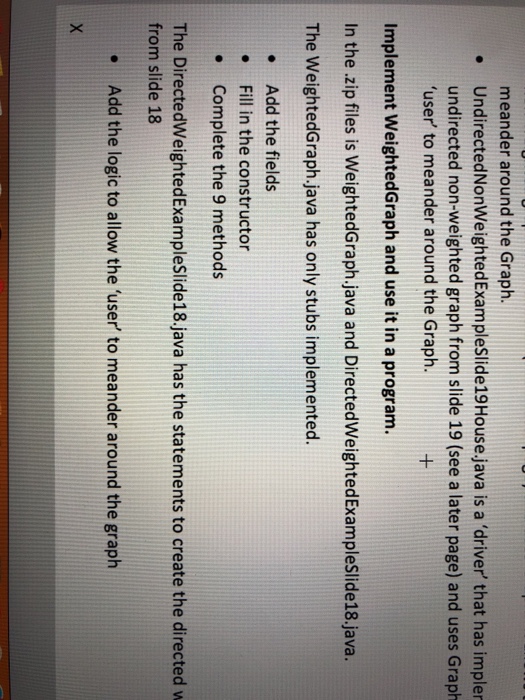
meander around the Graph . UndirectedNonWeightedExampleSlide19House.java is a 'driver that has impler undirected non-weighted graph from slide 19 (see a later page) and uses Graph 'user to meander around the Graph. Implement WeightedGraph and use it in a program. In the .zip files is WeightedGraph.java and DirectedWeightedExampleSlide18.java. The WeightedGraph.java has only stubs implemented. Add the fields . Fill in the constructor Complete the 9 methods The DirectedWeightedExampleSlide18.java has the statements to create the directed w from slide 18 Add the logic to allow the 'user to meander around the graph {
if (edges[vertex][i])
answer[count++] = i;
}
return answer;
}
/**
* removeEdge method receives 2 locations. The second location is removed
* as a neighbor to the first Location passed.
* @param source Location to lose a neighbor
* @param target Location to be removed as a neighbor
*/
public void removeEdge(int source, int target)
{
edges[source][target] = false;
}
/**
* setLabel assigns a label associated with the vertex passed
* @param vertex the vertex that we want to set the label for
* @param newLabel the label for the vertex
*/
public void setLabel(int vertex, Object newLabel)
{
labels[vertex] = newLabel;
}
/**
* size method returns the number of vertices in the graph
* @return number of vertices
*/
public int size( )
{
return labels.length;
}
}
Step by Step Solution
There are 3 Steps involved in it
1 Expert Approved Answer
Step: 1 Unlock

Question Has Been Solved by an Expert!
Get step-by-step solutions from verified subject matter experts
Step: 2 Unlock
Step: 3 Unlock
 Study Help