







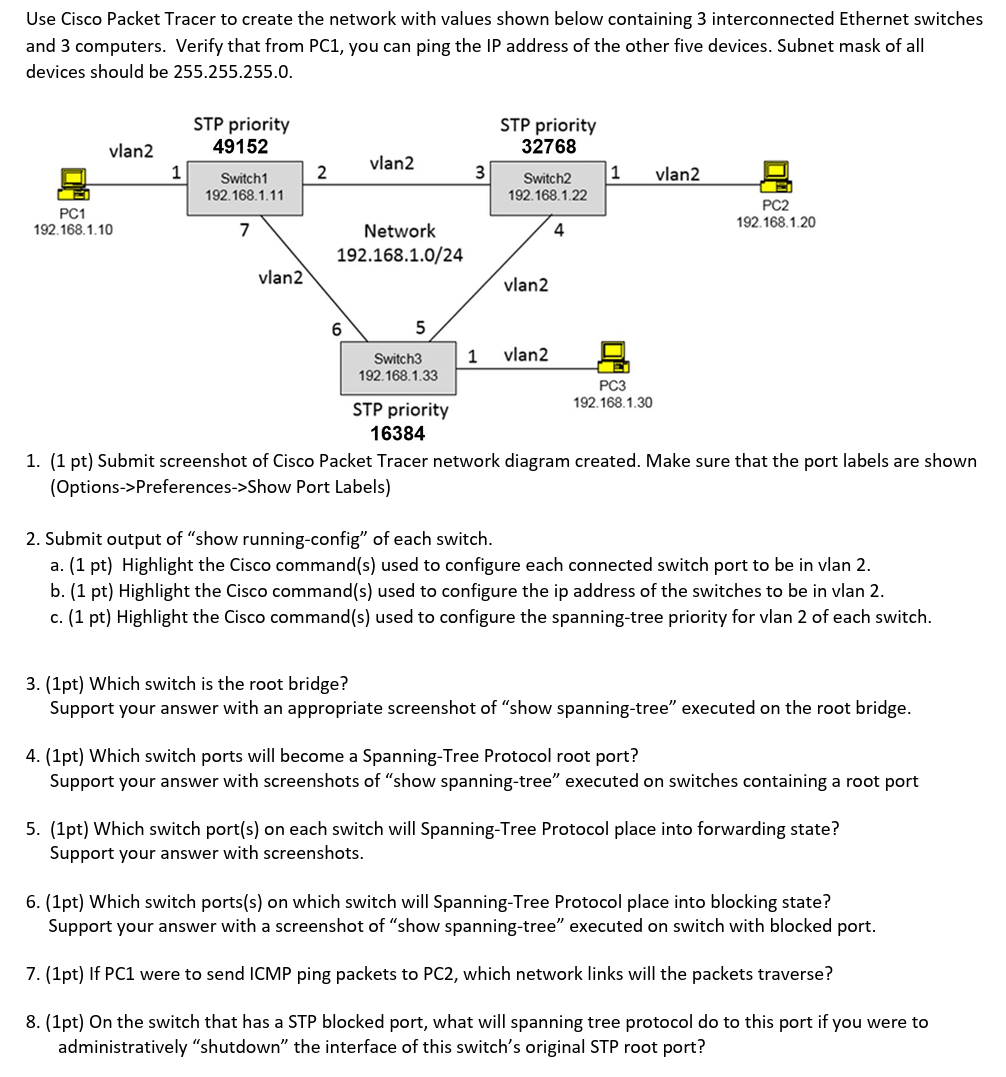
Question: ( NO AI Genereated Answer Please ) Use Cisco Packet Tracer to create the network with values shown below containing 3 interconnected Ethernet
NO AI Genereated Answer Please Use Cisco Packet Tracer to create the network with values shown below containing interconnected Ethernet switches
and computers. Verify that from PC you can ping the IP address of the other five devices. Subnet mask of all
devices should be
pt Submit screenshot of Cisco Packet Tracer network diagram created. Make sure that the port labels are shown
OptionsPreferencesShow Port Labels
Submit output of "show runningconfig" of each switch.
a pt Highlight the Cisco commands used to configure each connected switch port to be in vlan
b pt Highlight the Cisco commands used to configure the ip address of the switches to be in vlan
c pt Highlight the Cisco commands used to configure the spanningtree priority for vlan of each switch.
pt Which switch is the root bridge?
Support your answer with an appropriate screenshot of "show spanningtree" executed on the root bridge.
pt Which switch ports will become a SpanningTree Protocol root port?
Support your answer with screenshots of "show spanningtree" executed on switches containing a root port
pt Which switch ports on each switch will SpanningTree Protocol place into forwarding state?
Support your answer with screenshots.
pt Which switch portss on which switch will SpanningTree Protocol place into blocking state?
Support your answer with a screenshot of "show spanningtree" executed on switch with blocked port.
pt If PC were to send ICMP ping packets to PC which network links will the packets traverse?
pt On the switch that has a STP blocked port, what will spanning tree protocol do to this port if you were to
administratively "shutdown" the interface of this switch's original STP root port?
Step by Step Solution
There are 3 Steps involved in it
1 Expert Approved Answer
Step: 1 Unlock

Question Has Been Solved by an Expert!
Get step-by-step solutions from verified subject matter experts
Step: 2 Unlock
Step: 3 Unlock
 Study Help