







Question: Use Cisco Packet Tracer to create the network shown below containing 3 interconnected Ethernet switches and 3 computers - configure the hostnames as shown for
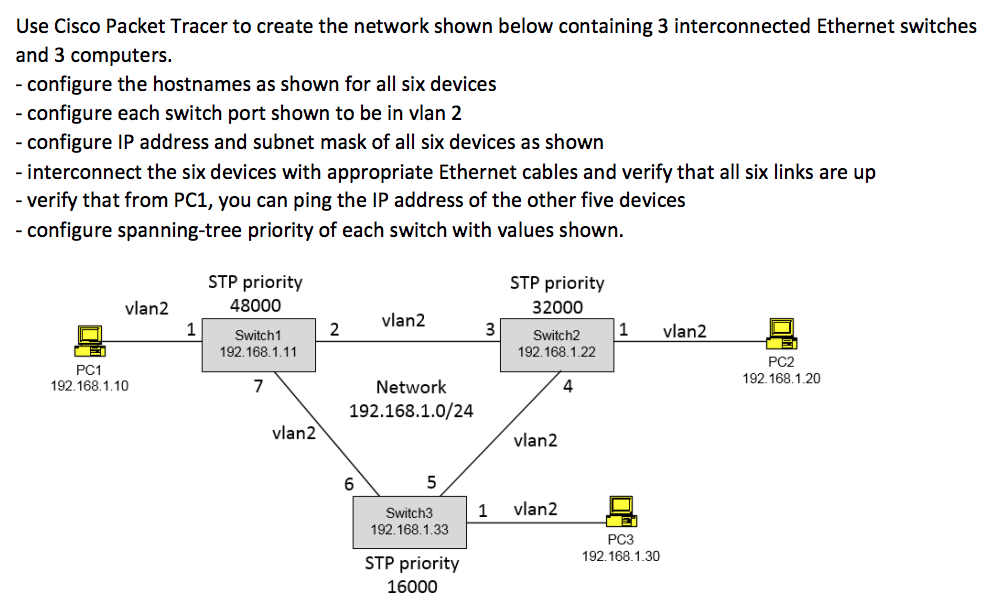
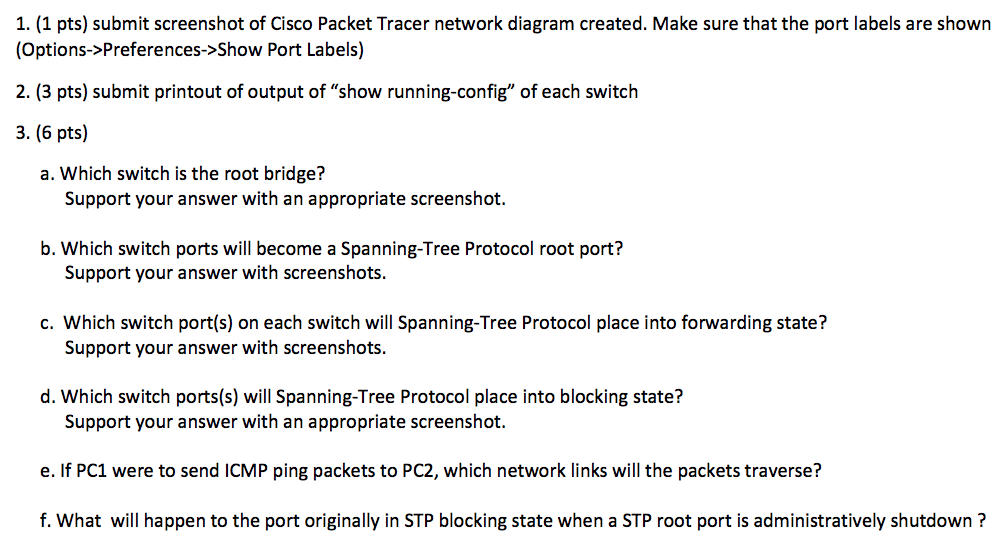
Use Cisco Packet Tracer to create the network shown below containing 3 interconnected Ethernet switches and 3 computers - configure the hostnames as shown for all six devices - configure each switch port shown to be in vlan 2 configure IP address and subnet mask of all six devices as shown interconnect the six devices with appropriate Ethernet cables and verify that all six links are up verify that from PC1, you can ping the IP address of the other five devices - configure spanning-tree priority of each switch with values shown STP priority 32000 Switch2 STP priority 48000 192.168.1.11 7 vlan2 vlan2 1 Switch1 vn2 192.168.1.22 PC1 192.168.1.10 PC2 192.168.1.20 Network 192.168.1.0/24 4 vlan2 vlan2 1 vlan2 Switch3 192.168.1.33 PC3 192.168.1.30 STP priority 16000 Use Cisco Packet Tracer to create the network shown below containing 3 interconnected Ethernet switches and 3 computers - configure the hostnames as shown for all six devices - configure each switch port shown to be in vlan 2 configure IP address and subnet mask of all six devices as shown interconnect the six devices with appropriate Ethernet cables and verify that all six links are up verify that from PC1, you can ping the IP address of the other five devices - configure spanning-tree priority of each switch with values shown STP priority 32000 Switch2 STP priority 48000 192.168.1.11 7 vlan2 vlan2 1 Switch1 vn2 192.168.1.22 PC1 192.168.1.10 PC2 192.168.1.20 Network 192.168.1.0/24 4 vlan2 vlan2 1 vlan2 Switch3 192.168.1.33 PC3 192.168.1.30 STP priority 16000
Step by Step Solution
There are 3 Steps involved in it

Get step-by-step solutions from verified subject matter experts
 Study Help