







Question: No input required-Each journal entry is posted automatically to the general ledger. Use the drop-down button to view the unadjusted or adjusted balances. 22 of
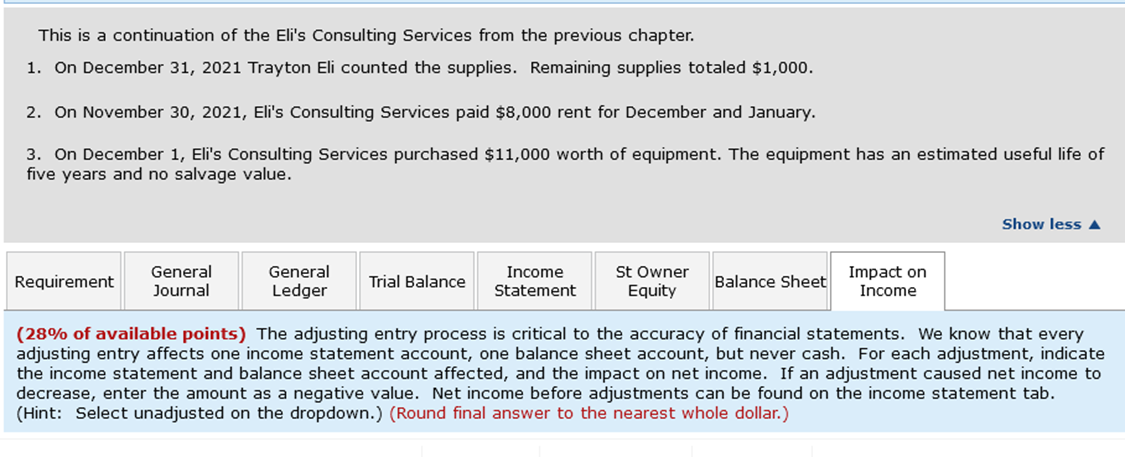
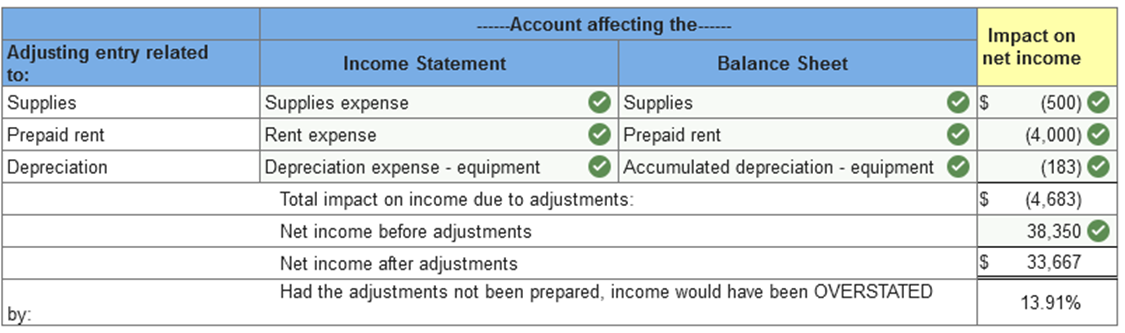

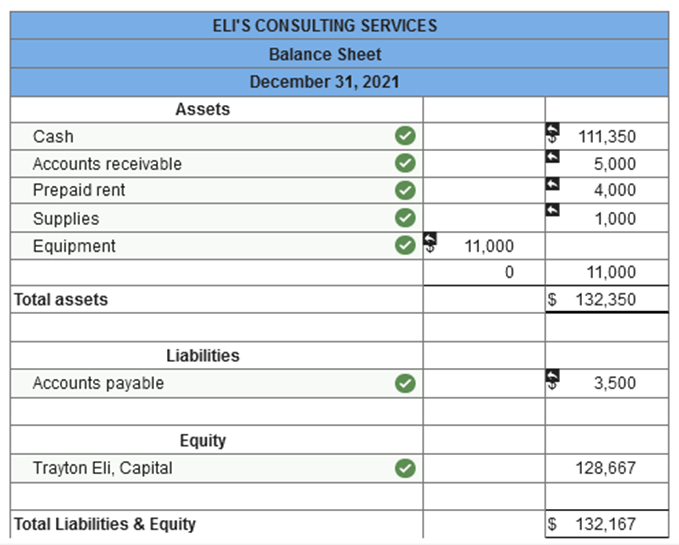
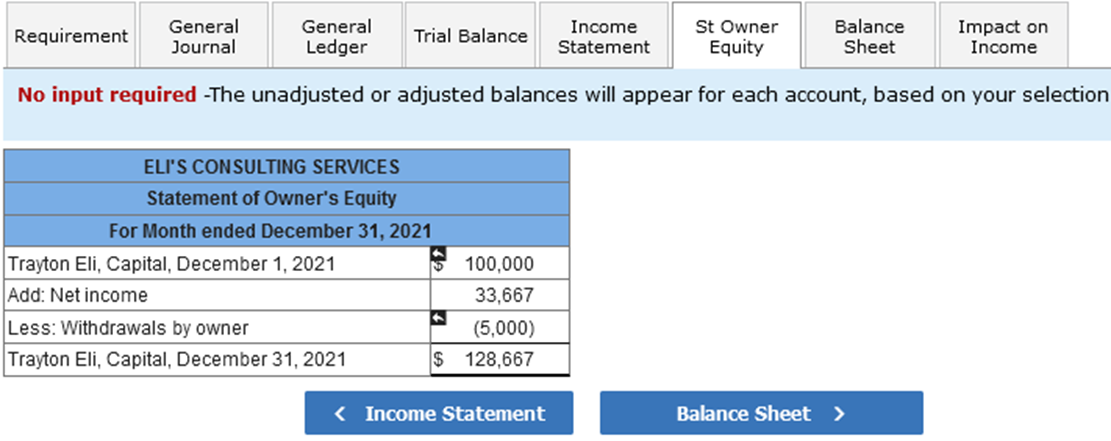

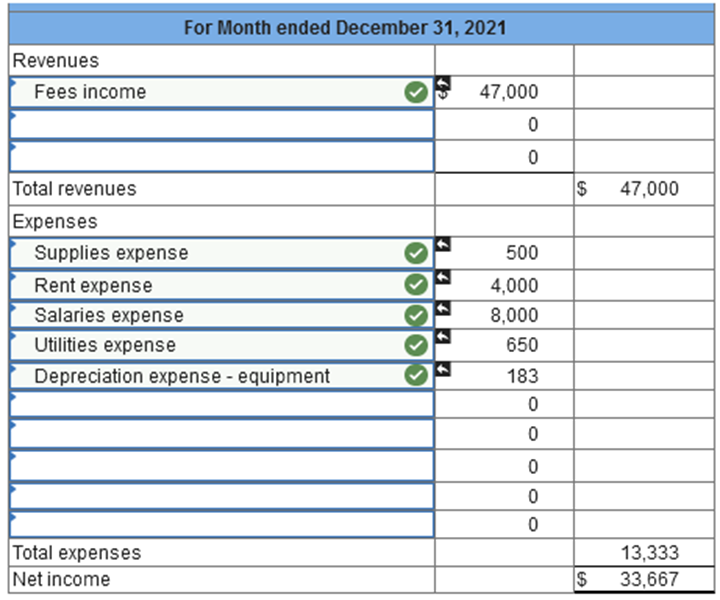
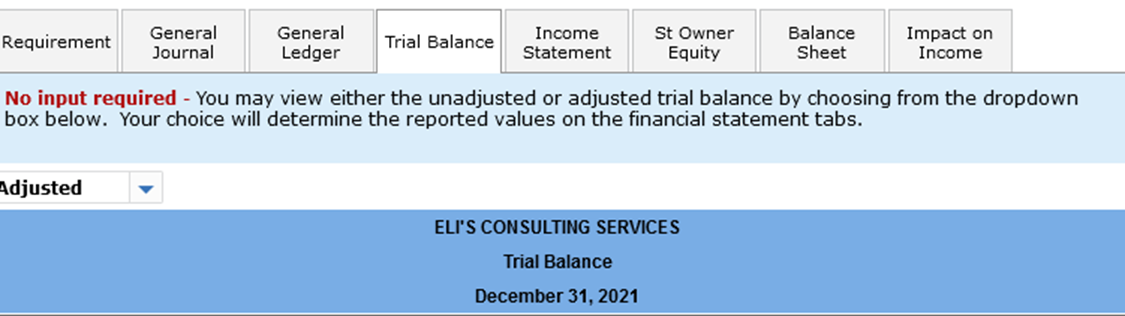
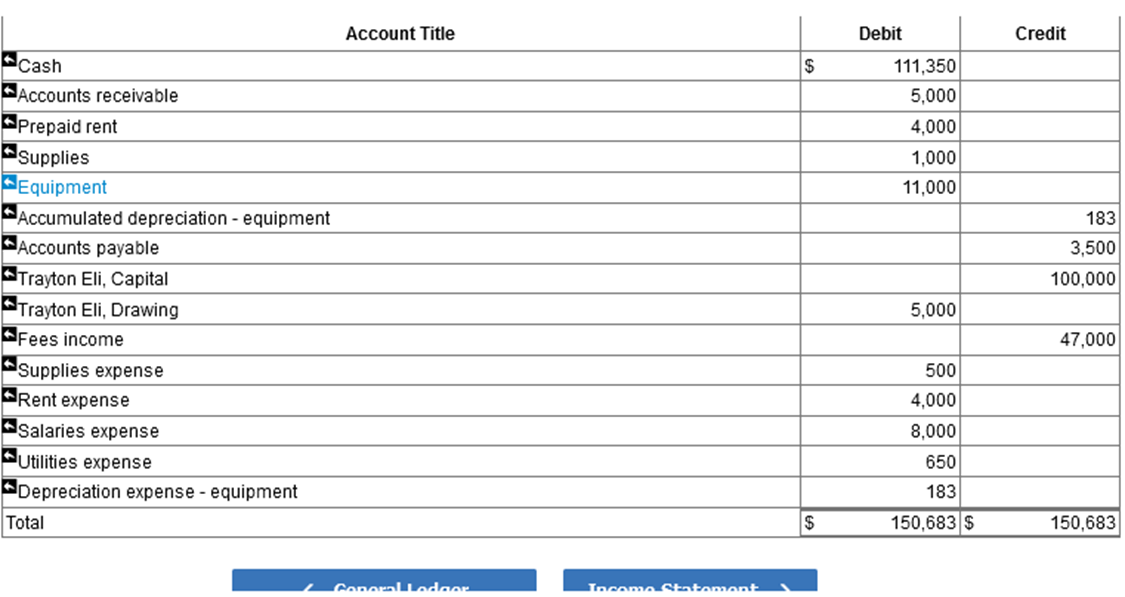
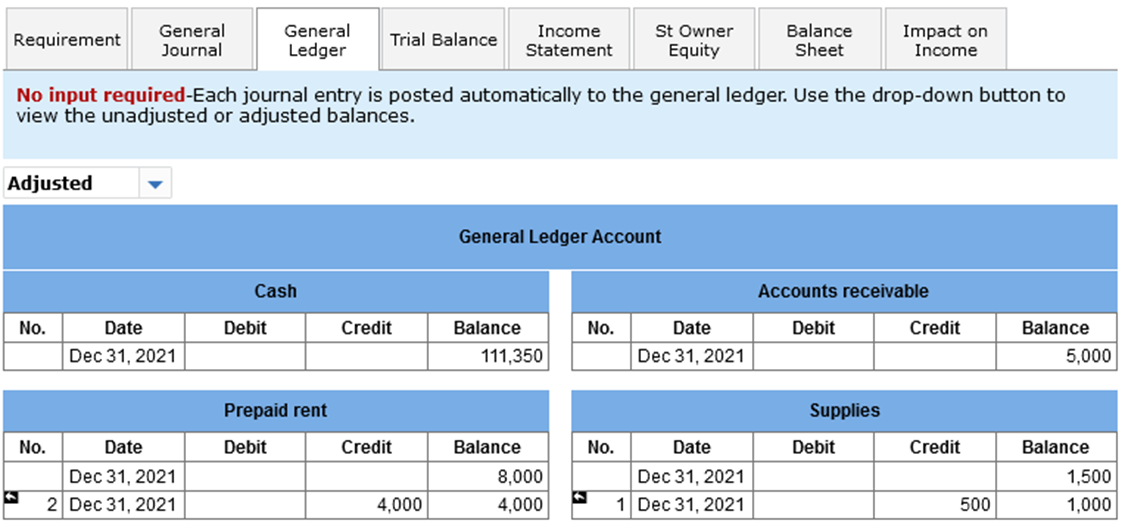
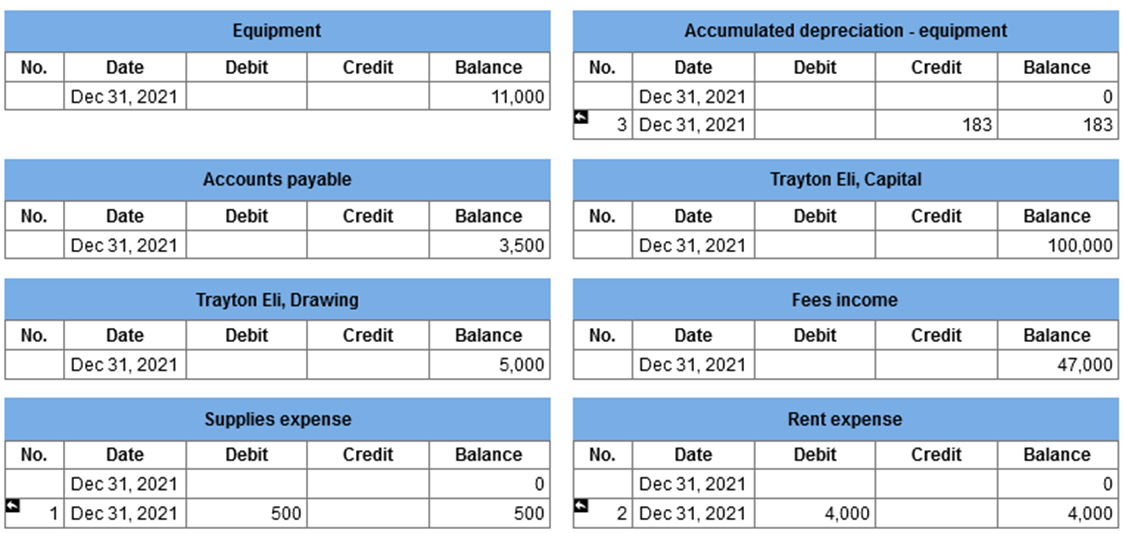
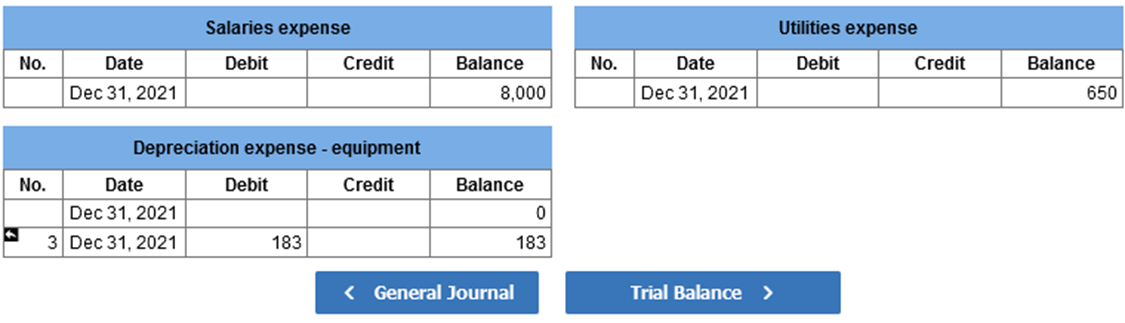
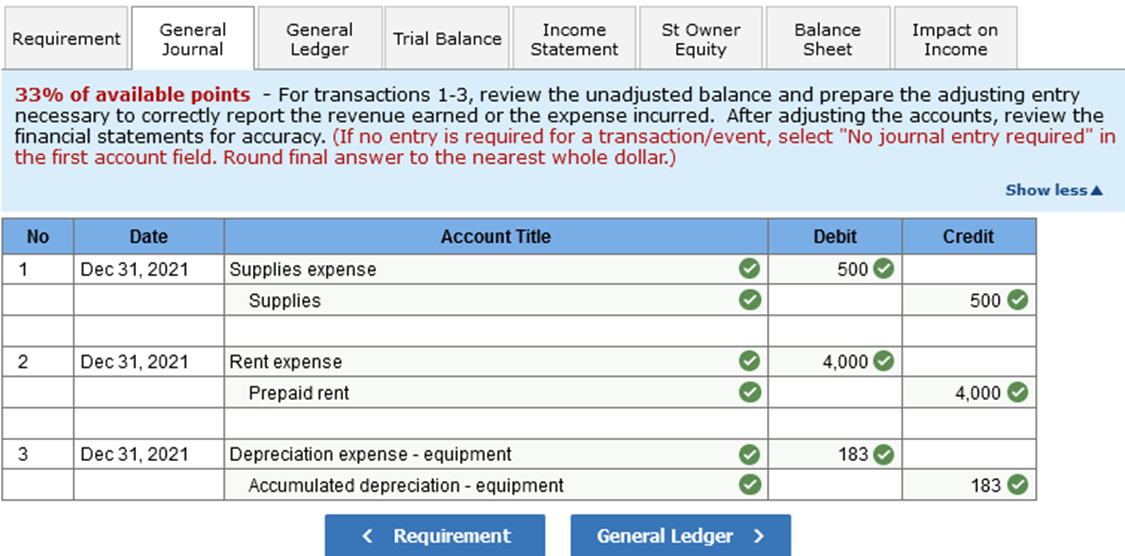
No input required-Each journal entry is posted automatically to the general ledger. Use the drop-down button to view the unadjusted or adjusted balances. \22 of available points - Using the dropdowns, select the account titles of the accounts properly included on the balance sheet. The dollar amounts (either adjusted or unadjusted) will autopopulate based on your selection. No input required -The unadjusted or adjusted balances will appear for each account, based on your select \\begin{tabular}{|l|c|c|c|r|} \\hline \\multicolumn{5}{|c|}{ Salaries expense } \\\\ \\hline No. & Date & Debit & Credit & Balance \\\\ \\hline & Dec 31,2021 & & & 8,000 \\\\ \\hline \\end{tabular} \\begin{tabular}{|l|c|c|c|c|} \\hline \\multicolumn{5}{|c|}{ Utilities expense } \\\\ \\hline No. & Date & Debit & Credit & Balance \\\\ \\hline & Dec 31,2021 & & & 650 \\\\ \\hline \\end{tabular} \\begin{tabular}{|r|c|c|c|r|} \\hline \\multicolumn{5}{|c|}{ Depreciation expense - equipment } \\\\ \\hline No. & Date & Debit & Credit & Balance \\\\ \\hline & Dec 31,2021 & & & 0 \\\\ \\hline 3 & Dec 31,2021 & 183 & & 183 \\\\ \\hline \\end{tabular} \33 of available points - For transactions \\( 1-3 \\), review the unadjusted balance and prepare the adjusting entry necessary to correctly report the revenue earned or the expense incurred. After adjusting the accounts, review financial statements for accuracy. (If no entry is required for a transaction/event, select \"No journal entry require the first account field. Round final answer to the nearest whole dollar.) This is a continuation of the Eli's Consulting Services from the previous chapter. 1. On December 31, 2021 Trayton Eli counted the supplies. Remaining supplies totaled \\( \\$ 1,000 \\). 2. On November 30, 2021, Eli's Consulting Services paid \\( \\$ 8,000 \\) rent for December and January. 3. On December 1 , Eli's Consulting Services purchased \\( \\$ 11,000 \\) worth of equipment. The equipment has an estimated useful life of five years and no salvage value. (28\\% of available points) The adjusting entry process is critical to the accuracy of financial statements. We know that every adjusting entry affects one income statement account, one balance sheet account, but never cash. For each adjustment, indicate the income statement and balance sheet account affected, and the impact on net income. If an adjustment caused net income to decrease, enter the amount as a negative value. Net income before adjustments can be found on the income statement tab. (Hint: Select unadjusted on the dropdown.) (Round final answer to the nearest whole dollar.) \17 of available point - Using the dropdowns, select the account titles of the accounts properly included on the income statement. The dollar amounts (either adjusted or unadjusted) will autopopulate based on your selection. No input required - You may view either the unadjusted or adjusted trial balance by choosing from the dropdown box below. Your choice will determine the reported values on the financial statement tabs. \\begin{tabular}{|c|c|c|c|c|} \\hline \\multicolumn{5}{|c|}{ Equipment } \\\\ \\hline No. & Date & Debit & Credit & Balance \\\\ \\hline & Dec 31,2021 & & & 11,000 \\\\ \\hline \\end{tabular} \\begin{tabular}{|r|c|c|c|r|} \\hline \\multicolumn{5}{|c|}{ Accumulated depreciation - equipment } \\\\ \\hline No. & Date & Debit & Credit & Balance \\\\ \\hline & Dec 31,2021 & & & 0 \\\\ \\hline 3 & Dec 31,2021 & & 183 & 183 \\\\ \\hline \\end{tabular} \\begin{tabular}{|l|c|c|c|r|} \\hline \\multicolumn{5}{|c|}{ Accounts payable } \\\\ \\hline No. & Date & Debit & Credit & Balance \\\\ \\hline & Dec 31,2021 & & & 3,500 \\\\ \\hline \\end{tabular} \\begin{tabular}{|r|c|c|c|c|} \\hline \\multicolumn{5}{|c|}{ Trayton Eli, Capital } \\\\ \\hline No. & Date & Debit & Credit & Balance \\\\ \\hline & Dec 31,2021 & & & 100,000 \\\\ \\hline \\end{tabular} \\begin{tabular}{|c|c|c|c|c|} \\hline \\multicolumn{5}{|c|}{ Trayton Eli, Drawing } \\\\ \\hline No. & Date & Debit & Credit & Balance \\\\ \\hline & Dec 31,2021 & & & 5,000 \\\\ \\hline \\end{tabular} \\begin{tabular}{|l|c|c|c|c|} \\hline \\multicolumn{5}{|c|}{ Fees income } \\\\ \\hline No. & Date & Debit & Credit & Balance \\\\ \\hline & Dec 31,2021 & & & 47,000 \\\\ \\hline \\end{tabular} \\begin{tabular}{|l|c|c|c|r|} \\hline \\multicolumn{5}{|c|}{ Supplies expense } \\\\ \\hline No. & Date & Debit & Credit & Balance \\\\ \\hline & Dec 31,2021 & & & 0 \\\\ \\hline 1 & Dec 31,2021 & 500 & & 500 \\\\ \\hline \\end{tabular} \\begin{tabular}{|l|c|c|c|r|} \\hline \\multicolumn{5}{|c|}{ Rent expense } \\\\ \\hline No. & Date & Debit & Credit & Balance \\\\ \\hline & Dec 31,2021 & & & 0 \\\\ \\hline 2 & Dec 31,2021 & 4,000 & & 4,000 \\\\ \\hline \\end{tabular} No input required-Each journal entry is posted automatically to the general ledger. Use the drop-down button to view the unadjusted or adjusted balances. \22 of available points - Using the dropdowns, select the account titles of the accounts properly included on the balance sheet. The dollar amounts (either adjusted or unadjusted) will autopopulate based on your selection. No input required -The unadjusted or adjusted balances will appear for each account, based on your select \\begin{tabular}{|l|c|c|c|r|} \\hline \\multicolumn{5}{|c|}{ Salaries expense } \\\\ \\hline No. & Date & Debit & Credit & Balance \\\\ \\hline & Dec 31,2021 & & & 8,000 \\\\ \\hline \\end{tabular} \\begin{tabular}{|l|c|c|c|c|} \\hline \\multicolumn{5}{|c|}{ Utilities expense } \\\\ \\hline No. & Date & Debit & Credit & Balance \\\\ \\hline & Dec 31,2021 & & & 650 \\\\ \\hline \\end{tabular} \\begin{tabular}{|r|c|c|c|r|} \\hline \\multicolumn{5}{|c|}{ Depreciation expense - equipment } \\\\ \\hline No. & Date & Debit & Credit & Balance \\\\ \\hline & Dec 31,2021 & & & 0 \\\\ \\hline 3 & Dec 31,2021 & 183 & & 183 \\\\ \\hline \\end{tabular} \33 of available points - For transactions \\( 1-3 \\), review the unadjusted balance and prepare the adjusting entry necessary to correctly report the revenue earned or the expense incurred. After adjusting the accounts, review financial statements for accuracy. (If no entry is required for a transaction/event, select \"No journal entry require the first account field. Round final answer to the nearest whole dollar.) This is a continuation of the Eli's Consulting Services from the previous chapter. 1. On December 31, 2021 Trayton Eli counted the supplies. Remaining supplies totaled \\( \\$ 1,000 \\). 2. On November 30, 2021, Eli's Consulting Services paid \\( \\$ 8,000 \\) rent for December and January. 3. On December 1 , Eli's Consulting Services purchased \\( \\$ 11,000 \\) worth of equipment. The equipment has an estimated useful life of five years and no salvage value. (28\\% of available points) The adjusting entry process is critical to the accuracy of financial statements. We know that every adjusting entry affects one income statement account, one balance sheet account, but never cash. For each adjustment, indicate the income statement and balance sheet account affected, and the impact on net income. If an adjustment caused net income to decrease, enter the amount as a negative value. Net income before adjustments can be found on the income statement tab. (Hint: Select unadjusted on the dropdown.) (Round final answer to the nearest whole dollar.) \17 of available point - Using the dropdowns, select the account titles of the accounts properly included on the income statement. The dollar amounts (either adjusted or unadjusted) will autopopulate based on your selection. No input required - You may view either the unadjusted or adjusted trial balance by choosing from the dropdown box below. Your choice will determine the reported values on the financial statement tabs. \\begin{tabular}{|c|c|c|c|c|} \\hline \\multicolumn{5}{|c|}{ Equipment } \\\\ \\hline No. & Date & Debit & Credit & Balance \\\\ \\hline & Dec 31,2021 & & & 11,000 \\\\ \\hline \\end{tabular} \\begin{tabular}{|r|c|c|c|r|} \\hline \\multicolumn{5}{|c|}{ Accumulated depreciation - equipment } \\\\ \\hline No. & Date & Debit & Credit & Balance \\\\ \\hline & Dec 31,2021 & & & 0 \\\\ \\hline 3 & Dec 31,2021 & & 183 & 183 \\\\ \\hline \\end{tabular} \\begin{tabular}{|l|c|c|c|r|} \\hline \\multicolumn{5}{|c|}{ Accounts payable } \\\\ \\hline No. & Date & Debit & Credit & Balance \\\\ \\hline & Dec 31,2021 & & & 3,500 \\\\ \\hline \\end{tabular} \\begin{tabular}{|r|c|c|c|c|} \\hline \\multicolumn{5}{|c|}{ Trayton Eli, Capital } \\\\ \\hline No. & Date & Debit & Credit & Balance \\\\ \\hline & Dec 31,2021 & & & 100,000 \\\\ \\hline \\end{tabular} \\begin{tabular}{|c|c|c|c|c|} \\hline \\multicolumn{5}{|c|}{ Trayton Eli, Drawing } \\\\ \\hline No. & Date & Debit & Credit & Balance \\\\ \\hline & Dec 31,2021 & & & 5,000 \\\\ \\hline \\end{tabular} \\begin{tabular}{|l|c|c|c|c|} \\hline \\multicolumn{5}{|c|}{ Fees income } \\\\ \\hline No. & Date & Debit & Credit & Balance \\\\ \\hline & Dec 31,2021 & & & 47,000 \\\\ \\hline \\end{tabular} \\begin{tabular}{|l|c|c|c|r|} \\hline \\multicolumn{5}{|c|}{ Supplies expense } \\\\ \\hline No. & Date & Debit & Credit & Balance \\\\ \\hline & Dec 31,2021 & & & 0 \\\\ \\hline 1 & Dec 31,2021 & 500 & & 500 \\\\ \\hline \\end{tabular} \\begin{tabular}{|l|c|c|c|r|} \\hline \\multicolumn{5}{|c|}{ Rent expense } \\\\ \\hline No. & Date & Debit & Credit & Balance \\\\ \\hline & Dec 31,2021 & & & 0 \\\\ \\hline 2 & Dec 31,2021 & 4,000 & & 4,000 \\\\ \\hline \\end{tabular}
Step by Step Solution
There are 3 Steps involved in it

Get step-by-step solutions from verified subject matter experts
 Study Help