







Question: NOTE: Please modify the function NRsys.m to be used in this problem which is below the picture. answer in matlab code and use comments to
NOTE: Please modify the function NRsys.m to be used in this problem which is below the picture. answer in matlab code and use comments to understand what your doing. Verify the code works with matlab software. thank you
% function file name: NRsys.m
function [x,res, ea,iter] = NRsys(f,J,xi,es,max_it,varargin) %[x,res, ea,iter] = NRsys(f,J,xi,es,max_it,varargin) % %Newton-Raphson method for the solution of a nonlinear system of equations % %Inputs % f: function that returns a column vector of function evaluations % for a vector of x-values % J: function that returns the Jacobian matrix for the system % evaluated for a column vector of x-values % xi: Column vector of initial guessses % es: optional stopping criterion, default is es = 1E-6 % max_it: optional maximum iterations, default is max_it = 50 % p1,p2,... optional parameter inputs for function evaluation % %Outputs % x: vector fo solution estimates % res: vector of residual values % ea: approximate relative error in solution % iter: number of iterations required for convergence
if nargin
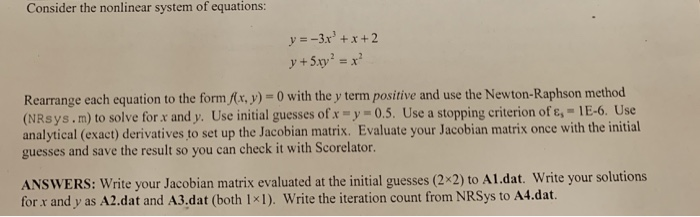
Consider the nonlinear system of equations y=-3x3 +x+2 Rearrange each equation to the formwith the y term positive and use the Newton-Raphson method (NRsys. m) to solve for x andy. Use initial guesses of x-y-0.5. Use a stopping criterion of .-1 E-6 Use analytical (exact) derivatives to set up the Jacobian matrix. Evaluate your Jacobian matrix once with the initial guesses and save the result so you can check it with Scorelator. ANSWERS: Write your Jacobian matrix evaluated at the initial guesses (2x2) to Al.dat. Write your solutions for r and y as A2.dat and A3.dat (both 1x1). Write the iteration count from NRSys to A4.dat
Step by Step Solution
There are 3 Steps involved in it

Get step-by-step solutions from verified subject matter experts
 Study Help