







Question: Note: The green power indicator LED will remain ON. Push Button 1 Push Button 2 Green LED Red LED Blue LED Not pressed Not pressed
Note: The green power indicator LED will remain ON. Push Button 1 Push Button 2 Green LED Red LED Blue LED Not pressed Not pressed OFF OFF OFF Pressed Not pressed OFF ON OFF Not pressed Pressed ON OFF OFF Pressed Pressed OFF OFF ON
Code must be C/C++ using the MSP432.
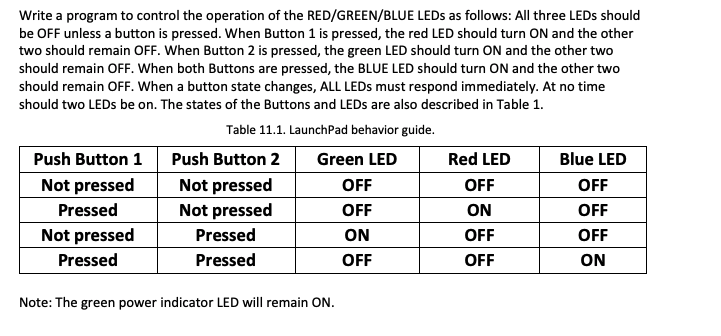
Write a program to control the operation of the RED/GREEN/BLUE LEDs as follows: All three LEDs should be OFF unless a button is pressed. When Button 1 is pressed, the red LED should turn ON and the other two should remain OFF. When Button 2 is pressed, the green LED should turn ON and the other two should remain OFF. When both Buttons are pressed, the BLUE LED should turn ON and the other two should remain OFF. When a button state changes, ALL LEDs must respond immediately. At no time should two LEDs be on. The states of the Buttons and LEDs are also described in Table 1 Table 11.1. LaunchPad behavior guide Push Button 1Push Button 2 Green LED Not pressed Pressed Not pressed Pressed Not pressed Not pressed Pressed Pressed OFF OFF ON OFF Red LED OFF ON OFF OFF Blue LED OFF OFF OFF ON Note: The green power indicator LED will remain ON Write a program to control the operation of the RED/GREEN/BLUE LEDs as follows: All three LEDs should be OFF unless a button is pressed. When Button 1 is pressed, the red LED should turn ON and the other two should remain OFF. When Button 2 is pressed, the green LED should turn ON and the other two should remain OFF. When both Buttons are pressed, the BLUE LED should turn ON and the other two should remain OFF. When a button state changes, ALL LEDs must respond immediately. At no time should two LEDs be on. The states of the Buttons and LEDs are also described in Table 1 Table 11.1. LaunchPad behavior guide Push Button 1Push Button 2 Green LED Not pressed Pressed Not pressed Pressed Not pressed Not pressed Pressed Pressed OFF OFF ON OFF Red LED OFF ON OFF OFF Blue LED OFF OFF OFF ON Note: The green power indicator LED will remain ON
Step by Step Solution
There are 3 Steps involved in it

Get step-by-step solutions from verified subject matter experts
 Study Help