







Question: Now things will begin to get interesting. Attached is an HTML file that lays out a short form and two additional fields where you will
Now things will begin to get interesting.
Attached is an HTML file that lays out a short form and two additional fields where you will write your output. There are a couple things to point out.
The book likes to use this function they named $(). A variable or function can start with a letter, an underscore, or a dollar sign, so a function can be named just "$". When you call this function you pass it the id of the object you want and it returns that object. So if you have a object with the id myNum you can get a hold of it by calling its function like this:
In the HTML: input type="text" id="myNum"
In the JavaScript var myNum = $("myNumn");
Notice I used the same name for the variable holding that object as I did for the id on the object itself. I would suggest you try to do the same. It will help you remember what is named what and it will be easier to debug if you are consistent like that. By the way, this $ function is an idea they got from JQuery. You will see very similar syntax when we get to that section.
Also, in the book, they like to set up their functions like this:
var someVariable = function(x) { blah blah code for function here blah blah }; // NOTICE - they need this semicolon here because it is set up like a statement
Then when they want to call that function they do this: var anotherVariable = someVariable(5);
You can also do it the way I have in the file:
function someFunction(x) { blah blah blah; } // NOTICE - no semicolon needed if you do it this way
Be aware it works either way, but if you do it as a statement, you will get an error if you forget that semicolon.
--- Instructions ---
Download the attached zip file and extract the file lab4.html. In that file are comments telling you what needs to be done and added.
When a user enters a number in the text box, we want the program to calculate the square of the number (N2) and the factorial of the number (N!). The factorial is defined as the product of an integer and all the integers below it; e.g. factorial four (4!) is equal to 24. 1 * 2 * 3 * 4
7! = 1 * 2 * 3 * 4 * 5 * 6 * 7 = 5040 The numbers get big fast.
When the user clicks the button it calls the function calculate(), and from within that function it calls calcFactorial. So we have one function calling another. From within calculate() you should display the values in the proper fields on the page.
Remember to name your file correctly and to add the correct header for the output.
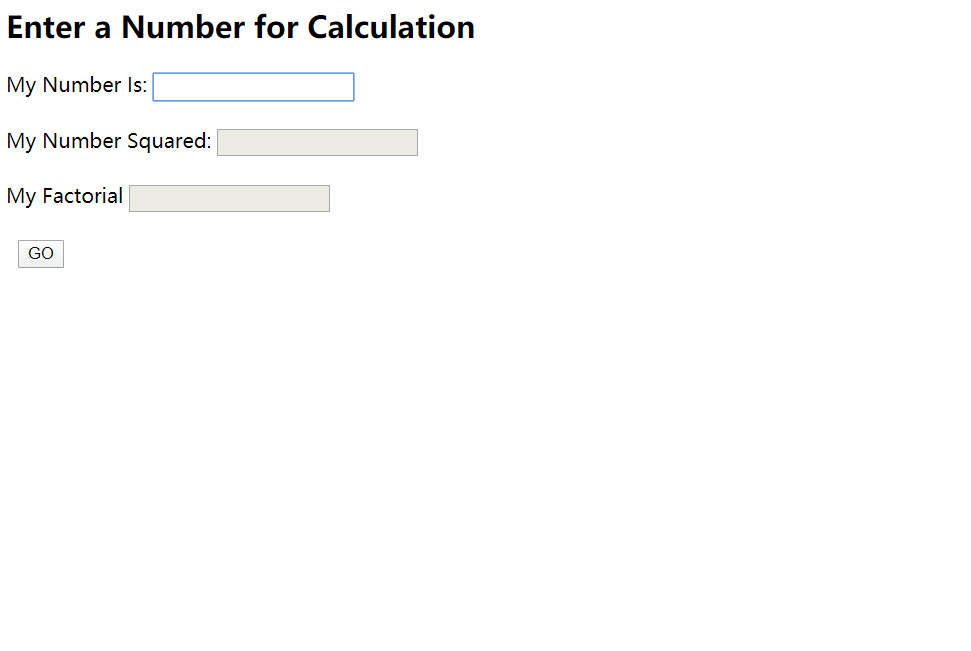
Enter a Number for Calculation My Number is: My Number Squared: My Factorial
Step by Step Solution
There are 3 Steps involved in it

Get step-by-step solutions from verified subject matter experts
 Study Help