







Question: Objective: - Use a For Each loop to create a list of schools and display in a message box - Use nested For Loops to
Objective: - Use a For Each loop to create a list of schools and display in a message box
- Use nested For Loops to create a list of all possible pairs of comparisons for a given number of options
Part A: School List
-Create a range variable (named rngIndex) that represents the list of numbers in column A of the Data sheet.
- SET that variable to cells A2 to A21 of the Data sheet but DO NOT hardcode the reference. Use a combination of Offset and End(xlDown) to determine the current size of the range.
- Loop through each cell in rngIndex and create a string variable (strList) that shows the AlphaOrder, Name and Mascot where mascot is in uppercase. (Use UCASE function.)
- Display that string in a message box as in the example >> 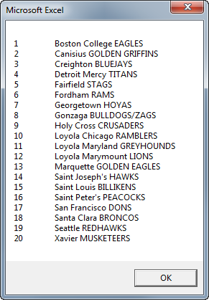
- Attach the code to this button to execute.
Lines of code needed: about 10
Microsoft Excel 1 2 3 6 7 8 9 10 11 12 13 Boston College EAGLES Canisius GOLDEN GRIFFINS Creighton BLUEJAYS Detroit Mercy TITANS Fairfield STAGS Fordham RAMS Georgetown HOYAS Gonzaga BULLDOGS/ZAGS Holy Cross CRUSADERS Loyola Chicago RAMBLERS Loyola Maryland GREYHOUNDS Loyola Marymount LIONS Marquette GOLDEN EAGLES Saint Joseph's HAWKS Saint Louis BILLIKENS Saint Peter's PEACOCKS San Francisco DONS Santa Clara BRONCOS Seattle REDHAWKS Xavier MUSKETEERS 14 15 16 17 18 19 OK Microsoft Excel 1 2 3 6 7 8 9 10 11 12 13 Boston College EAGLES Canisius GOLDEN GRIFFINS Creighton BLUEJAYS Detroit Mercy TITANS Fairfield STAGS Fordham RAMS Georgetown HOYAS Gonzaga BULLDOGS/ZAGS Holy Cross CRUSADERS Loyola Chicago RAMBLERS Loyola Maryland GREYHOUNDS Loyola Marymount LIONS Marquette GOLDEN EAGLES Saint Joseph's HAWKS Saint Louis BILLIKENS Saint Peter's PEACOCKS San Francisco DONS Santa Clara BRONCOS Seattle REDHAWKS Xavier MUSKETEERS 14 15 16 17 18 19 OK
Step by Step Solution
There are 3 Steps involved in it

Get step-by-step solutions from verified subject matter experts
 Study Help