







Question: Objectives Finish the network documentation. Perform basic device configurations on a router and a switch. Verify connectivity and troubleshoot any issues. Scenario Your network manager
Objectives
Finish the network documentation.
Perform basic device configurations on a router and a switch.
Verify connectivity and troubleshoot any issues.
Scenario
Your network manager is impressed with your performance in your job as a LAN technician. She would like you to now demonstrate your ability to configure a router connecting two LANs. Your tasks include configuring basic settings on a router and a switch using the Cisco IOS. You will then verify your configurations, as well as configurations on existing devices by testing end-to-end connectivity.
Note: After completing this activity, you can choose to click the Reset Activity button to generate a new set of requirements. Variable aspects include device names, IP addressing schemes, and the topology.
Requirements
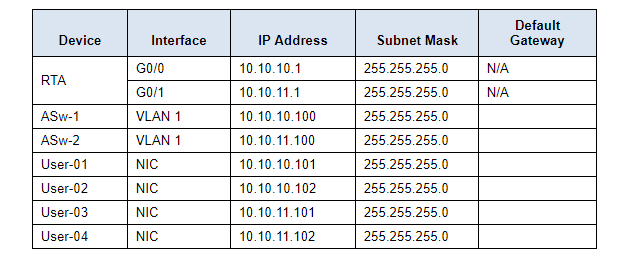
Provide the missing information in the Addressing Table.
Name the router RTA and the second switch ASw-2. You will not be able to access ASw-1.
Use cisco as the user EXEC password for all lines.
Use class as the privileged EXEC password.
Encrypt all plain text passwords.
Configure an appropriate banner.
Configure addressing for all devices according to the Addressing Table.
Document interfaces with descriptions, including the ASw-2 VLAN 1 interface.
Save your configurations.
Verify connectivity between all devices. All devices should be able to ping any other device.
Troubleshoot and document any issues.
Implement the solutions necessary to enable and verify full end-to-end connectivity.
Analysis Question
What should be done on the configuration level if we have to remove the router and use only switches instead?
Device Interface IP Address Subnet Mask Default Gateway G0/0 N/A RTA N/A G0/1 VLAN 1 ASW-1 ASW-2 User-01 User-02 User-03 User-04 VLAN 1 NIC NIC 10.10.10.1 10.10.11.1 10.10.10.100 10.10.11.100 10.10.10.101 10.10.10.102 10.10.11.101 10.10.11.102 255.255.255.0 255.255.255.0 255.255.255.0 255.255.255.0 255.255.255.0 255.255.255.0 255.255.255.0 255.255.255.0 NIC NIC
Step by Step Solution
There are 3 Steps involved in it

Get step-by-step solutions from verified subject matter experts
 Study Help