







Question: Objectives Instantiating objects, sending messages, and managing multiple files Continued practice with loops and decomposition For this assignment you'll be using the DrawingPanelava class provided
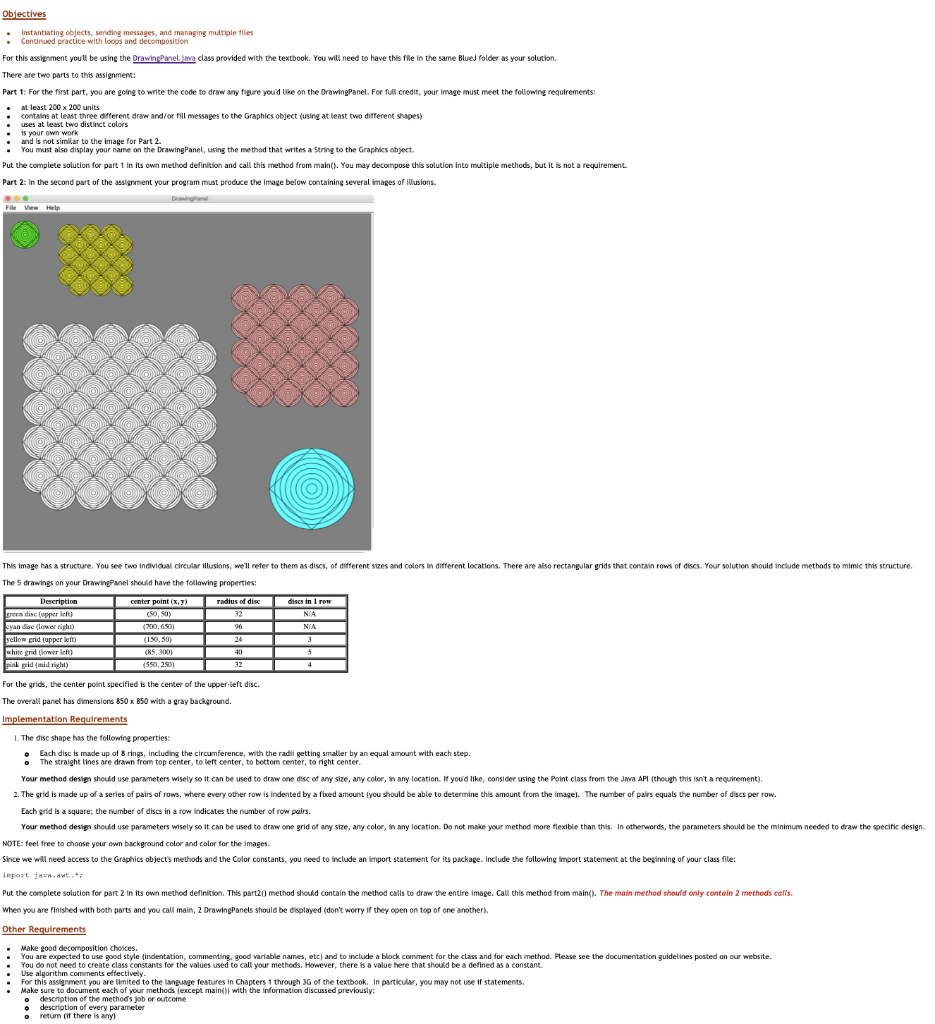
Objectives Instantiating objects, sending messages, and managing multiple files Continued practice with loops and decomposition For this assignment you'll be using the DrawingPanelava class provided with the textbook. You will need to have this file in the same Blue folder as your solution. There are two parts to this assignment: Part 1: For the first part, you are going to write the code to draw any figure you'd like on the DrawingPanel. For full credit, your image must meet the following requirements: at least 200 x 200 units . contains at least three different draw and/or fill messages to the Graphics object (using at least two different shapes) / uses at least two distinct colors 1 is your own work . and is not similar to the image for Part 2 . You must also display your name on the Drawing Panel, using the method that writes a String to the Graphics object. Put the complete solution for part 1 in its own method definition and call this method from main(). You may decompose this solution into multiple methods, but it is not a requirement. Part 2: In the second part of the assignment your program must produce the image below containing several images of illusions Drawing FileViewe This image has a structure. You see two individual circular illusions, we'll refer to them as discs, of different sizes and colors in different locations. There are also rectangular grids that contain rows of discs. Your solution should include methods to mimic this structure. The 5 drawings on your DrawingPanel should have the following properties: : Description center point (x,y: radius of disc discs in 1 row green disc upper 32 NIA cyan dise (lower righ) (700,00) 96 yellow grid upper left () (150.50 24 white grid (lower) (R5,3001) 40 pink. rid (mild rishi) (550, 2001 32 4 For the grids, the center point specified is the center of the upper left disc. The overall panel has dimensions 850 x 850 with a gray background. Implementation Requirements 1. The disc shape has the following properties: Each disc is made up of rings, including the circumference, with the radii getting smaller by an equal amount with each step. The straight lines are drawn from top center, to left center, to bottom center, to right center. Your method design should use parameters wisely so it can be used to draw one disc of any size, any color, in any location. If you'd like, consider using the point class from the Java API (though this isn't a requirement). 2. The grid is made up of a series of pairs of rows, where every other row is indented by a fixed amount (you should be able to determine this amount from the image). The number of pairs equals the number of discs per row. Each grid is a square the number of discs in a row indicates the number of row pairs. Your method design should use parameters wisely so it can be used to draw one grid of any size, any color, tin any location. Do not make your method more flexible than this. In otherwords, the parameters should be the minimum needed to draw the specific design NOTE: feel free to choose your own background color and color for the images. Since we will need access to the Graphics object's methods and the Color constants, you need to include an import statement for its package. Include the following import statement at the beginning of your class file: import java.awt. Put the complete solution for part 2 in its own method definition. This part20 method should contain the method calls to draw the entire image. Call this method from main(). The main method should only contain 2 methods calls. When you are finished with both parts and you call main, 2 Drawing Panels should be displayed (don't worry if they open on top of one another). . Other Requirements Make good decomposition choices. You are expected to use good style findentation, commenting, good variable names, etc) and to include a block comment for the class and for each method. Please see the documentation guidelines posted on our website. . You do not need to create class constants for the values used to call your methods. However, there is a value here that should be a defined as a constant. Use algorithm comments effectively. . For this assignment you are limited to the language features in Chapters 1 through 3G of the textbook. In particular, you may not use if statements. Make sure to document each of your methods (except main() with the information discussed previously: description of the methods yob or outcome description of every parameter retum if there is any . 0
Step by Step Solution
There are 3 Steps involved in it

Get step-by-step solutions from verified subject matter experts
 Study Help