







Question: Its java program, and please screenshot the code for the better understanding here's DrawingPanel.java: http://www.buildingjavaprograms.com/DrawingPanel.java Drawings Please save your project in either a .zip or
Its java program, and please screenshot the code for the better understanding
here's DrawingPanel.java: http://www.buildingjavaprograms.com/DrawingPanel.java 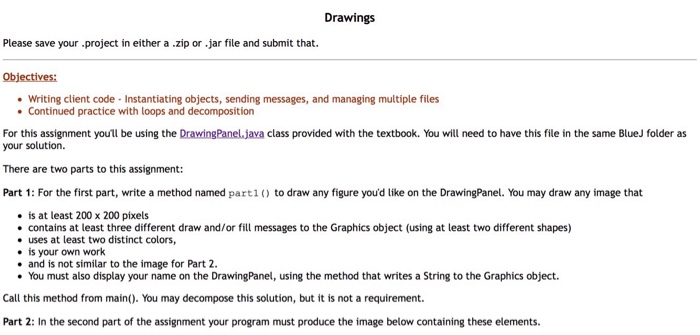
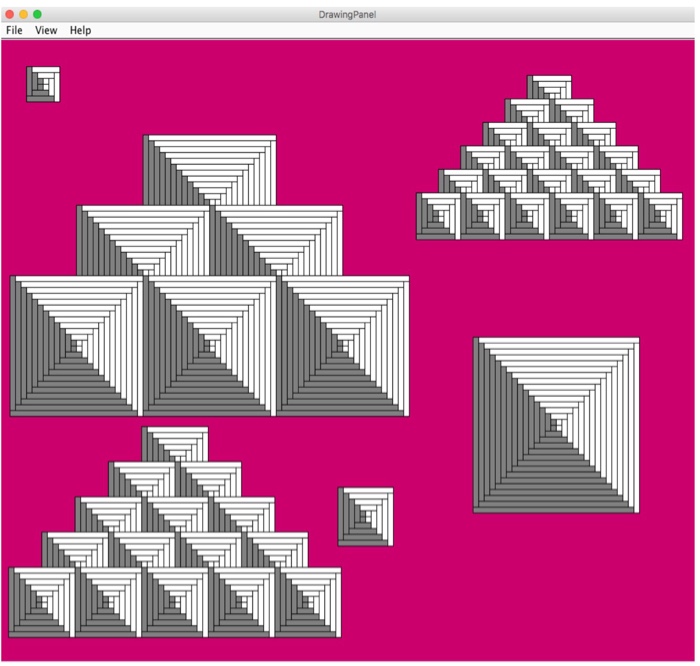
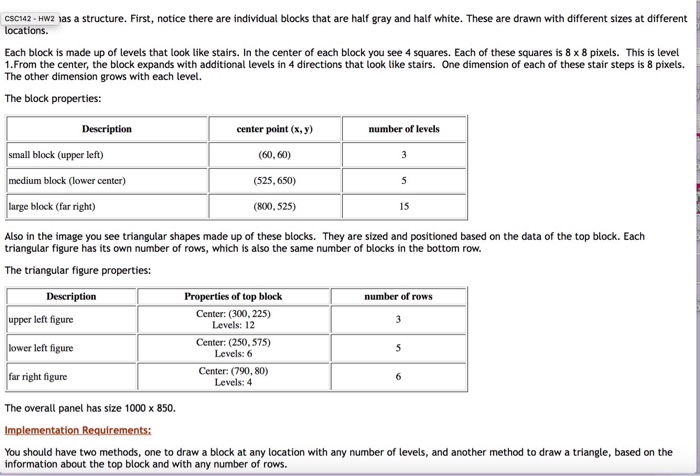

Drawings Please save your project in either a .zip or jar file and submit that. Objectives: Writing client code Instantiating objects, sending messages, and managing multiple files . Continued practice with loops and decomposition For this assignment youll be using the DrawingPanel.java class provided with the textbook. You will need to have this file in the same BlueJ folder as your solution. There are two parts to this assignment: Part 1: For the first part, write a method named part1 to draw any figure you'd like on the DrawingPanel. You may draw any image that . is at least 200 x 200 pixels contains at least three different draw and/or fill messages to the Graphics object (using at least two different shapes) uses at least two distinct colors, is your own work . and is not similar to the image for Part 2. You must also display your name on the DrawingPanel, using the method that writes a String to the Graphics object Call this method from main(). You may decompose this solution, but it is not a requirement. Part 2: In the second part of the assignment your program must produce the image below containing these elements. Drawings Please save your project in either a .zip or jar file and submit that. Objectives: Writing client code Instantiating objects, sending messages, and managing multiple files . Continued practice with loops and decomposition For this assignment youll be using the DrawingPanel.java class provided with the textbook. You will need to have this file in the same BlueJ folder as your solution. There are two parts to this assignment: Part 1: For the first part, write a method named part1 to draw any figure you'd like on the DrawingPanel. You may draw any image that . is at least 200 x 200 pixels contains at least three different draw and/or fill messages to the Graphics object (using at least two different shapes) uses at least two distinct colors, is your own work . and is not similar to the image for Part 2. You must also display your name on the DrawingPanel, using the method that writes a String to the Graphics object Call this method from main(). You may decompose this solution, but it is not a requirement. Part 2: In the second part of the assignment your program must produce the image below containing these elements
Step by Step Solution
There are 3 Steps involved in it

Get step-by-step solutions from verified subject matter experts
 Study Help