







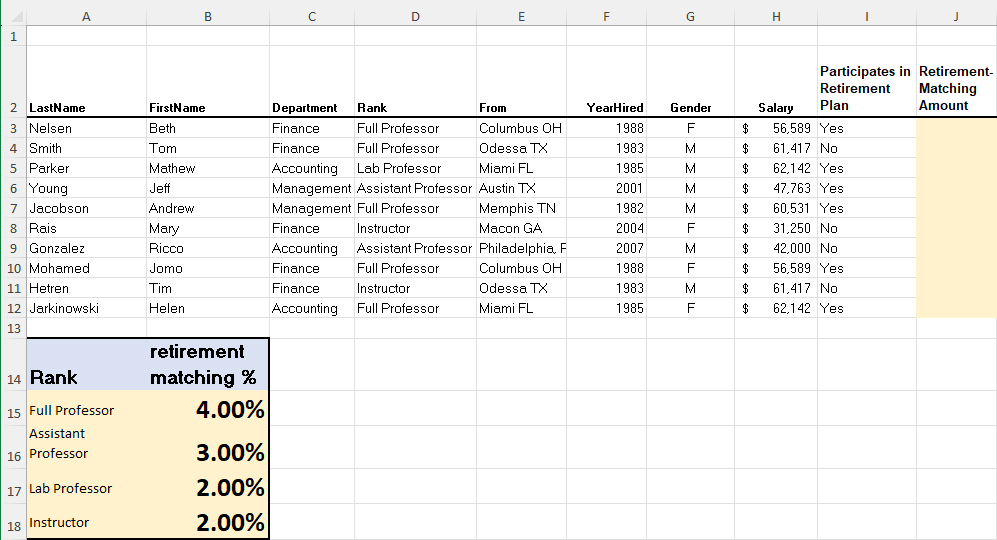
Question: On the Instructor Data worksheet, in cell J 3 , use an IF function nested with Vlookup function to calculate the retirement matching amount for
On the Instructor Data worksheet, in cell J use an IF function nested with Vlookup function to calculate the retirement matching amount for each instructor.
For an instructor who participates in retirement plan which is indicated in column I the retirement matching amount is calculated by multiplying hisher salary in column H by the retirement matching percentage. The retirement matching percentage is based on the instructors rank specified in column D You can look for the retirement matching percentage and rank information in the range A:Byou may want to turn relative cell reference into absolute cell reference
For nonparticipating instructors, the retirement matching amount is
Apply the currency number format with decimal places to the results. Use the fill handle to copy the function down through the column.
Step by Step Solution
There are 3 Steps involved in it
1 Expert Approved Answer
Step: 1 Unlock

Question Has Been Solved by an Expert!
Get step-by-step solutions from verified subject matter experts
Step: 2 Unlock
Step: 3 Unlock
 Study Help