


Question: On the Transactions worksheet, create an IF function in cell O9 to determine whether a customer used a coupon in the Coupon_Used column showing the
On the Transactions worksheet, create an IF

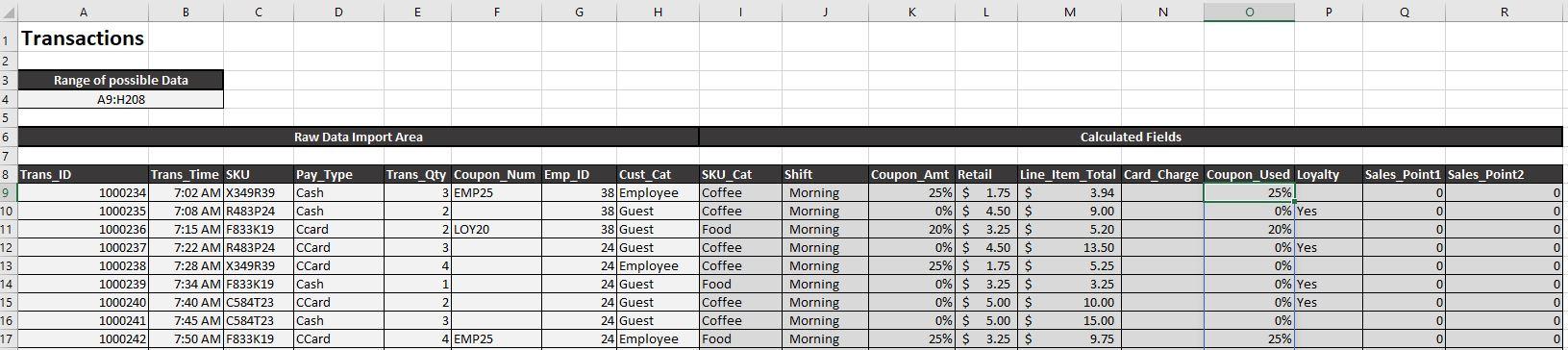
  1. On the Transactions worksheet, create an IF function in cell O9 to determine whether a customer used a coupon in the Coupon_Used column showing the value of Coupon if a coupon was used (Coupon_Amt > 0) and displaying as empty if a coupon was not used (Coupon_Amt = 0). Copy the formula down to cell O208.
A B D E F G H J K L M N 0 P Q R Raw Data Import Area Calculated fields 1 Transactions 2 3 Range of possible Data 4 A9:H208 5 6 7 8 Trans ID Trans Time SKU 9 1000234 7:02 AM X349R39 10 1000235 7:08 AMR483P24 11 1000236 7:15 AM F833K19 12 1000237 7:22 AM R483P24 13 1000238 7:28 AM X349R39 14 1000239 7:34 AMF833K19 15 1000240 7:40 AM C584123 16 1000241 7:45 AM 0584123 17 1000242 7:50 AM F833K19 Sales Pointi Sales Point2 0 Trans Qty Coupon_Num Emp_ID 3 EMP25 2 2 LOY20 3 0 0 0 0 0 0 0 Pay_Type Cash Cash Ccard CCard CCard Cash CCard Cash CCard Cust Cat 38 Employee 38 Guest 38 Guest 24 Guest 24 Employee 24 Guest 24 Guest 24 Guest 24 Employee SKU Cat Coffee Coffee Food Coffee Coffee Food Coffee Coffee Food Shift Morning Morning Morning Morning Morning Morning Morning Morning Morning Coupon_Amt Retail Line_item_Total Card_Charge Coupon_Used Loyalty 25% $ 1.75$ 3.94 25% 0% $ 4.50 $ 9.00 0% Yes 20% $ 3.25 $ 5.20 20% 0% $ 4.50 4.50 $ 13.50 0% Yes 25% $ 1.75$ 5.25 0% 0% $ 3.25$ 3.25 0% Yes 0% $ 5.00 $ 10.00 0% Yes 0% $ 5.00$ 15.00 0% 25% $ 3.25 3.25$ 9.75 25% 4 0 0 1 0 0 2 0 0 3 0 0 4 EMP25 0 0

Step by Step Solution

There are 3 Steps involved in it

1 Expert Approved Answer
Step: 1 Unlock blur-text-image

Question Has Been Solved by an Expert!

Get step-by-step solutions from verified subject matter experts

Step: 2 Unlock
Step: 3 Unlock

Students Have Also Explored These Related General Management Questions!