







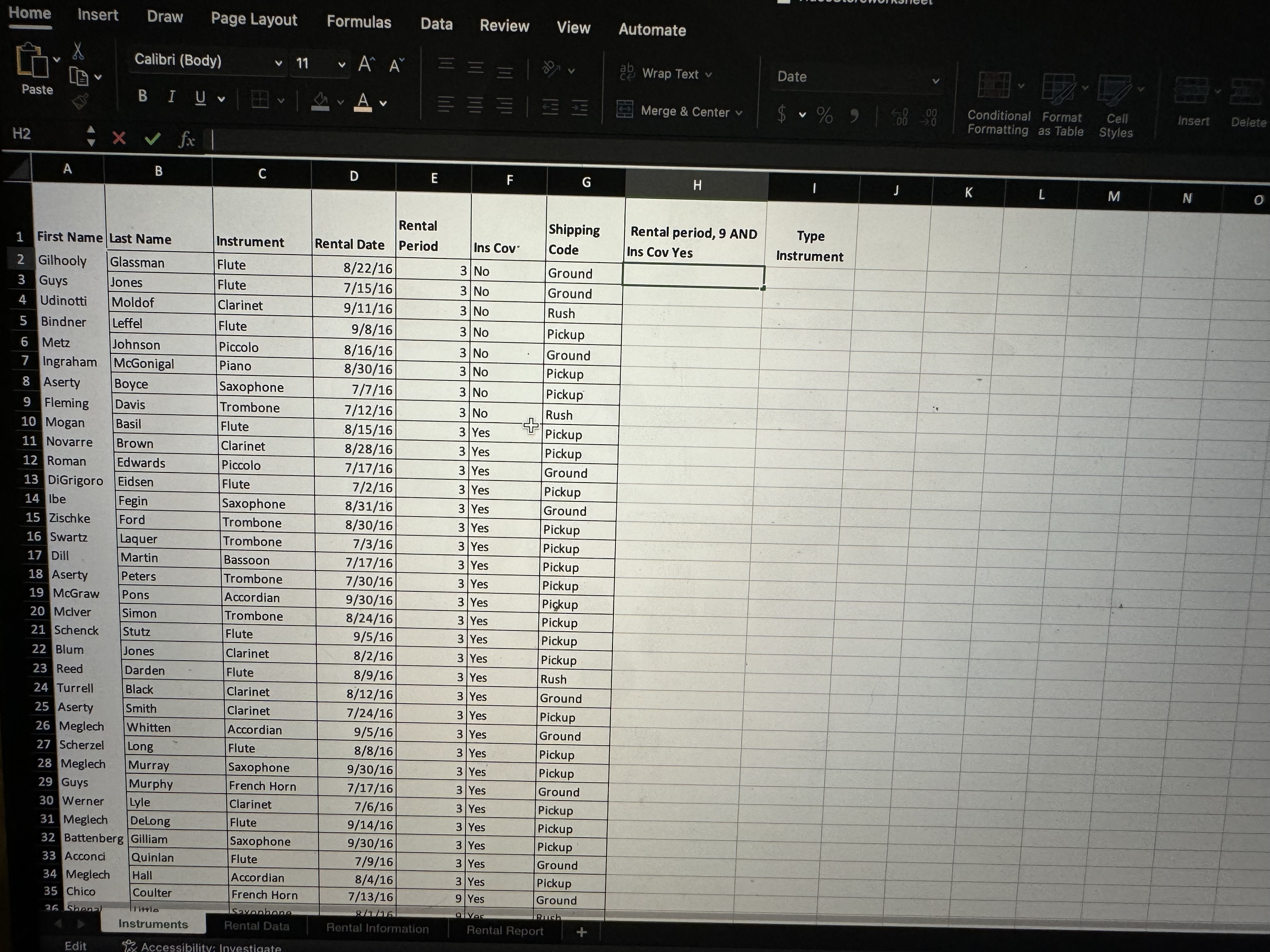
Question: Open the Instruments Worksheet Home Insert Draw Page Layout Formulas Data Review View Automate x Paste Calibri ( Body ) 1 1 A A ?
Open the Instruments Worksheet Home
Insert
Draw Page Layout
Formulas
Data
Review
View
Automate
Paste
Calibri Body
del
Wrap Text
Date
B
A
Merge & Center
$
Conditional Format
Cell
H Instruments
Rental
Rental Information
Rental Report
Ready
Accessibility: Investigate
In cell H create a function to add the text Gold Customer if the Rental Period is and Insurance Coverage is Yes. If the condition is not met the cell should be blank.
In cell I create a function to put the value, Brass in the cell if the instrument is either a Trombone or a French Horn, and put the value, Woodwind if the instrument is either a Flute, Clarinet, or Oboe, and blank if either condition is not met.
Rental Data Worksheet the formula is created in column I, once you create the formula for column H the correct answers will appear.
In column H create a lookup function to lookup the Instrument and return the group code from the Instrument Group Array in the Rental Information sheet. This is an exact match. Copy the formula down.
In columns H and I, add the IFERROR function to the lookup function that states, Instrument is not listed. Copy the formula down
In column J create an If lookup to lookup the insurance cost. The insurance cost is based on the group code. If they have insurance coverage, lookup the value and it by rental period, if they dont have insurance should be entered in the cell. Hint, the monthly insurance is located in column D on the Rental Information worksheet.
In column K create a nested IF function to find the shipping cost based on the shipping code.Pickup Ground Other Rush
In column L create a formula to find the Total Cost. Rental $ Insurance Cost Shipping Cost
In column M pull out the month for the rental date. You will get the number representing the month.
In column N Combine Columns A and B; make sure you put a space between the first and last name. Widen the column to fit.
In column O change the instrument name to Upper Case. Widen the column to fit.
Create a Pivot table to resemble the diagram below dont worry if your numbers do not match place it on a separate sheet:
Return to the rental data worksheet and add subtotals to subtotal the Total Cost by Group CodeOpen the Rental Report Worksheet
In cell C Count the number of rentals that are months and have insurance coverage.
In cell C Count the number of rentals that are months and have insurance coverage.
In cell D Sum the Total rental price for the rentals that are months and have insurance coverage.
In cell D Sum the Total rental price for the rentals that are months and have insurance coverage.
Apply a background color and change the font color of cells A:D
Wrap the text in D
Merge cells A:D
Apply the currency style to cells D
Step by Step Solution
There are 3 Steps involved in it
1 Expert Approved Answer
Step: 1 Unlock

Question Has Been Solved by an Expert!
Get step-by-step solutions from verified subject matter experts
Step: 2 Unlock
Step: 3 Unlock
 Study Help