







Question: Output each floating-point value with two digits after the decimal point, which can be achieved as follows: print (f'{your_value:.2f}') (1) Prompt the user for the
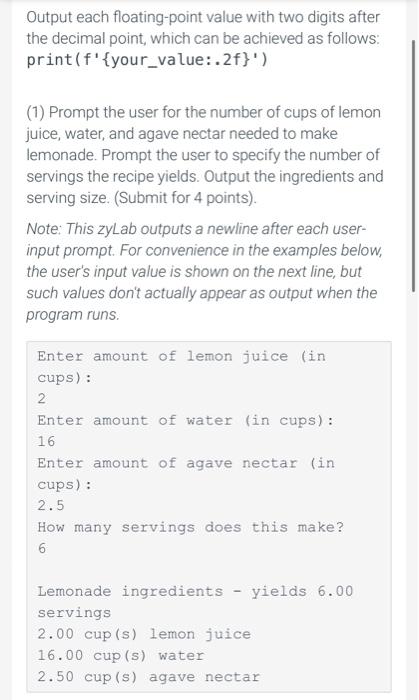
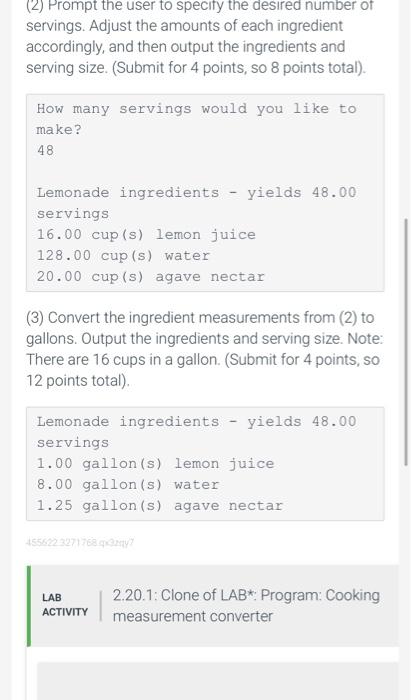
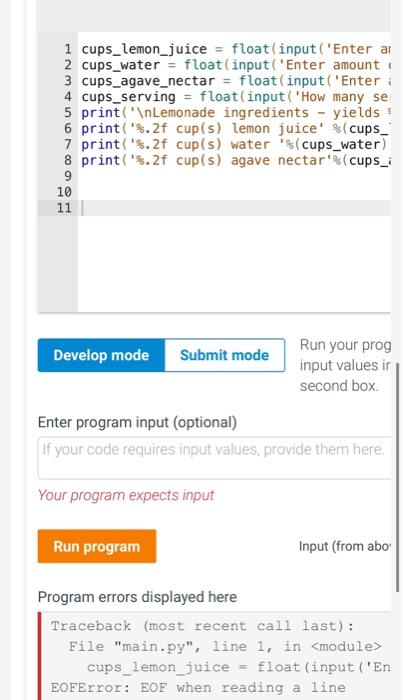
Output each floating-point value with two digits after the decimal point, which can be achieved as follows: print (f'\{your_value:.2f\}') (1) Prompt the user for the number of cups of lemon juice, water, and agave nectar needed to make lemonade. Prompt the user to specify the number of servings the recipe yields. Output the ingredients and serving size. (Submit for 4 points). Note: This zyLab outputs a newline after each userinput prompt. For convenience in the examples below, the user's input value is shown on the next line, but such values don't actually appear as output when the program runs. Enter amount of lemon juice (in cups): 2 Enter amount of water (in cups) : 16 Enter amount of agave nectar (in cups): 2.5 How many servings does this make? 6 Lemonade ingredients - yields 6.00 servings 2.00 cup (s) lemon juice 16.00 cup (s) water 2.50 cup (s) agave nectar (2) Prompt the user to specity the desired number of servings. Adjust the amounts of each ingredient accordingly, and then output the ingredients and serving size. (Submit for 4 points, so 8 points total). (3) Convert the ingredient measurements from (2) to gallons. Output the ingredients and serving size. Note: There are 16 cups in a gallon. (Submit for 4 points, so 12 points total). Lemonade ingredients - yields 48.00 servings 1.00gallon(s) lemon juice 8.00 gallon (s) water Run your prog input values ir second box. Enter program input (optional) If your code requires input values, provide them here. Your program expects input Input (from abo' Program errors displayed here Traceback (most recent call last) : File "main.py", line 1 , in cups lemon_juice = float (input ('En EOFError: EOF when reading a line
Step by Step Solution
There are 3 Steps involved in it

Get step-by-step solutions from verified subject matter experts
 Study Help