







Question: Packet Tracer - Use CDP to Map a Network Addressing Table Objectives Map a network using CDP and SSH remote access. Background / Scenario subnet
Packet Tracer Use CDP to Map a Network
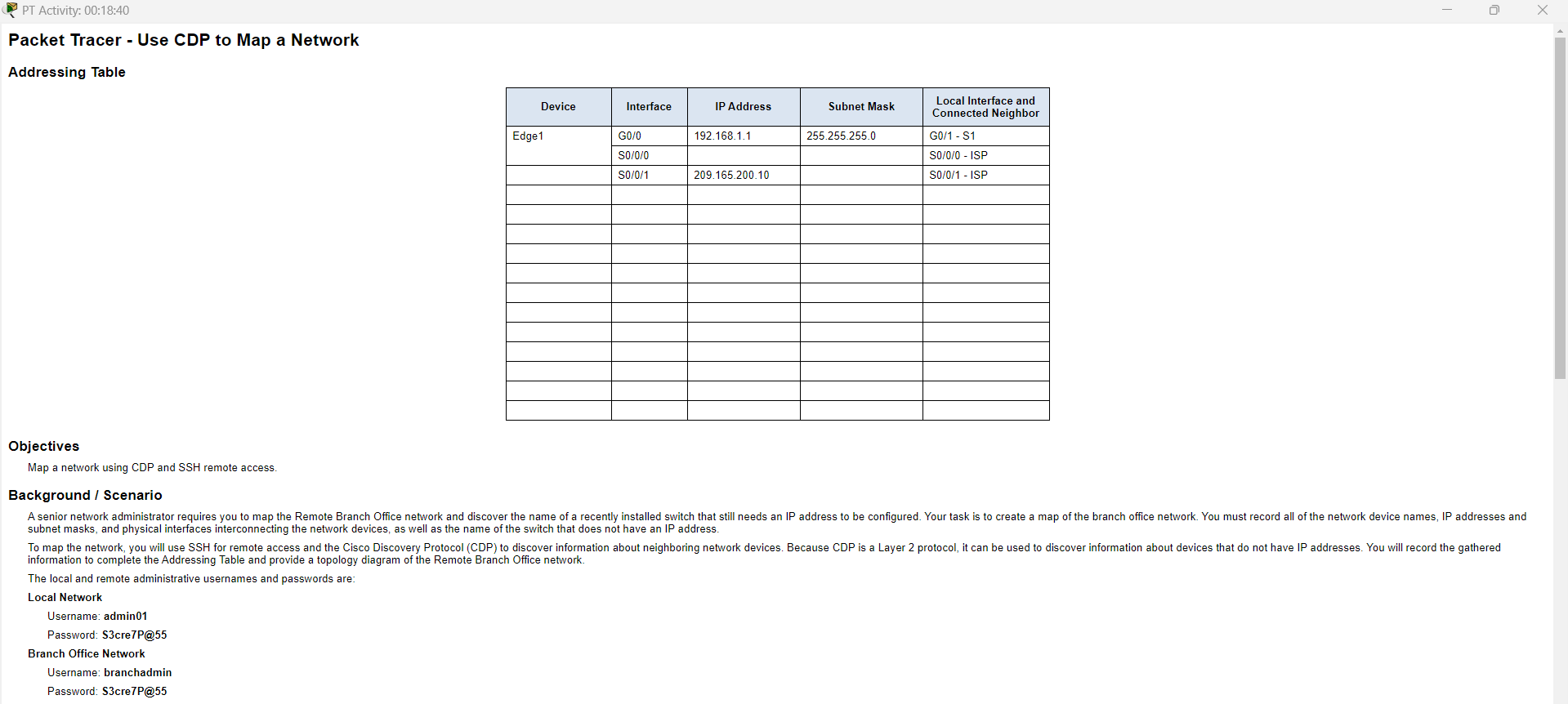
Addressing Table
Objectives
Map a network using CDP and SSH remote access.
Background Scenario subnet masks, and physical interfaces interconnecting the network devices, as well as the name of the switch that does not have an IP address
The local and remote administrative usernames and passwords are:
Local Network
Username: admin
Password: ScreP@
Branch Office Network
Username: branchadmin
Password: ScreP@ Instructions
Part : Use SSH to Remotely Access Network Devices
In Part use the AdminPC to remotely access the Edge gateway router. Next, from the Edge router you will SSH into the Remote Branch Office.
a On the AdminPC open a command prompt.
b SSH into the gateway router at using the username admin and the password ScreP@
PC ssh l admin
Open
Password:
Edge#
Note: Notice that you are placed directly into privileged EXEC mode. This is because the admin user account is set to privilege level
c Use the show ip interface brief and show interfaces commands to document the Edge router's physical interfaces, IP addresses, and subnet masks in the Addressing Table.
d From Edge use SSH to access the Remote Branch Office at with the username branchadmin and the same password as above:
Edge# ssh l branchadmin
Open
Password:
BranchEdge#
After connecting to the Remote Branch Office what piece of previously missing information can now be added to the Addressing Table above?
Part : Use CDP to Discover Neighboring Devices
You are now remotely connected to the BranchEdge router. Using CDP begin looking for connected network devices.
BranchEdge# show ip interface brief
BranchEdge# show interfaces
b Security best practice recommends only running CDP when needed, so CDP may need to be turned on Use the show cdp command to display its status.
BranchEdge# show cdp
& CDP is not enabled
BranchEdge# configure terminal
BranchEdge config# cdp run
BranchEdge config# interface s
BranchEdgeconfigif# no cdp enable
BranchEdgeconfigif# exit
d Issue a show cdp neighbors command to find any neighboring network devices.
Note: CDP will only show connected Cisco devices that are also running CDP
BranchEdge# show cdp neighbors
Is there a neighboring network device? What type of device is it What is its name? On what interface is it connected? Is the device's IP address listed? Record the information in the Addressing Table.
Note: It may take some time for CDP updates to be received. If you see no output from the command, press the Fast Forward Time button several times.
e To find the IP address of the neighboring device use the show cdp neighbors detail command and record the ip address:
BranchEdge# show cdp neighbors detail
Aside from the neighboring device's IP address, what other piece of potentially sensitive information is listed? f Now that you know the IP address of the neighbor device, connect to it with SSH in order to discover other devices that may be its neighbors.
Note: To connect with SSH use the same Remote Branch Office username and password.
BranchEdge# ssh l branchadmin
What is the IP address of the neighbor device?
After successfully connecting with SSH what does the command prompt show?
g You are remotely connected to the next neighbor. Use the show cdp neighbors command, and the show cdp neighbors detail command, to discover other connected neighbor devices.
What types of network devices neighbor this device? Record any newly discovered devices in the Addressing Table. Include their hostname, interfaces, and IP addresses.
h Continue discovering new network devices using SSH and the show CDP commands. Eventually, you will reach the end of the network and there will be no more devices to discover.
What is the name of the switch that does not have an IP address on the network?
i Draw a topology of the Remote Branch Office network using the information you have gathered using CDP
Step by Step Solution
There are 3 Steps involved in it
1 Expert Approved Answer
Step: 1 Unlock

Question Has Been Solved by an Expert!
Get step-by-step solutions from verified subject matter experts
Step: 2 Unlock
Step: 3 Unlock
 Study Help