Question: Page 2 Part 2: Excel Create a workbook to use for tracking expenses for the company picnic. Use the same theme as you did for
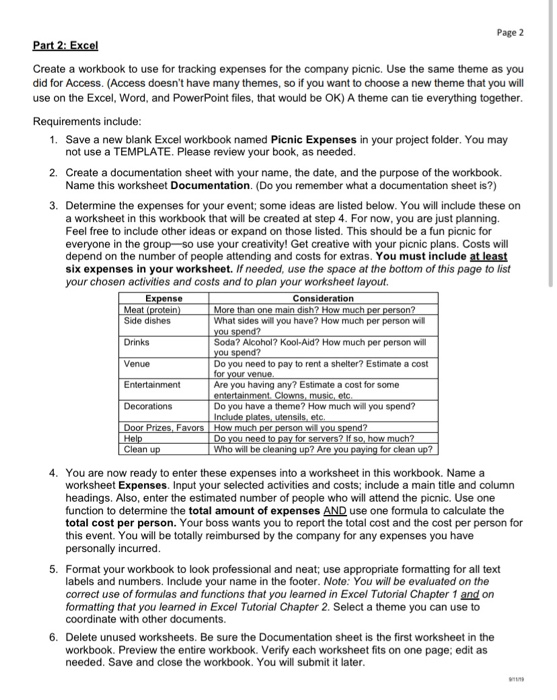
Page 2 Part 2: Excel Create a workbook to use for tracking expenses for the company picnic. Use the same theme as you did for Access. (Access doesn't have many themes, so if you want to choose a new theme that you will use on the Excel, Word, and PowerPoint files, that would be OK) A theme can tie everything together. Requirements include: 1. Save a new blank Excel Workbook named Picnic Expenses in your project folder. You may not use a TEMPLATE. Please review your book, as needed. 2. Create a documentation sheet with your name, the date, and the purpose of the workbook. Name this worksheet Documentation. (Do you remember what a documentation sheet is?) 3. Determine the expenses for your event; some ideas are listed below. You will include these on a worksheet in this workbook that will be created at step 4. For now, you are just planning. Feel free to include other ideas or expand on those listed. This should be a fun picnic for everyone in the group-so use your creativity! Get creative with your picnic plans. Costs will depend on the number of people attending and costs for extras. You must include at least six expenses in your worksheet. If needed, use the space at the bottom of this page to list your chosen activities and costs and to plan your worksheet layout. Expense Consideration Meat (protein) More than one main dish? How much per person? Side dishes What sides will you have? How much per person will you spend? Drinks Soda? Alcohol? Kool-Ald? How much per person will you spend? Venue Do you need to pay to rent a shelter? Estimate a cost for your venue. Entertainment Are you having any? Estimate a cost for some entertainment Clowns, music, etc Decorations Do you have a theme? How much will you spend? Include plates, utensils, etc. Door Prizes Favors How much per person will you spend? Help Do you need to pay for servers? If so, how much? Clean up Who will be cleaning up? Are you paying for clean up? 4. You are now ready to enter these expenses into a worksheet in this workbook. Name a worksheet Expenses. Input your selected activities and costs, include a main title and column headings. Also, enter the estimated number of people who will attend the picnic. Use one function to determine the total amount of expenses AND use one formula to calculate the total cost per person. Your boss wants you to report the total cost and the cost per person for this event. You will be totally reimbursed by the company for any expenses you have personally incurred. 5. Format your workbook to look professional and neat; use appropriate formatting for all text labels and numbers. Include your name in the footer. Note: You will be evaluated on the correct use of formulas and functions that you learned in Excel Tutorial Chapter 1 and on formatting that you learned in Excel Tutorial Chapter 2. Select a theme you can use to coordinate with other documents. 6. Delete unused worksheets. Be sure the Documentation sheet is the first worksheet in the workbook. Preview the entire workbook. Verify each worksheet fits on one page, edit as needed. Save and close the workbook. You will submit it later. ets. Be suncok. Very submit Page 2 Part 2: Excel Create a workbook to use for tracking expenses for the company picnic. Use the same theme as you did for Access. (Access doesn't have many themes, so if you want to choose a new theme that you will use on the Excel, Word, and PowerPoint files, that would be OK) A theme can tie everything together. Requirements include: 1. Save a new blank Excel Workbook named Picnic Expenses in your project folder. You may not use a TEMPLATE. Please review your book, as needed. 2. Create a documentation sheet with your name, the date, and the purpose of the workbook. Name this worksheet Documentation. (Do you remember what a documentation sheet is?) 3. Determine the expenses for your event; some ideas are listed below. You will include these on a worksheet in this workbook that will be created at step 4. For now, you are just planning. Feel free to include other ideas or expand on those listed. This should be a fun picnic for everyone in the group-so use your creativity! Get creative with your picnic plans. Costs will depend on the number of people attending and costs for extras. You must include at least six expenses in your worksheet. If needed, use the space at the bottom of this page to list your chosen activities and costs and to plan your worksheet layout. Expense Consideration Meat (protein) More than one main dish? How much per person? Side dishes What sides will you have? How much per person will you spend? Drinks Soda? Alcohol? Kool-Ald? How much per person will you spend? Venue Do you need to pay to rent a shelter? Estimate a cost for your venue. Entertainment Are you having any? Estimate a cost for some entertainment Clowns, music, etc Decorations Do you have a theme? How much will you spend? Include plates, utensils, etc. Door Prizes Favors How much per person will you spend? Help Do you need to pay for servers? If so, how much? Clean up Who will be cleaning up? Are you paying for clean up? 4. You are now ready to enter these expenses into a worksheet in this workbook. Name a worksheet Expenses. Input your selected activities and costs, include a main title and column headings. Also, enter the estimated number of people who will attend the picnic. Use one function to determine the total amount of expenses AND use one formula to calculate the total cost per person. Your boss wants you to report the total cost and the cost per person for this event. You will be totally reimbursed by the company for any expenses you have personally incurred. 5. Format your workbook to look professional and neat; use appropriate formatting for all text labels and numbers. Include your name in the footer. Note: You will be evaluated on the correct use of formulas and functions that you learned in Excel Tutorial Chapter 1 and on formatting that you learned in Excel Tutorial Chapter 2. Select a theme you can use to coordinate with other documents. 6. Delete unused worksheets. Be sure the Documentation sheet is the first worksheet in the workbook. Preview the entire workbook. Verify each worksheet fits on one page, edit as needed. Save and close the workbook. You will submit it later. ets. Be suncok. Very submit









 Study Help