







Question: Part 1 Getting Started . Open ECICIGLE CHROME or other compatible browser and DISABLE all BROWSER PCiP-UP BLDCKERS. ' Use the following site navigation Sequence:
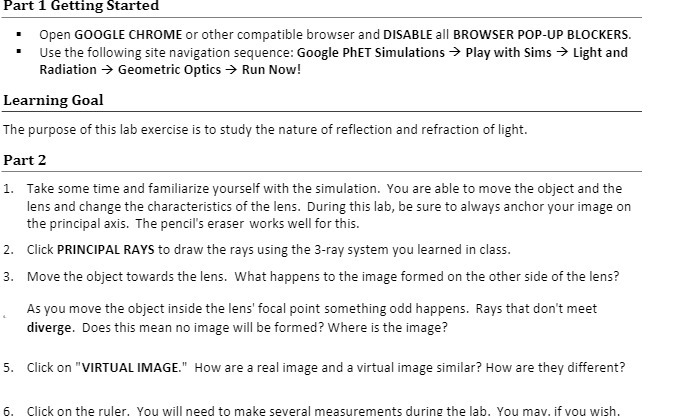
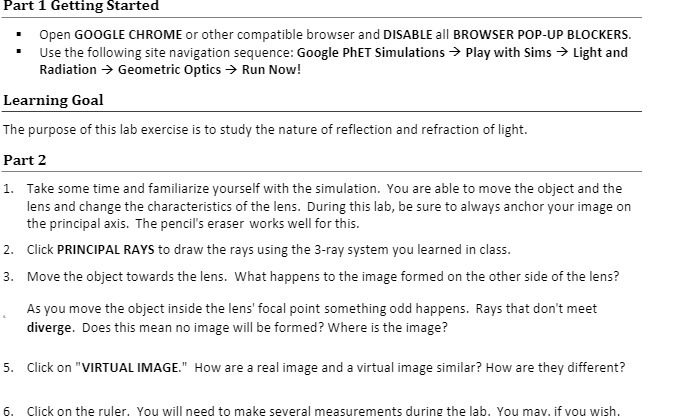
Part 1 Getting Started . Open ECICIGLE CHROME or other compatible browser and DISABLE all BROWSER PCiP-UP BLDCKERS. ' Use the following site navigation Sequence: Google Phi-Tr Simulations -} Play with Sims 9 Light and Radiation 9r Geometric Optics } Hun Now! Learning Goal The purpose of this lalo exercise is to study the nature of reflection and refraction of light. Part2 1. Take some time and familiarize yourself with the simulation. You are able to move the object and the lens and change the characteristics of the lens. During this laloy be sure to always anchor your image on the principal axis. The pencil's eraser works well forthis. 2. Click PRINCIPAL RMFS to draw the rays using the 3ray system you learned in class. 3. Move the object towards the lens. What happens to the image formed on the other side of the lens? As you move the object inside the lens' focal point something odd happens. Rays that don't meet diverge. Does this mean no image will he formed? Where is the image? 5. Click on "VIRTUAL IMAGE.\" How are a real image and a virtual image similar? How are they different? En. Click on the ruler. You will need to make several measurements durine the lab. \"You may. if you wish
Step by Step Solution
There are 3 Steps involved in it

Get step-by-step solutions from verified subject matter experts
 Study Help