







Question: Part 1: Use MySQL Workbench to implement the relational database design based on the ERD below of assignment 1, part 2 (of the Employee, Department,
Part 1: Use MySQL Workbench to implement the relational database design based on the ERD below of assignment 1, part 2 (of the Employee, Department, Dependent, Project).
Requirements:
1. Name the database schema: companydb
2. You must choose the right data type for each field. For text fields, you must choose appropriate field size either fixed size of variable size. For decimal data type, you must choose the number of digits and decimal places.
4. Each table must have a key (some table may require a composite key). The relationship table of a M:M relationship must have a composite key.
5. Use Insert Into statements to enter about 5-10 records for each table.
Submit: Each tables design view (right click the table name and choose Alter Table to show the design view); and records (right click the table name and choose select rows)
Note: You need to capture the screens of the design views and record by using the PrintScrn key then pasting it to Word. If you are using Mac: press Command-Shift-4 and select the screen to capture.
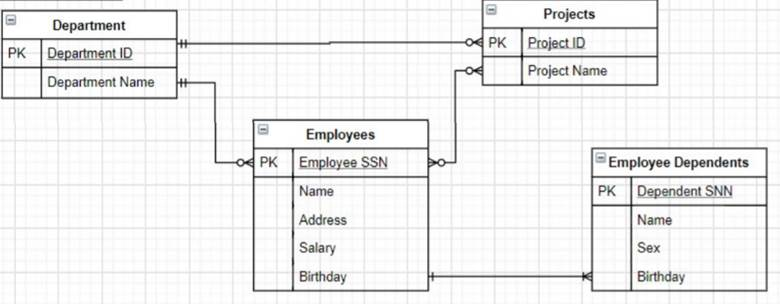
- PK Projects Project ID Project Name Department Department ID Department Name | Employees Employee SSN LOPK Employee Dependents PK Dependent SNN Name Address Name Sex Salary Birthday Birthday
Step by Step Solution
There are 3 Steps involved in it

Get step-by-step solutions from verified subject matter experts
 Study Help