







Question: Part 2: Implement a driver class (main class) as follows: (35 pts) 1. Create a Folder object with name rend from the user. (5 pts)
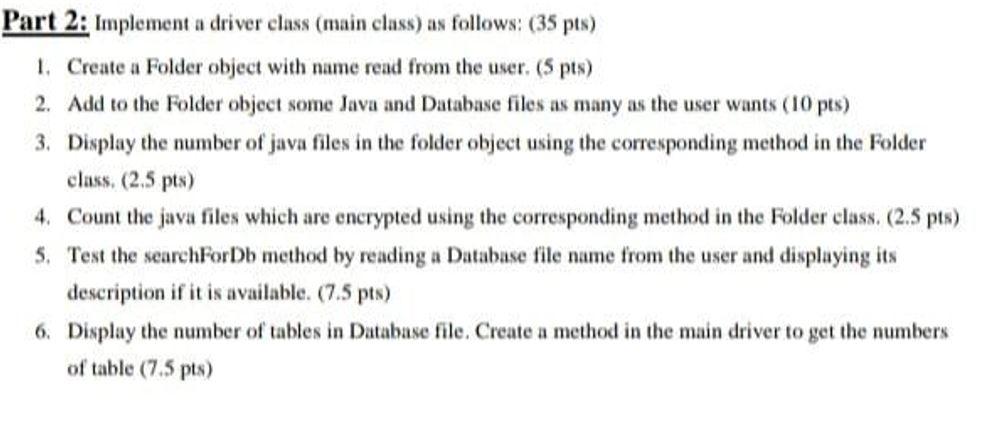
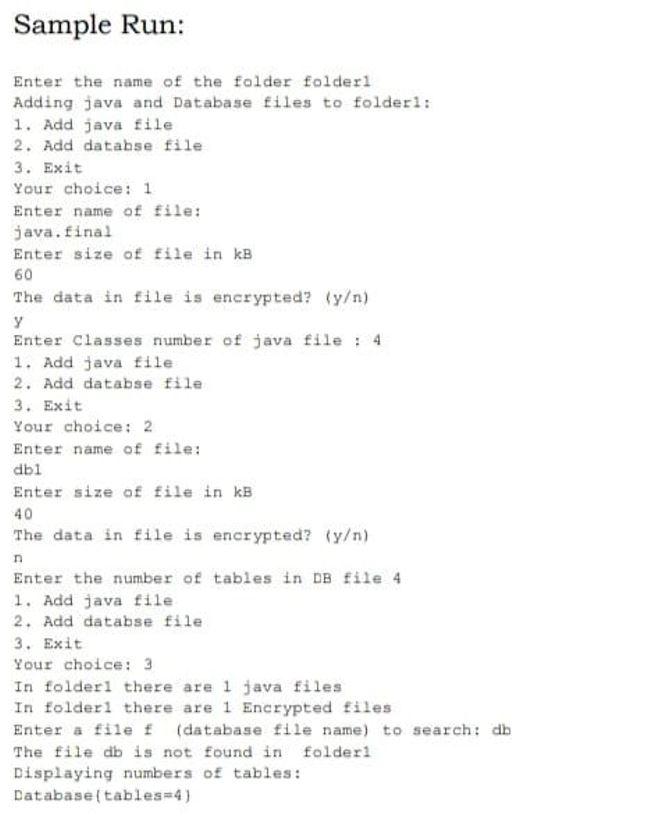
Part 2: Implement a driver class (main class) as follows: (35 pts) 1. Create a Folder object with name rend from the user. (5 pts) 2. Add to the folder object some Java and Database files as many as the user wants (10 pts) 3. Display the number of java files in the folder object using the corresponding method in the Folder class. (2.5 pts) 4. Count the java files which are encrypted using the corresponding method in the folder class. (2.5 pts) $. Test the search ForDb method by reading a Database file name from the user and displaying its description if it is available. (7.5 pts) 6. Display the number of tables in Database file. Create a method in the main driver to get the numbers of table (7.5 pts) Sample Run: Enter the name of the folder folder Adding java and Database files to folderi: 1. Add java file 2. Add databse file 3. Exit Your choice: 1 Enter name of file: java.final Enter size of file in kB 60 The data in file is encrypted? (y) Enter Classes number of java file : 4 1. Add java file 2. Add databse file 3. Exit Your choice: 2 Enter name of file: dbi Enter size of file in kB 40 The data in file is encrypted? (y) n Enter the number of tables in DB File 4 1. Add java file 2. Add databse file 3. Exit Your choice: 3 In folder1 there are 1 java files In folder1 there are 1 Encrypted files Enter a file f (database file name) to search: db The file db is not found in folder Displaying numbers of tables: Database tables=4)
Step by Step Solution
There are 3 Steps involved in it

Get step-by-step solutions from verified subject matter experts
 Study Help