







Question: Part 2 Overall Page Layout You will use CSS grid to create the overall page layout. The page mainly contains three rows and three columns
Part Overall Page Layout
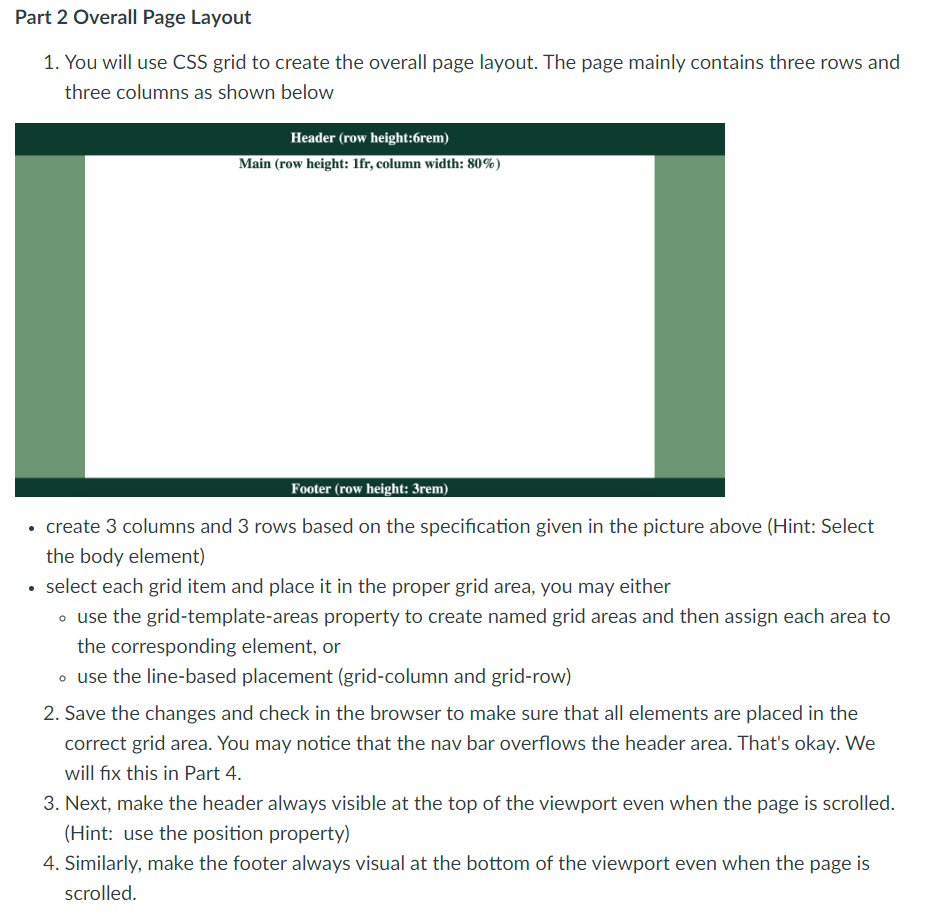
You will use CSS grid to create the overall page layout. The page mainly contains three rows and
three columns as shown below
Header row height:rem
Main row height: fr column width:
Footer row height: rem
create columns and rows based on the specification given in the picture above Hint: Select
the body element
select each grid item and place it in the proper grid area, you may either
use the gridtemplateareas property to create named grid areas and then assign each area to
the corresponding element, or
use the linebased placement gridcolumn and gridrow
Save the changes and check in the browser to make sure that all elements are placed in the
correct grid area. You may notice that the nav bar overflows the header area. That's okay. We
will fix this in Part
Next, make the header always visible at the top of the viewport even when the page is scrolled.
Hint: use the position property
Similarly, make the footer always visual at the bottom of the viewport even when the page is
scrolled.
Step by Step Solution
There are 3 Steps involved in it
1 Expert Approved Answer
Step: 1 Unlock

Question Has Been Solved by an Expert!
Get step-by-step solutions from verified subject matter experts
Step: 2 Unlock
Step: 3 Unlock
 Study Help