





Question: PART 2 - Subnet the network using VLSM, and assign IP addresses to the appropriate devices. Each location has the following number of hosts Location
PART 2 - Subnet the network using VLSM, and
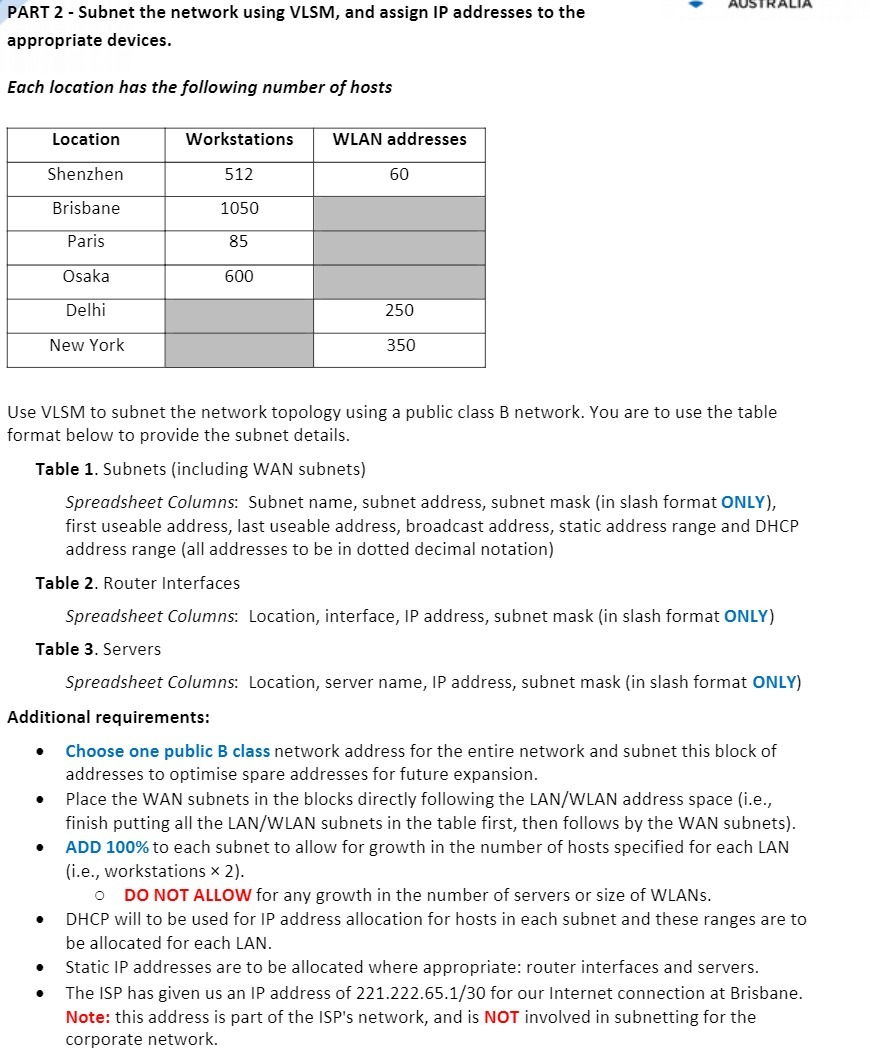
PART 2 - Subnet the network using VLSM, and assign IP addresses to the appropriate devices. Each location has the following number of hosts Location Workstations WLAN addresses Shenzhen 512 60 Brisbane 1050 Paris 85 Osaka 600 Delhi 250 New York 350 Use VLSM to subnet the network topology using a public class B network. You are to use the table format below to provide the subnet details. Table 1. Subnets (including WAN subnets) Spreadsheet Columns: Subnet name, subnet address, subnet mask (in slash format ONLY), first useable address, last useable address, broadcast address, static address range and DHCP address range (all addresses to be in dotted decimal notation) Table 2. Router Interfaces Spreadsheet Columns: Location, interface, IP address, subnet mask (in slash format ONLY) Table 3. Servers Spreadsheet Columns: Location, server name, IP address, subnet mask (in slash format ONLY) Additional requirements: Choose one public B class network address for the entire network and subnet this block of addresses to optimise spare addresses for future expansion. . Place the WAN subnets in the blocks directly following the LAN/WLAN address space (i.e., finish putting all the LAN/WLAN subnets in the table first, then follows by the WAN subnets). ADD 100% to each subnet to allow for growth in the number of hosts specified for each LAN (i.e., workstations x 2). o DO NOT ALLOW for any growth in the number of servers or size of WLANs. DHCP will to be used for IP address allocation for hosts in each subnet and these ranges are to be allocated for each LAN. Static IP addresses are to be allocated where appropriate: router interfaces and servers. The ISP has given us an IP address of 221.222.65.1/30 for our Internet connection at Brisbane. Note: this address is part of the ISP's network, and is NOT involved in subnetting for the corporate network

Step by Step Solution

There are 3 Steps involved in it

1 Expert Approved Answer
Step: 1 Unlock blur-text-image

Question Has Been Solved by an Expert!

Get step-by-step solutions from verified subject matter experts

Step: 2 Unlock
Step: 3 Unlock

Students Have Also Explored These Related Mathematics Questions!