







Question: Part 3 - Indentured List / Gantt Chart (10 marks) Create an Indentured List / Gantt Chart including the work items and activities from your
Part 3 - Indentured List / Gantt Chart (10 marks)
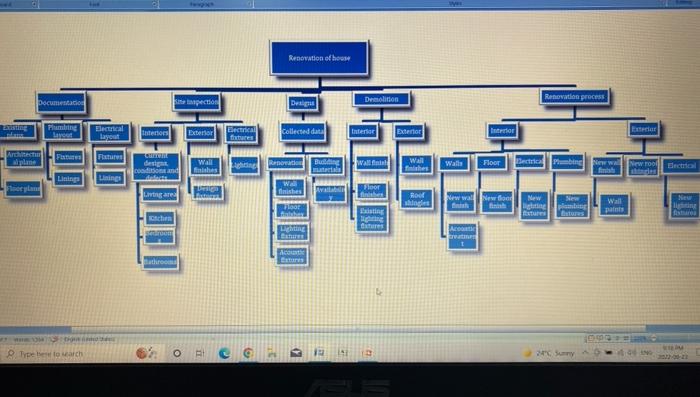
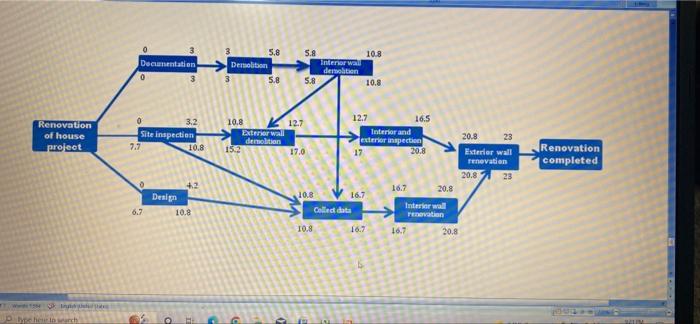
Create an Indentured List / Gantt Chart including the work items and activities from your WBS and
Network Diagram.
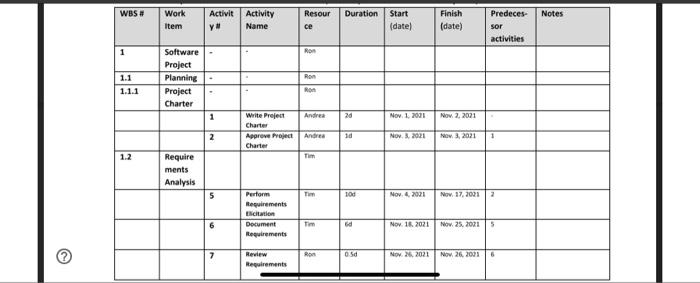
The Indentured List must be generated as a table or spreadsheet imbedded within MS Word
For the Indentured List / Gantt Chart:
List the work items one row at as time. Include the following for work items, leave the remaining
columns blank:
WBS # (leave the Activity # blank).
Work Item (name)
Resource (responsible)
Then list the corresponding activities under each related Work Item. Leave the WBS # blank, and
include the following columns in the table for each of:
Activity number/id (leave the WBS# blank)
Activity name
Resource name
Duration (# days)
Start date, finish date (and optionally time)
Predecessor activities/dependencies i.e. activity number/id of activities() which must
complete before the current activity can start.
Notes. If there is a dependency that is non-technical i.e. resource, explain in the note.
Optionally include a Gantt Chart diagram to reflect the activities.
Pic 1 - Answer of part 1
pic 2- Answer of part 2
pic 3 - sample for answer 3 which you have to make the table and all the instructions i have paste down as you can see so please make a table and please use the actual date as well i know you can make it
please give it ASAP its request to you.
Step by Step Solution
There are 3 Steps involved in it
1 Expert Approved Answer
Step: 1 Unlock

Question Has Been Solved by an Expert!
Get step-by-step solutions from verified subject matter experts
Step: 2 Unlock
Step: 3 Unlock
 Study Help