





Question: Part C: Writing into a Direct Access File Write a C program called LabSC.c to read the student infomation stored in file stdInfo.txt and write
 Part C: Writing into a Direct Access File Write a C

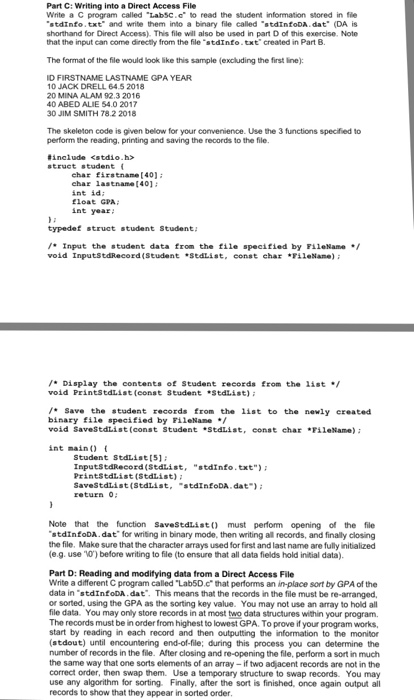
Part C: Writing into a Direct Access File Write a C program called "LabSC.c to read the student infomation stored in file stdInfo.txt and write them into a binary file called "stdInfoDA. dat (DA is shorthand for Direct Access). This file will also be used in part D of this exercise. Note that the input can come directly from the file "stdInfo.txt created in Part B. The format of the file would look like this sample (excluding the first line): D FIRSTNAME LASTNAME GPA YEAR 10 JACK DRELL 64.5 2018 20 MINA ALAM 92.3 2016 40 ABED ALIE 54.0 2017 30 JIM SMITH 78.2 2018 The skeleton code is given below for your convenience. Use the 3 functions specified to perform the reading, printing and saving the records to the file. #include char firstnane[40) ehar lastname [401 int id float GPA int year typedef struct student Student Input the student data from the file specified by FileName void InputstdRecord (StudentSedList, const char ileNane): /Display the contents of Student recorda from the 1ist void PrintStdlist (conat Student Stdlist) Save the student records from the list to the newly ereated binary file specified by FileNane void SaveStdList(const Student Stdist, eonst char rileName) int main Student Stdlist[s) InputstdRecord (Sedlist, "stdInfo.txt") Printstdlist (Stdlist) SaveStdlist(Stdlist, "stdinfoDA. dat" return 0 Note that the function SaveStdListo must perform opening of the file stdInfoDA.dat for writing in binary mode, then writing all records, and finally closing the file. Make sure that the character arrays used for first and last name are fully initialized e.g. use vo) before writing to file (to ensure that all data fields hold initial data). Part D: Reading and modifying data from a Direct Access File Write a different C program called "Lab5D.c" that performs an in-place sort by GPA of the data in "stdInfoDA.dat. This means that the records in the file must be re-arranged, or sorted, using the GPA as the sorting key value. You may not use an array to hold all file data. You may only store records in at most two data structures within your program. The records must be in order from highest to lowest GPA. To prove if your program works start by reading in each record and then outputting the information to the monitor (stdout) until encountering end-of-file; during this process you can determine the number of records in the file. After closing and re-opening the file, perform a sort in much the same way that one sorts elements of an array-if two ad acent records are not in the correct order, then swap them. Use a temporary structure to swap records. You may use any algorithm for sorting. Finally, after the sort is finished, once again output all records to show that they appear in sorted order

Step by Step Solution

There are 3 Steps involved in it

1 Expert Approved Answer
Step: 1 Unlock blur-text-image
Question Has Been Solved by an Expert!

Get step-by-step solutions from verified subject matter experts

Step: 2 Unlock
Step: 3 Unlock

Students Have Also Explored These Related Databases Questions!