



Question: Part I - Using Sliders in JavaFX Car Payment FX: In Eclipse, create a new project named PO3_CarPaymentFX and a single class file named CarPayment.
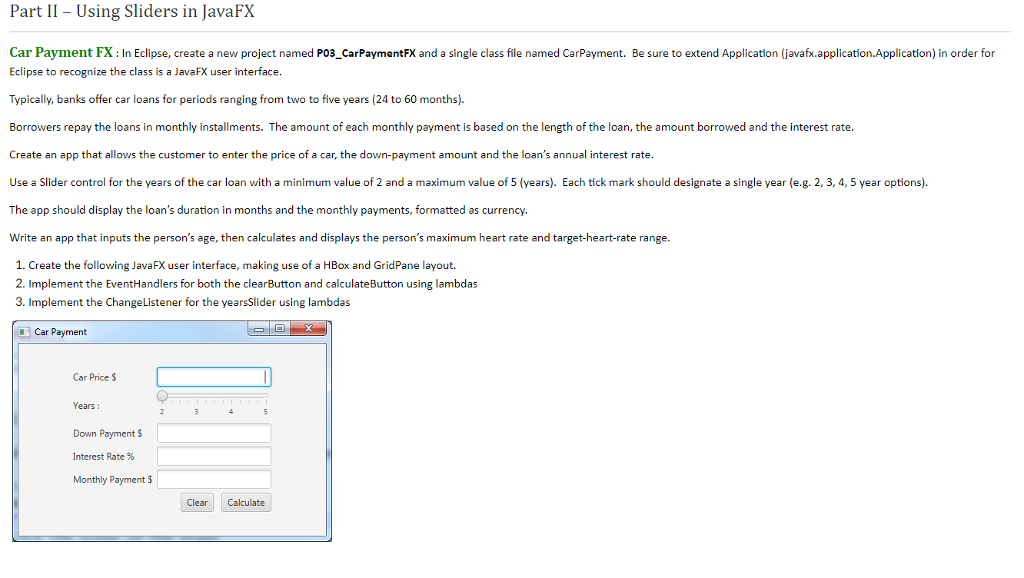
Part I - Using Sliders in JavaFX Car Payment FX: In Eclipse, create a new project named PO3_CarPaymentFX and a single class file named CarPayment. Be sure to extend Application (javafx.application.Application) in order for Eclipse to recognize the class is a JavaFX user interface Typically, banks offer car loans for periods ranging from two to five years (24 to 60 months). Borrowers repay the loans in monthly installments. The amount of each monthly payment is based on the length of the loan, the amount borrowed and the interest rate. Create an app that allows the customer to enter the price of a car, the down-payment amount and the loan's annual interest rate. Use a Slider control for the years of the car loan with a minimum value of 2 and a maximum value of 5 years ch tick man should designate a single e reg . . 5 ear options The app should display the loan's duration in months and the monthly payments, formatted as currency. Write an app that inputs the person's age, then calculates and displays the person's maximum heart rate and target-heart-rate range 1. Create the following JavaFX user interface, making use of a HBox and GridPane layout 2. Implement the EventHandlers for both the clearButton and calculateButton using lambdas 3. Implement the ChangeListener for the yearsSlider using lambdas Car Payment Car Price S Years: Down Payment S Interest Rate % Monthly Payment $ Clear Calculate
Step by Step Solution
There are 3 Steps involved in it

Get step-by-step solutions from verified subject matter experts