







Question: % ============ % PCM ENCODING % ============ % from https://www.mathworks.com/matlabcentral/fileexchange/34610-pcm-matlab-code/content/Untitled.m % modified by JEC for CSE408 HW3 clc; clear all; f = 2; % input
% ============ % PCM ENCODING % ============ % from https://www.mathworks.com/matlabcentral/fileexchange/34610-pcm-matlab-code/content/Untitled.m % modified by JEC for CSE408 HW3
clc; clear all;
f = 2; % input frequency 2Hz
fs = 20; % sampling at 20Hz Ts = 1/fs;
fss = 1.e4; % fine sampling for the time axis 10k sampls/sec Tss = 1/fss;
t = 0:Tss:2-Tss; % continuous time axis, 2 seconds, 20k samples d = Ts/40:Ts:2+Ts/40; % discrete time axis 41 samples starting at... % a very small value, 1/40 of the Sampling Period % rectangular pulses 1/Ts wide are 20 samples (1/fs*25)/(1/Tss)) wide in the t scale (which % is 10000Hz, while fs is 20Hz p = pulstran(t,d,'rectpuls',1/(fs*25));
% ================= % Analog MSG Signal % ================= % simple sinusoid at f (2fps) with a +shift of 1.1 to keep all values above % zero m = sin(2*pi*f*t)+1.1; % constant 1.1 is added so all values are positive % HW part 3 -- AM Input % comment the line above (and assign a new value to it) % add 1Hz 25% amplitude modulation to the input m, i.e. positive % amplitude variation between 0.75 and 1.25 % Hint: the modulating sin or cos amplitude is 0.25, so you need to add 1.0 % observe the reconstructed signal, why is it not correct? % what adjustment do you need to do to the signal so the dynamic range % remains as before? % insert your code here..
% ================= % Sampled signal % ================= ms = m.*p;
% ================= % Quantized Msg % ================= qm = quant(ms,2/16); em = 8*(qm);
% ================= % ENCODING MSG % =================
% get the sampled signal j = 1; for i=1:length(em) if (em(i)~=0 && em(i-1)==0) || ((i==1)&&(em(i)~=0)) x(j) = em(i)-1; j=j+1; end end
% convert to binary representation z = dec2bin(x,5); z = z'; z = z(:); z = str2num(z);
% z is the binary string sent through the channel, using 5-bit symbols
% ============= % PCM DE-CODING % ============= % the input is z % we know in advance that the stream is made of 5-bit symbols rb = z; l = length(rb);
for i = 1:l/5 q = rb((5*i)-4:5*i); q = num2str(q'); x1(i) = bin2dec(q); e(i) = x1(i)+1; end
e = e/8; ms1 = e; % recovered sampled signal
% Now recover the original signal by interpolating e using % fs*upSamplingFactor samples upSamplingFactor = 5;
rm = interpft(e,fs*upSamplingFactor); % This is the received signal
% define discrete time axis for recovered signal Tsr = 2*Ts/upSamplingFactor; dr = 0:Tsr:2-Tsr;
% HW 2 Part 1: insert your PSNR code here
MSE = mean((m-rm).^2)
% ================== % Plotting Signals % ==================
% uncomment to look at intermediate signals and for debugging %start of comment % % figure(1); % subplot(2,1,1) % plot(t,m,'b',t,ms,'r'); % legend('Analog Msg','Sampled Msg') % grid; % xlabel('t -->'); % ylabel('Amplitude'); % axis([0 2 0 2.25]); % % subplot(2,1,2) % plot(t,ms,'k',t,qm,'r'); % legend('Sampled Msg','Quantized Msg') % grid; % xlabel('t -->'); % ylabel('Amplitude'); % axis([0 2 0 2.25]); % % figure(2); % subplot(2,1,1) % plot(t,em,'b') % xlabel('t -->'); % ylabel('Amplitude'); % title('Binary Encoded Msg sent'); % grid; % axis([0 2 -0.5 16.5]); % % figure(3); % stem(ms1,'Marker','.'); % title('Recovered Sampled Msg') % grid; % xlabel('t -->'); % ylabel('Amplitude');
%end of comment
figure; plot(t,m,'b'); title('Original Signal') grid; xlabel('t -->'); ylabel('Amplitude'); axis([0 2 0 2.25]);
figure; plot(dr,rm,'b'); title('Recovered Analog Msg') grid; xlabel('t -->'); ylabel('Amplitude'); axis([0 2 0 2.25]);
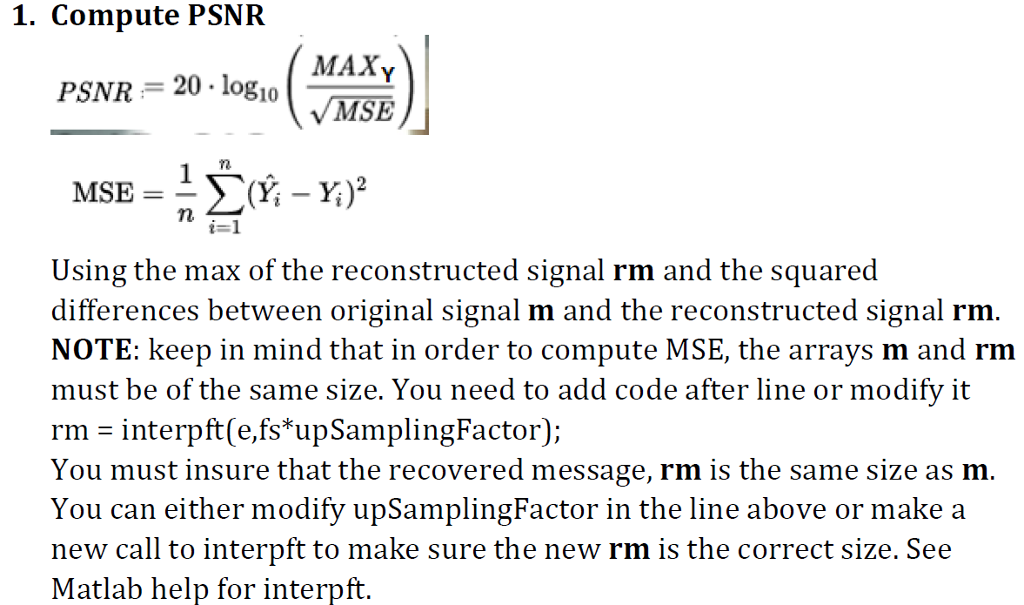
1. Compute PSNFR MAXY MSE PSNR 20 logio Using the max of the reconstructed signal rm and the squared differences between original signal m and the reconstructed signal rm NOTE: keep in mind that in order to compute MSE, the arrays m and rm must be of the same size. You need to add code after line or modify it rm - interpft e,fs upSamplingFactor); You must insure that the recovered message, rm is the same size as m You can either modify upSamplingFactor in the line above or make a new call to interpft to make sure the new rm is the correct size. See Matlab help for interpft 1. Compute PSNFR MAXY MSE PSNR 20 logio Using the max of the reconstructed signal rm and the squared differences between original signal m and the reconstructed signal rm NOTE: keep in mind that in order to compute MSE, the arrays m and rm must be of the same size. You need to add code after line or modify it rm - interpft e,fs upSamplingFactor); You must insure that the recovered message, rm is the same size as m You can either modify upSamplingFactor in the line above or make a new call to interpft to make sure the new rm is the correct size. See Matlab help for interpft
Step by Step Solution
There are 3 Steps involved in it

Get step-by-step solutions from verified subject matter experts
 Study Help