







Question: PHP >> XAMPP and MYSQL >> Instructions Create a new project with your name in the project name (eg. smith asst1 ). In this project,
PHP >>
XAMPP and MYSQL >>
Instructions
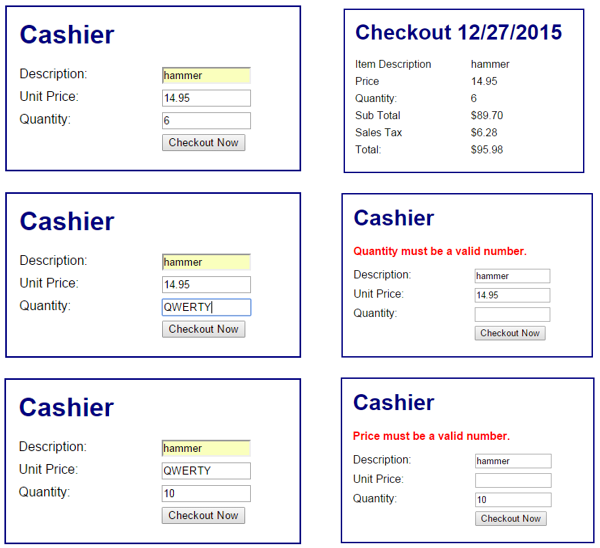
Create a new project with your name in the project name (eg. smith asst1). In this project, code index.php and checkout.php as below.
index.php
- displays a web form for processing a retail transaction. Your form should show the same textboxes.
- validates each textbox entry and displays error messages as appropriate.
- executes checkout.php when the form is submitted.
checkout.php
- reads form data safely into variables with filter_input() function.
- validates the price and quantity inputs, displaying error messages if needed.
- computes the subtotal, 7% sales tax, and total for the transaction.
- displays a record of the transaction including the date.
- displays calculations in currency format, guarding against XSS attacks where needed.
sample :
Cashier Checkout 12/27/2015 hammer Description: Unit Price: Quantity 14.95 Item Description Price Quantity Sub Total Sales Tax Total: hammer 14.95 6 $89.70 $6.28 $95.98 6 Checkout Now Cashier hammer Description: Unit Price: Quantity Cashier Quantity must be a valid number. Description: hammer Unit Price: 14.95 Quantity 14.95 QWERTY Checkout Now Checkout Now Cashier Cashier Description: Unit Price: Quantity hammer QWERTY hammer Price must be a valid number. Description: Unit Price Quantity 10 10 Checkout Now Checkout Now
Step by Step Solution
There are 3 Steps involved in it

Get step-by-step solutions from verified subject matter experts
 Study Help