







Question: Please add md5() , mysqli_real_escape_string(),htmlentities to the php code below and please also add comments to explain the code after putting the functions session_start(); 1/29
Please add md5() , mysqli_real_escape_string(),htmlentities to the php code below
and please also add comments to explain the code after putting the functions
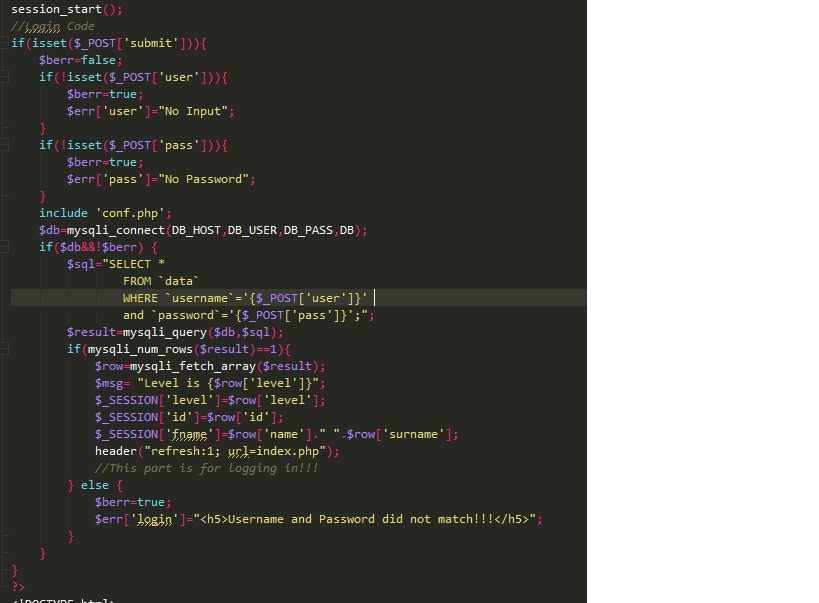
session_start(); 1/29 in Code if(isset($_POST['submit'])){ $berr=false; if(!isset($_POST['user'])){ $berr=true; $err['user']="No Input"; } if(!isset($_POST['pass'])){ $berr=true; $err['pass']="No Password"; } include 'conf.php'; $db=mysqli_connect (DB_HOST, DB_USER, DB_PASS,DB); if ($db&&!$berr) { $sql="SELECT FROM `data WHERE username = '{$_POST['user']}'|| and `password ='{$_POST['pass']}';"; $result=mysqli_query($db, $sql); if (mysqli_num_rows($result)=-1){ $row=mysqli_fetch_array($result); $msg= "Level is {$row['level']}"; $_SESSION['level' ]=$row['level']; $_SESSION['id' ]=$row['id']; $_SESSION['fname' ]=$row[ 'name']." '. $row['surname']; header("refresh:1; url=index.php"); //This part is for Logging in!!! } else { $berr=true; $err['login']="
Username and Password did not match!!!
"; } session_start(); 1/29 in Code if(isset($_POST['submit'])){ $berr=false; if(!isset($_POST['user'])){ $berr=true; $err['user']="No Input"; } if(!isset($_POST['pass'])){ $berr=true; $err['pass']="No Password"; } include 'conf.php'; $db=mysqli_connect (DB_HOST, DB_USER, DB_PASS,DB); if ($db&&!$berr) { $sql="SELECT FROM `data WHERE username = '{$_POST['user']}'|| and `password ='{$_POST['pass']}';"; $result=mysqli_query($db, $sql); if (mysqli_num_rows($result)=-1){ $row=mysqli_fetch_array($result); $msg= "Level is {$row['level']}"; $_SESSION['level' ]=$row['level']; $_SESSION['id' ]=$row['id']; $_SESSION['fname' ]=$row[ 'name']." '. $row['surname']; header("refresh:1; url=index.php"); //This part is for Logging in!!! } else { $berr=true; $err['login']="
Username and Password did not match!!!
"; }
Step by Step Solution
There are 3 Steps involved in it

Get step-by-step solutions from verified subject matter experts
 Study Help