







Question: *** PLEASE ANSWER ALL YELLOW HIGHLIGHTED CELLS WITH CORRECT EXCEL FORMULA NOT JUST THE ANSWER BUT ALSO THE FORMULA PLEASE *** *** PLEASE ANSWER ALL
*** PLEASE ANSWER ALL YELLOW HIGHLIGHTED CELLS WITH CORRECT EXCEL FORMULA NOT JUST THE ANSWER BUT ALSO THE FORMULA PLEASE ***
*** PLEASE ANSWER ALL YELLOW HIGHLIGHTED CELLS WITH CORRECT EXCEL FORMULA NOT JUST THE ANSWER BUT ALSO THE FORMULA PLEASE ***
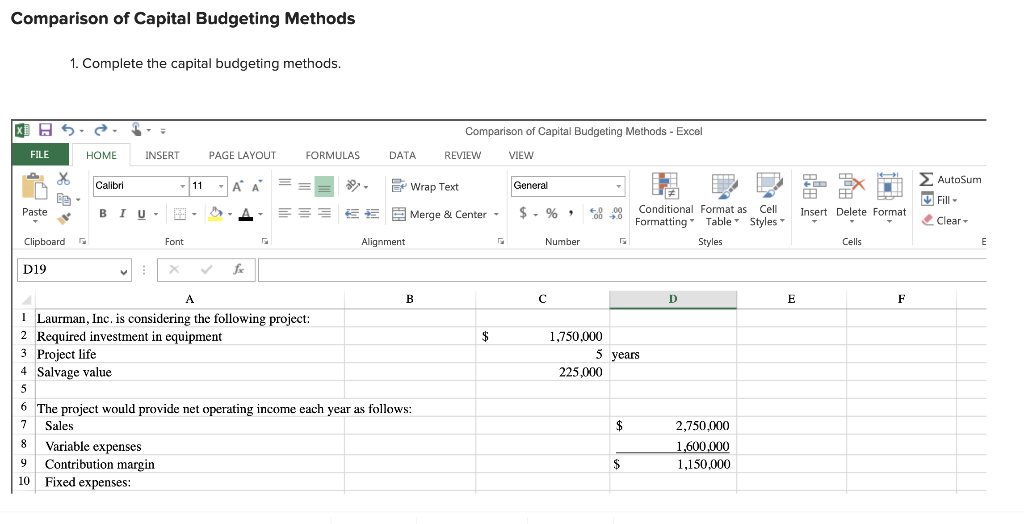
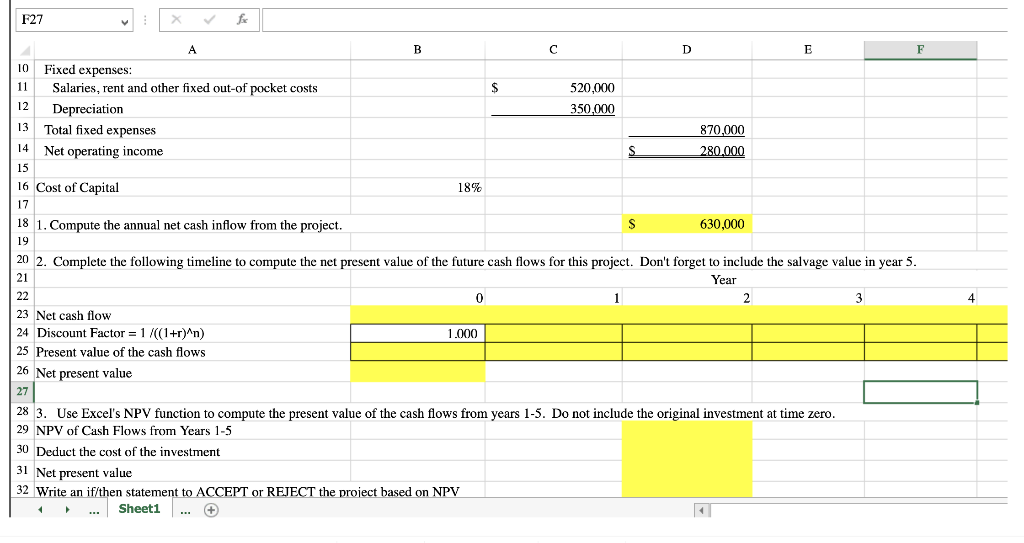
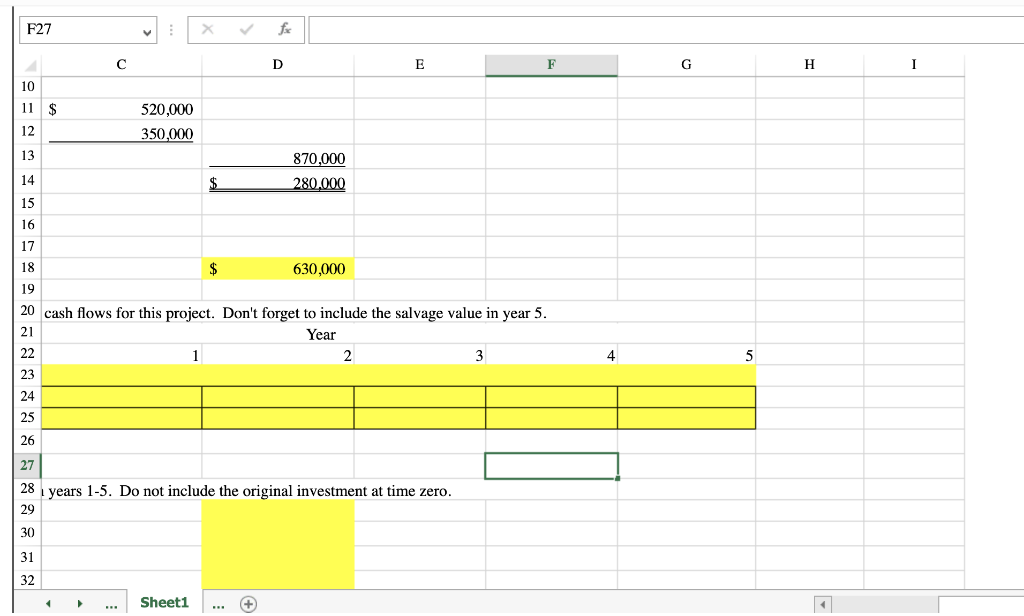
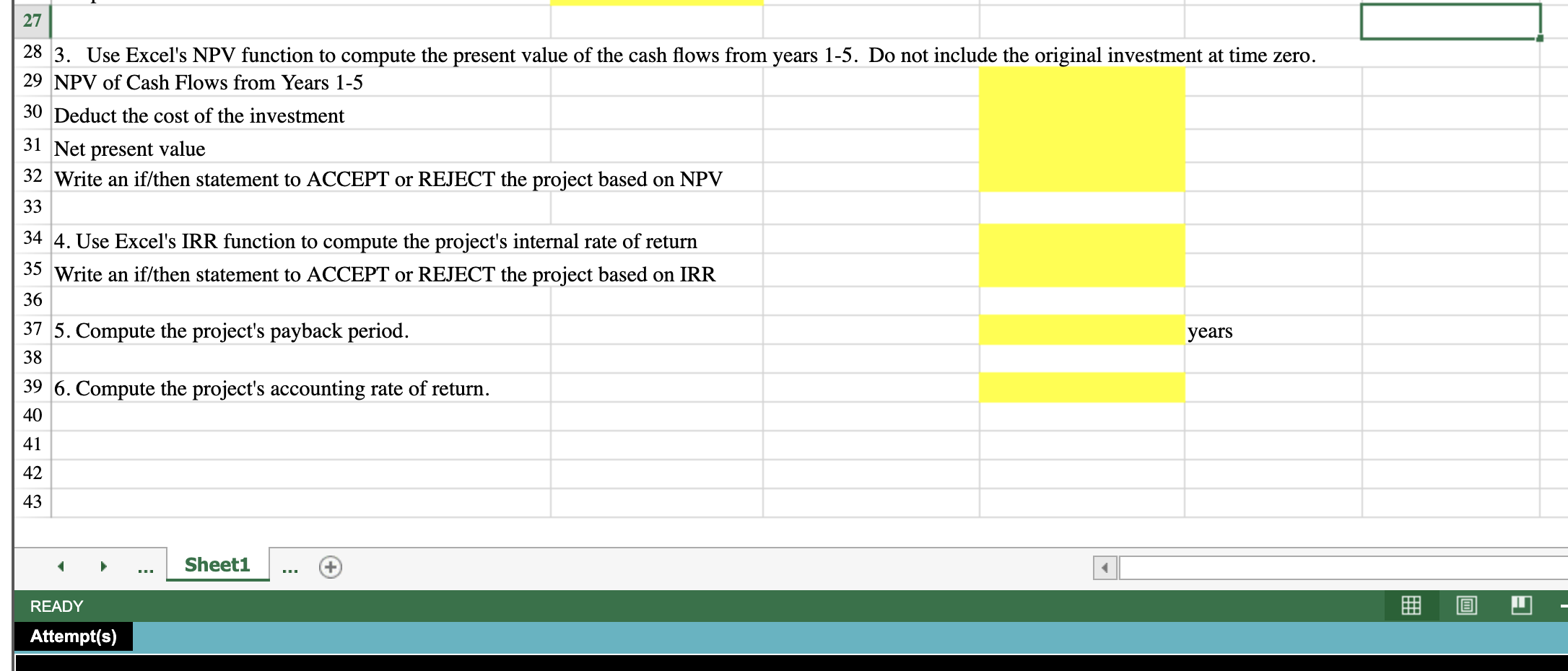
Comparison of Capital Budgeting Methods 1. Complete the capital budgeting methods. IKE H XE Comparison of Capital Budgeting Methods - Excel FILE HOME INSERT PAGE LAYOUT FORMULAS DATA REVIEW VIEW X Calibri - 11 - Be Wrap Text General AutoSum Be Fill - Paste BIU- Merge & Center $ % 8,99 Insert Delete Format Conditional Format as Cell Formatting" Table Styles Styles Clear - Clipboard Font Alignment Number Cells E D19 A B D E F $ 1,750,000 5 years 225,000 1 Laurman, Inc. is considering the following project: 2 Required investment in equipment Project life 4 Salvage value 5 6 The project would provide net operating income each year as follows: 7 Sales 8 Variable expenses 9 Contribution margin 10 Fixed expenses: $ 2,750,000 1,600,000 1,150,000 $ F27 B A D E 10 Fixed expenses: $ 11 520.000 Salaries, rent and other fixed out-of pocket costs 12 Depreciation 350.000 13 Total fixed expenses 870,000 14 S 280.000 Net operating income 15 16 Cost of Capital 18% 17 S 630,000 18 1. Compute the annual net cash inflow from the project. 19 20 2. Complete the following timeline to compute the net present value of the future cash flows for this project. Don't forget to include the salvage value in year 5. Year 21 0 22 1 2 3 23 Net cash flow 24 Discount Factor = 1/((1+r)^n) 1.000 25 Present value of the cash flows 26 Net present value 4 28 3. Use Excel's NPV function to compute the present value of the cash flows from years 1-5. Do not include the original investment at time zero. 29 NPV of Cash Flows from Years 1-5 30 Deduct the cost of the investment 31 Net present value 32 Write an if/then statement to ACCEPT or REJECT the project based on NPV Sheet1 + F27 f D E F G H 10 11 $ 520,000 350,000 12 13 870,000 280.000 14 $ 15 16 17 18 $ 630,000 19 20 cash flows for this project. Don't forget to include the salvage value in year 5. 21 Year 22 1 2 3 4 5 23 24 25 26 27 28 1 years 1-5. Do not include the original investment at time zero. 29 30 31 32 Sheet1 27 28 3. Use Excel's NPV function to compute the present value of the cash flows from years 1-5. Do not include the original investment at time zero. 29 NPV of Cash Flows from Years 1-5 30 Deduct the cost of the investment 31 Net present value 32 Write an if/then statement to ACCEPT or REJECT the project based on NPV 33 34 4. Use Excel's IRR function to compute the project's internal rate of return 35 Write an if/then statement to ACCEPT or REJECT the project based on IRR 36 yea 37 5. Compute the project's payback period. 38 39 6. Compute the project's accounting rate of return. 40 41 42 43 Sheet1 READY Attempt(s)
Step by Step Solution
There are 3 Steps involved in it

Get step-by-step solutions from verified subject matter experts
 Study Help