







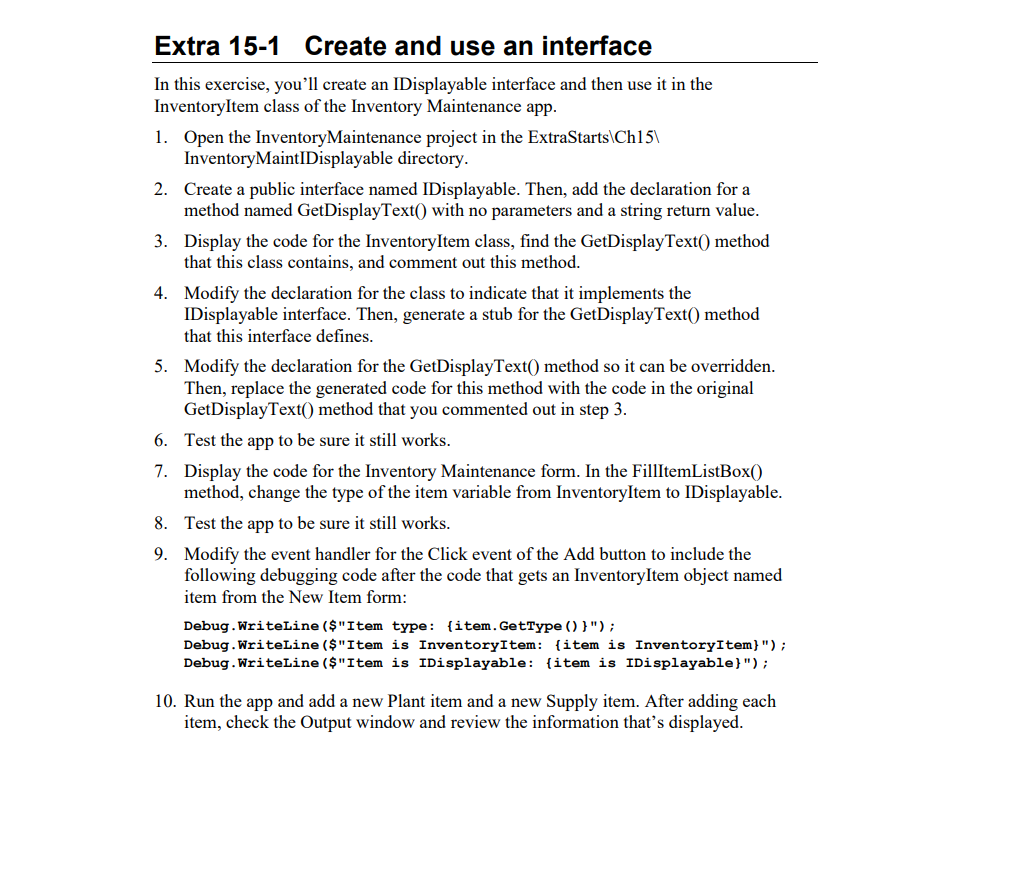
Question: Please Answer in C# Extra 1 5 - 1 Create and use an interface In this exercise, you'll create an IDisplayable interface and then use
Please Answer in C#
Extra Create and use an interface
In this exercise, you'll create an IDisplayable interface and then use it in the
InventoryItem class of the Inventory Maintenance app.
Open the InventoryMaintenance project in the ExtraStarts
InventoryMaintIDisplayable directory.
Create a public interface named IDisplayable. Then, add the declaration for a
method named GetDisplayText with no parameters and a string return value.
Display the code for the InventoryItem class, find the GetDisplayText method
that this class contains, and comment out this method.
Modify the declaration for the class to indicate that it implements the
IDisplayable interface. Then, generate a stub for the GetDisplayText method
that this interface defines.
Modify the declaration for the GetDisplayText method so it can be overridden.
Then, replace the generated code for this method with the code in the original
GetDisplayText method that you commented out in step
Test the app to be sure it still works.
Display the code for the Inventory Maintenance form. In the FillItemListBox
method, change the type of the item variable from InventoryItem to IDisplayable.
Test the app to be sure it still works.
Modify the event handler for the Click event of the Add button to include the
following debugging code after the code that gets an InventoryItem object named
item from the New Item form:
Debug.Writeline $"Item type: itemGetType ;
Debug.WriteLine$"Item is InventoryItem: item is InventoryItem;
Debug.WriteLine$"Item is IDisplayable: item is IDisplayable;
Run the app and add a new Plant item and a new Supply item. After adding each
item, check the Output window and review the information that's displayed.
This is the code I have so Far:
namespace InventoryMaintenance
public partial class frmNewItem : Form
public frmNewItem
InitializeComponent;
private InventoryItem item null!;
public InventoryItem GetNewItem
rdoPlant.Checked true;
this.ShowDialog;
return item;
private void btnSaveClickobject sender EventArgs e
if IsValidData
if rdoPlantChecked
item new Plant
Convert.ToInttxtItemNoText
txtDescription.Text,
Convert.ToDecimaltxtPriceText
cboSizeOrManufacturer.SelectedItem.ToString
;
else
item new Supply
Convert.ToInttxtItemNoText
txtDescription.Text,
Convert.ToDecimaltxtPriceText
cboSizeOrManufacturer.SelectedItem.ToString
;
this.Close;
private bool IsValidData
bool success true;
string errorMessage ;
errorMessage Validator.IsPresenttxtItemNoText, "Item no;
errorMessage Validator.IsInttxtItemNoText, "Item no;
errorMessage Validator.IsPresenttxtDescriptionText, "Description";
errorMessage Validator.IsPresenttxtPriceText, "Price";
errorMessage Validator.IsDecimaltxtPriceText, "Price";
Validate combo box use label text for name remove ending colon
string name lblSizeOrManufacturer.Text.Substring lblSizeOrManufacturer.Text.Length ;
errorMessage Validator.IsSelectedcboSizeOrManufacturerSelectedIndex, name;
if errorMessage
success false;
MessageBox.ShowerrorMessage "Entry Error";
return success;
private void rdoPlantCheckedChangedobject sender EventArgs e
if rdoPlantChecked
lblSizeOrManufacturer.Text "Size:";
else
lblSizeOrManufacturer.Text "Manufacturer:";
LoadComboBox;
private void LoadComboBox
cboSizeOrManufacturer.Items.Clear;
if rdoPlantChecked
cboSizeOrManufacturer.Items.Add gallon";
cboSizeOrManufacturer.Items.Add gallon";
cboSizeOrManufacturer.Items.Add gallon";
cboSizeOrManufacturer.Items.Addinch box";
cboSizeOrManufacturer.Items.Addinch box";
else
cboSizeOrManufacturer.Items.AddBayer;
Step by Step Solution
There are 3 Steps involved in it
1 Expert Approved Answer
Step: 1 Unlock

Question Has Been Solved by an Expert!
Get step-by-step solutions from verified subject matter experts
Step: 2 Unlock
Step: 3 Unlock
 Study Help