







Question: Please Answer in Excel Format with formulas! Mortgage and Refinance Excel Project Use Excel work sheet to build two Mortgage Amortization Tables. **In the excel
 Please Answer in Excel Format with formulas!
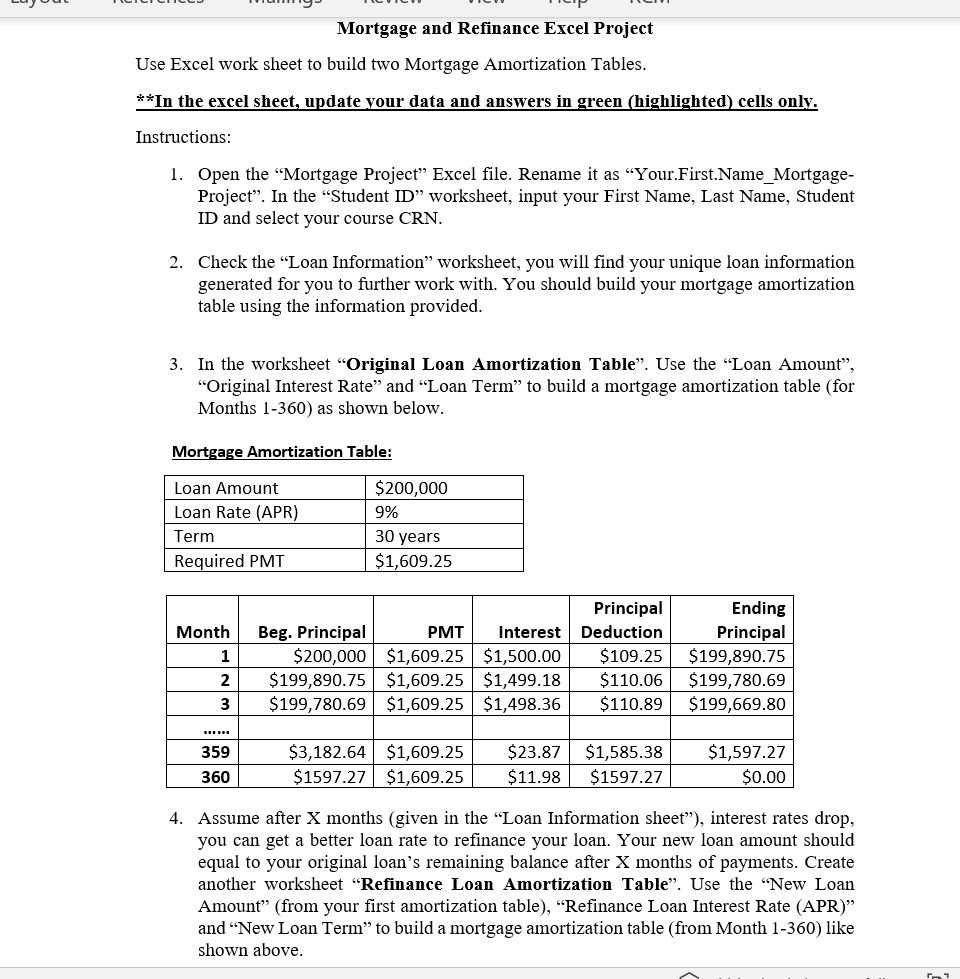
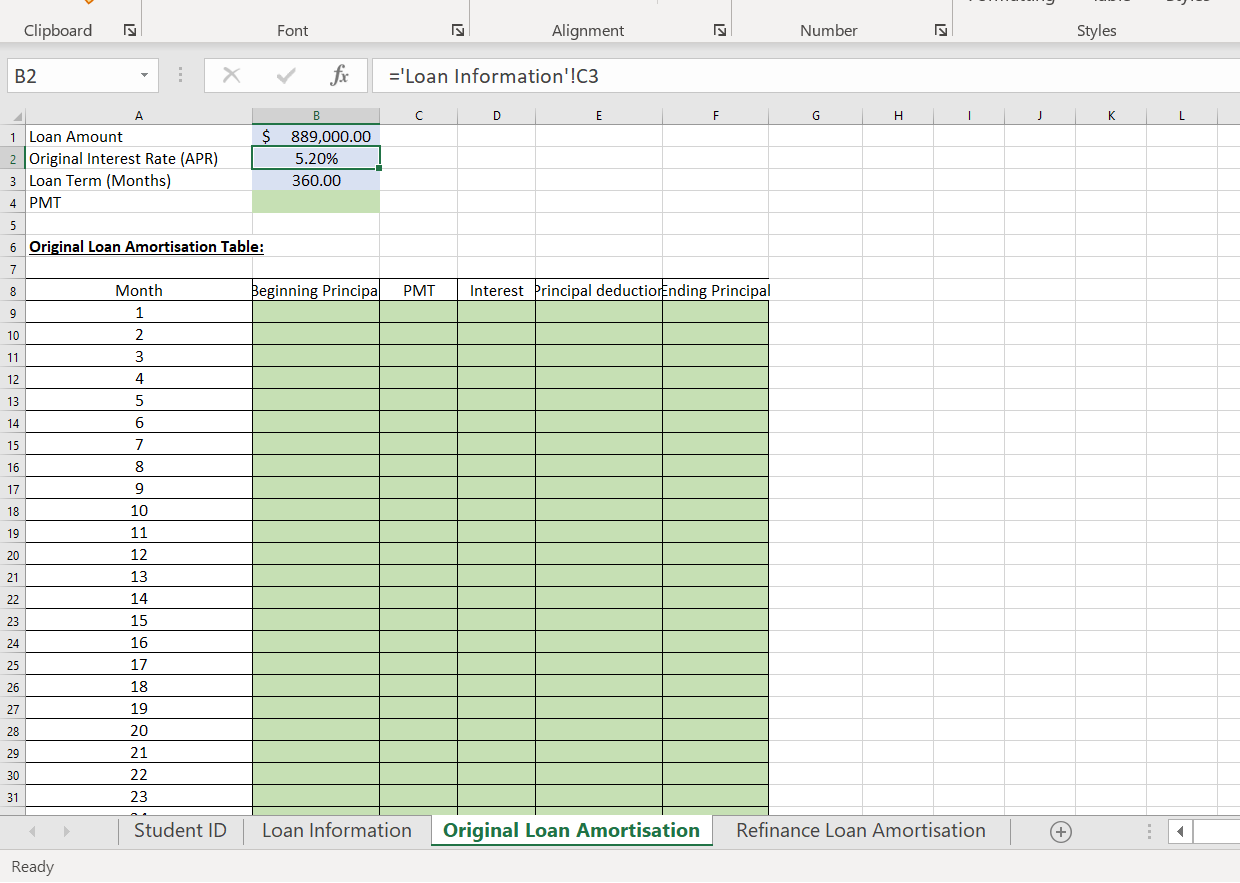
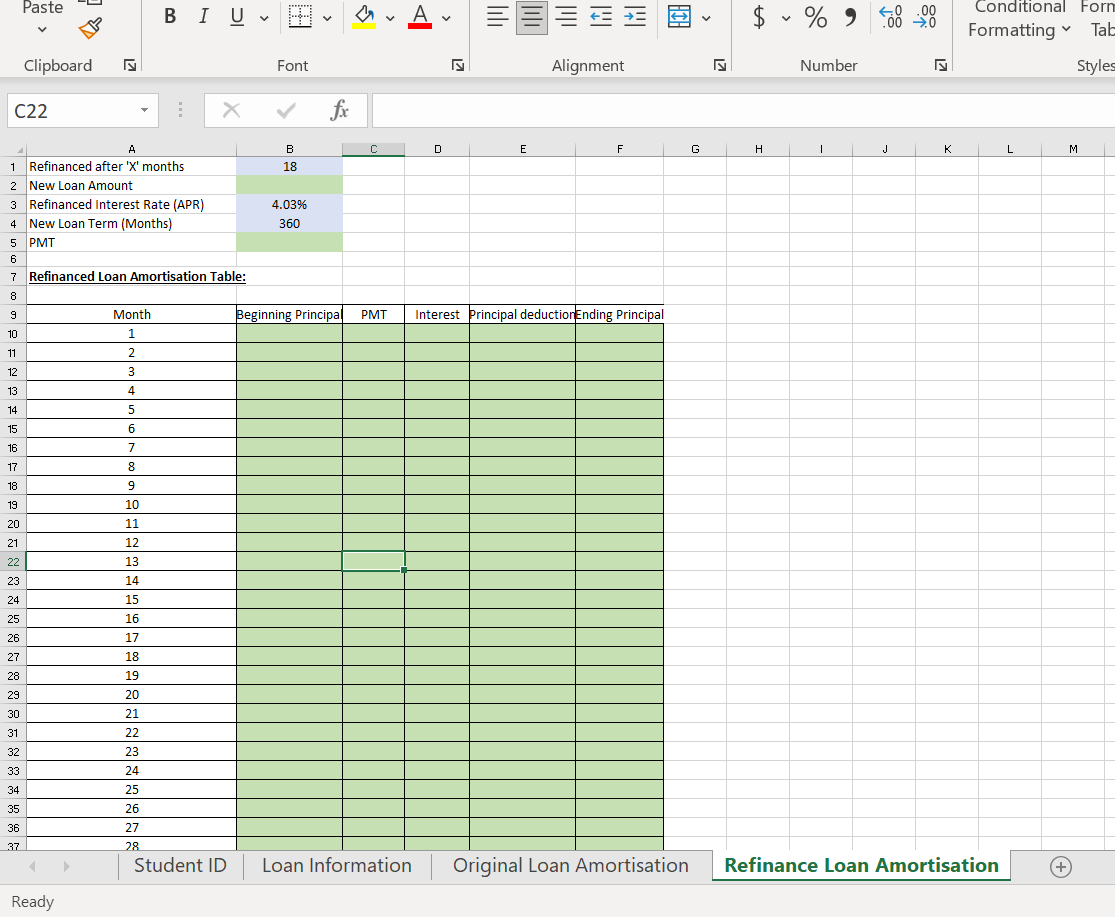
Mortgage and Refinance Excel Project Use Excel work sheet to build two Mortgage Amortization Tables. **In the excel sheet, update your data and answers in green (highlighted) cells only. Instructions: 1. Open the Mortgage Project Excel file. Rename it as Your.First.Name_Mortgage- Project. In the Student ID worksheet, input your First Name, Last Name, Student ID and select your course CRN. 2. Check the Loan Information worksheet, you will find your unique loan information generated for you to further work with. You should build your mortgage amortization table using the information provided. 3. In the worksheet "Original Loan Amortization Table". Use the "Loan Amount", Original Interest Rate and Loan Term to build a mortgage amortization table (for Months 1-360) as shown below. Mortgage Amortization Table: Loan Amount Loan Rate (APR) Term Required PMT $200,000 9% 30 years $1,609.25 Month 1 2 Principal Beg. Principal PMT Interest Deduction $200,000 $1,609.25 $1,500.00 $109.25 $199,890.75 $1,609.25 $1,499.18 $110.06 $199,780.69 $1,609.25 $1,498.36 $110.89 Ending Principal $199,890.75 $199,780.69 $199,669.80 3 359 360 $3,182.64 $1,609.25 $1597.27 $1,609.25 $23.87 $11.98 $1,585.38 $1597.27 $1,597.27 $0.00 4. Assume after X months (given in the Loan Information sheet), interest rates drop, you can get a better loan rate to refinance your loan. Your new loan amount should equal to your original loan's remaining balance after X months of payments. Create another worksheet Refinance Loan Amortization Table". Use the "New Loan Amount" (from your first amortization table), Refinance Loan Interest Rate (APR) and "New Loan Term" to build a mortgage amortization table (from Month 1-360) like shown above. Clipboard Font 27 Alignment Number Styles B2 fx ='Loan Information'!C3 A B D E F G I j K L 1 Loan Amount $ 889,000.00 2 Original Interest Rate (APR) 5.20% 3 Loan Term (Months) 360.00 4 PMT 5 6 Original Loan Amortisation Table: 7 8 Beginning Principal PMT Interest Principal deductiorEnding Principal 9 10 Month 1 2 3 4 5 11 12 13 14 15 6 7 8 16 17 18 19 9 10 11 12 13 20 21 22 14 23 24 25 15 16 17 18 19 20 26 27 28 29 30 21 22 23 31 Student ID Loan Information Original Loan Amortisation Refinance Loan Amortisation + Ready Paste B IU ..... av A || a > $ v % ) 60.00 .000 Conditional Forn Formatting Tale Clipboard is Font 2 Alignment Number Styles C22 ! X fic C D E F H 1 J K L L M B 18 1 A Refinanced after 'X' months 2 New Loan Amount 3 Refinanced Interest Rate (APR) 4 New Loan Term (Months) 5 PMT 4.03% 360 6 PMT Interest principal deduction Ending Principal 7 Refinanced Loan Amortisation Table: 8 9 Month Beginning Principal 10 1 11 2 2. 12 3 13 4 14 5 15 6 7 16 17 8 18 9 10 19 20 11 21 12 22 23 13 14 15 24 25 16 17 26 27 18 28 19 29 20 30 21 31 22 23 32 33 24 25 34 35 26 27 36 37 28 Student ID Loan Information Original Loan Amortisation Refinance Loan Amortisation + Ready Mortgage and Refinance Excel Project Use Excel work sheet to build two Mortgage Amortization Tables. **In the excel sheet, update your data and answers in green (highlighted) cells only. Instructions: 1. Open the Mortgage Project Excel file. Rename it as Your.First.Name_Mortgage- Project. In the Student ID worksheet, input your First Name, Last Name, Student ID and select your course CRN. 2. Check the Loan Information worksheet, you will find your unique loan information generated for you to further work with. You should build your mortgage amortization table using the information provided. 3. In the worksheet "Original Loan Amortization Table". Use the "Loan Amount", Original Interest Rate and Loan Term to build a mortgage amortization table (for Months 1-360) as shown below. Mortgage Amortization Table: Loan Amount Loan Rate (APR) Term Required PMT $200,000 9% 30 years $1,609.25 Month 1 2 Principal Beg. Principal PMT Interest Deduction $200,000 $1,609.25 $1,500.00 $109.25 $199,890.75 $1,609.25 $1,499.18 $110.06 $199,780.69 $1,609.25 $1,498.36 $110.89 Ending Principal $199,890.75 $199,780.69 $199,669.80 3 359 360 $3,182.64 $1,609.25 $1597.27 $1,609.25 $23.87 $11.98 $1,585.38 $1597.27 $1,597.27 $0.00 4. Assume after X months (given in the Loan Information sheet), interest rates drop, you can get a better loan rate to refinance your loan. Your new loan amount should equal to your original loan's remaining balance after X months of payments. Create another worksheet Refinance Loan Amortization Table". Use the "New Loan Amount" (from your first amortization table), Refinance Loan Interest Rate (APR) and "New Loan Term" to build a mortgage amortization table (from Month 1-360) like shown above. Clipboard Font 27 Alignment Number Styles B2 fx ='Loan Information'!C3 A B D E F G I j K L 1 Loan Amount $ 889,000.00 2 Original Interest Rate (APR) 5.20% 3 Loan Term (Months) 360.00 4 PMT 5 6 Original Loan Amortisation Table: 7 8 Beginning Principal PMT Interest Principal deductiorEnding Principal 9 10 Month 1 2 3 4 5 11 12 13 14 15 6 7 8 16 17 18 19 9 10 11 12 13 20 21 22 14 23 24 25 15 16 17 18 19 20 26 27 28 29 30 21 22 23 31 Student ID Loan Information Original Loan Amortisation Refinance Loan Amortisation + Ready Paste B IU ..... av A || a > $ v % ) 60.00 .000 Conditional Forn Formatting Tale Clipboard is Font 2 Alignment Number Styles C22 ! X fic C D E F H 1 J K L L M B 18 1 A Refinanced after 'X' months 2 New Loan Amount 3 Refinanced Interest Rate (APR) 4 New Loan Term (Months) 5 PMT 4.03% 360 6 PMT Interest principal deduction Ending Principal 7 Refinanced Loan Amortisation Table: 8 9 Month Beginning Principal 10 1 11 2 2. 12 3 13 4 14 5 15 6 7 16 17 8 18 9 10 19 20 11 21 12 22 23 13 14 15 24 25 16 17 26 27 18 28 19 29 20 30 21 31 22 23 32 33 24 25 34 35 26 27 36 37 28 Student ID Loan Information Original Loan Amortisation Refinance Loan Amortisation + Ready
Step by Step Solution
There are 3 Steps involved in it

Get step-by-step solutions from verified subject matter experts
 Study Help