







Question: Please answer these three excel questions Given the data set below which cells should you select to create a useful chart? A B D E
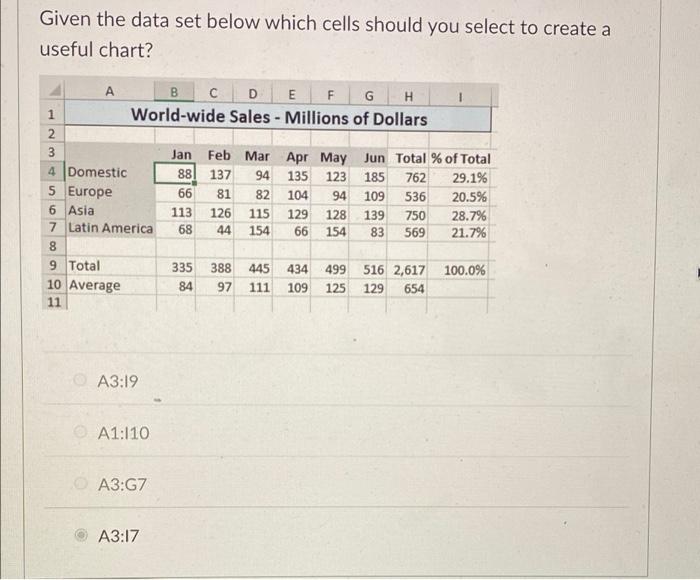
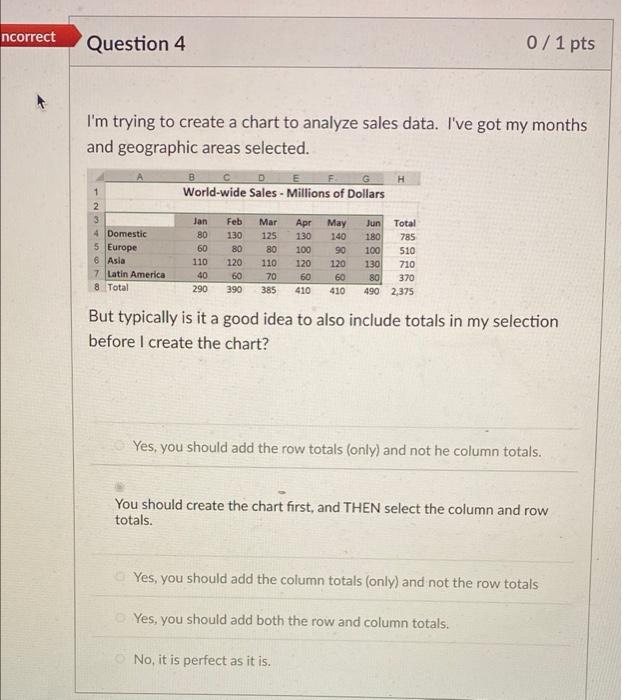
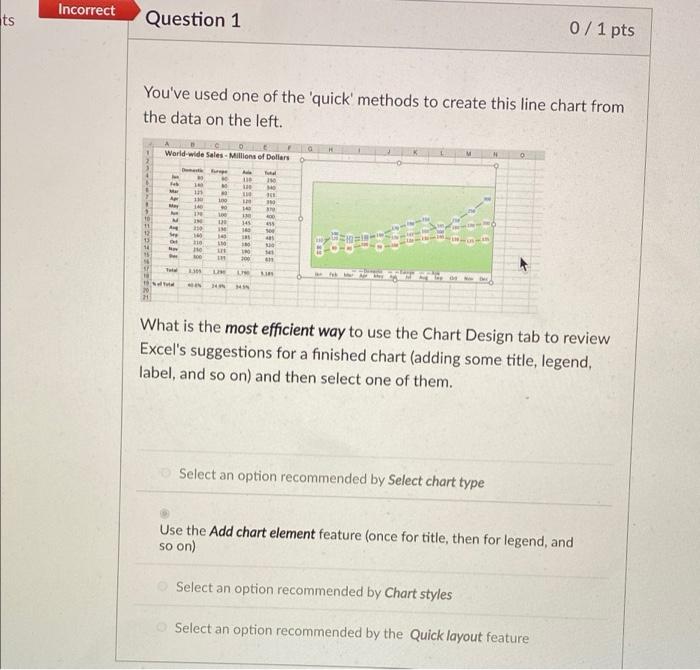
Given the data set below which cells should you select to create a useful chart? A B D E F G H 1 World-wide Sales - Millions of Dollars 2 3 Jan Feb Mar Apr May Jun Total % of Total 4 Domestic 88 137 94 135 123 185 762 29.1% 5 Europe 66 81 82 104 94 109 536 20.5% 6 Asia 113 126 115 129 128 139 750 28.7% 7 Latin America 68 44 154 66 154 83 569 21.7% 8 9 Total 335 388 445 434 499 516 2,617 100.0% 10 Average 84 97 111 109 125 129 654 11 A3:19 A1:110 A3:G7 A3:17 ncorrect Question 4 0/1 pts I'm trying to create a chart to analyze sales data. I've got my months and geographic areas selected. H B D E F G World-wide Sales - Millions of Dollars 1 2 3 4 Domestic 5 Europe 6 Asia 7 Latin America 8 Total Jan 80 60 110 40 290 Feb 130 80 120 60 390 Mar 125 80 110 70 385 Apr 130 100 120 60 410 May 140 90 120 60 410 Jun Total 180 785 100 510 130 710 80 370 490 2,375 But typically is it a good idea to also include totals in my selection before I create the chart? Yes, you should add the row totals (only) and not he column totals. You should create the chart first, and THEN select the column and row totals. Yes, you should add the column totals (only) and not the row totals Yes, you should add both the row and column totals. No, it is perfect as it is. Incorrect ts Question 1 0 / 1 pts You've used one of the 'quick' methods to create this line chart from the data on the left. World-wide Sales - Millions of Dollars fe Alle 13 10 10 1 16 A no . 3 1 TA 1 M A O 1 145 16 400 33 12 150 1 10 he 45 14 15 100 10 30 SP 165 1 11 What is the most efficient way to use the Chart Design tab to review Excel's suggestions for a finished chart (adding some title, legend, label, and so on) and then select one of them. Select an option recommended by Select chart type Use the Add chart element feature (once for title, then for legend, and so on) Select an option recommended by Chart styles Select an option recommended by the Quick layout feature
Step by Step Solution
There are 3 Steps involved in it

Get step-by-step solutions from verified subject matter experts
 Study Help