







Question: please answer this correctly. chegg keeps giving me wrong answers :/ answer all parts of the question eBook Show Me How Office 365 Compute bond
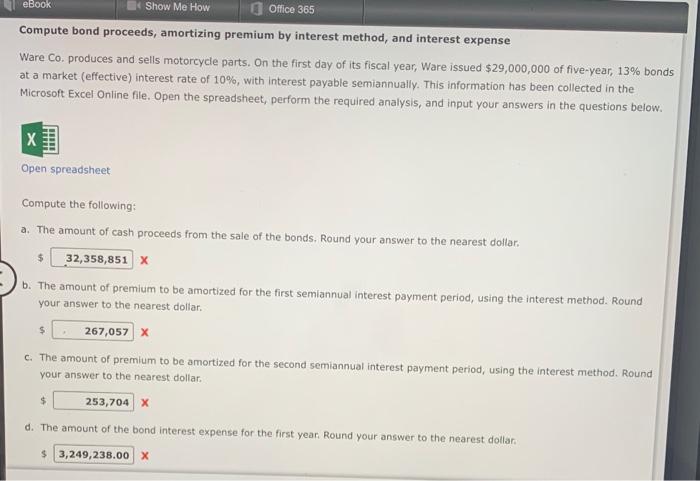
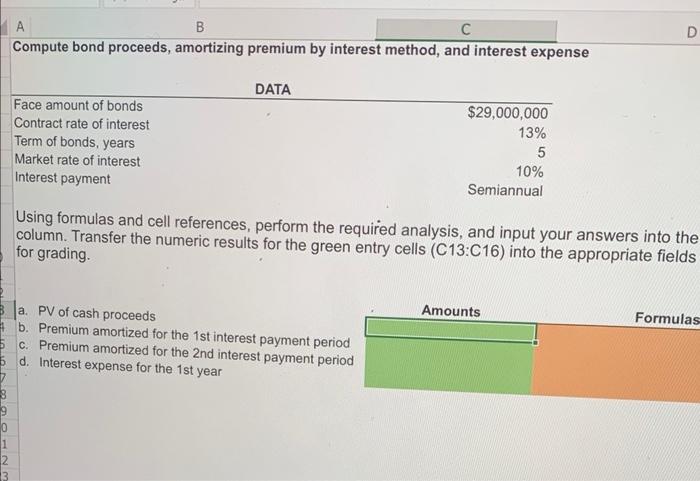
eBook Show Me How Office 365 Compute bond proceeds, amortizing premium by interest method, and interest expense Ware Co. produces and sells motorcycle parts. On the first day of its fiscal year, Ware issued $29,000,000 of five-year, 13% bonds at a market (effective) interest rate of 10%, with interest payable semiannually. This information has been collected in the Microsoft Excel Online file. Open the spreadsheet, perform the required analysis, and input your answers in the questions below. X Open spreadsheet Compute the following: a. The amount of cash proceeds from the sale of the bonds. Round your answer to the nearest dollar. 32,358,851 X b. The amount of premium to be amortized for the first semiannual interest payment period, using the interest method. Round your answer to the nearest dollar. 267,057 X c. The amount of premium to be amortized for the second semiannual interest payment period, using the interest method. Round your answer to the nearest dollar. $ 253,704 X d. The amount of the bond interest expense for the first year. Round your answer to the nearest dollar. $3,249,238.00 X $ A B C Compute bond proceeds, amortizing premium by interest method, and interest expense 13 Face amount of bonds Contract rate of interest Term of bonds, years Market rate of interest Interest payment DATA a. PV of cash proceeds b. Premium amortized for the 1st interest payment period c. Premium amortized for the 2nd interest payment period 5 d. Interest expense for the 1st year $29,000,000 13% 5 10% Semiannual Using formulas and cell references, perform the required analysis, and input your answers into the column. Transfer the numeric results for the green entry cells (C13:C16) into the appropriate fields for grading. D Amounts Formulas
Step by Step Solution
There are 3 Steps involved in it

Get step-by-step solutions from verified subject matter experts
 Study Help