







Question: Please complete his assignment in Ubuntu - 64 bit VM. Task A Practice File Permissions (60 points) 1. Create a new file named forxxxx.txt in
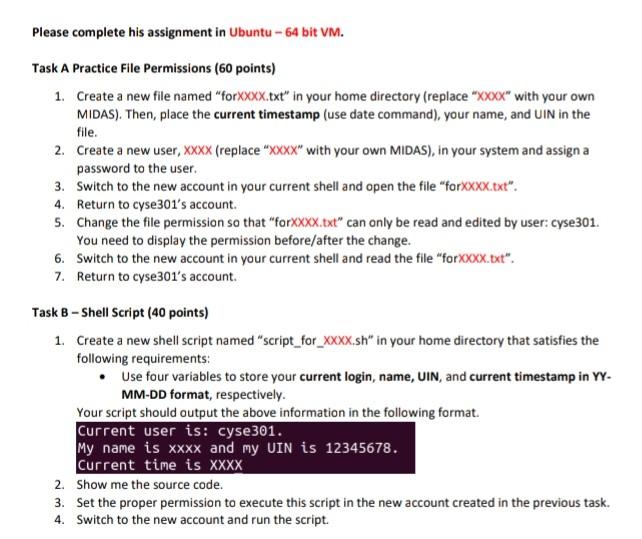
Please complete his assignment in Ubuntu - 64 bit VM. Task A Practice File Permissions (60 points) 1. Create a new file named "forxxxx.txt" in your home directory (replace "xxxx" with your own MIDAS). Then, place the current timestamp (use date command), your name, and UIN in the file. 2. Create a new user, XXXX (replace XXXX" with your own MIDAS), in your system and assign a password to the user. 3. Switch to the new account in your current shell and open the file "forxxxx.txt". 4. Return to cyse301's account. 5. Change the file permission so that "forXXXX.txt" can only be read and edited by user: cyse 301. You need to display the permission before/after the change. 6. Switch to the new account in your current shell and read the file "forXXXX.txt". 7. Return to cyse301's account. Task 3 - Shell Script (40 points) 1. Create a new shell script named "script_for_XXXX.sh" in your home directory that satisfies the following requirements: Use four variables to store your current login, name, UIN, and current timestamp in YY. MM-DD format, respectively. Your script should output the above information in the following format. Current user is: cyse 301. My name is xxxx and my UIN is 12345678. Current time is XXXX 2. Show me the source code. 3. Set the proper permission to execute this script in the new account created in the previous task. 4. Switch to the new account and run the script
Step by Step Solution
There are 3 Steps involved in it

Get step-by-step solutions from verified subject matter experts
 Study Help