







Question: please copy and paste the output So i can copy and paste it to my own txt file. ty will give thumbs up if done
please copy and paste the output So i can copy and paste it to my own txt file. ty will give thumbs up if done correctly :)
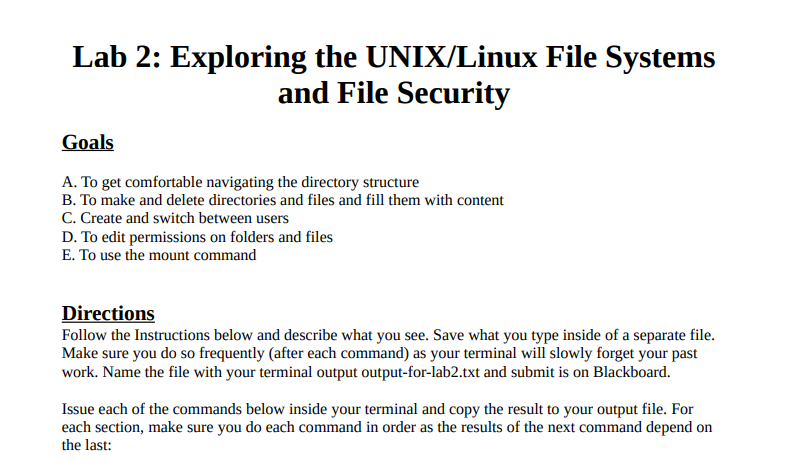
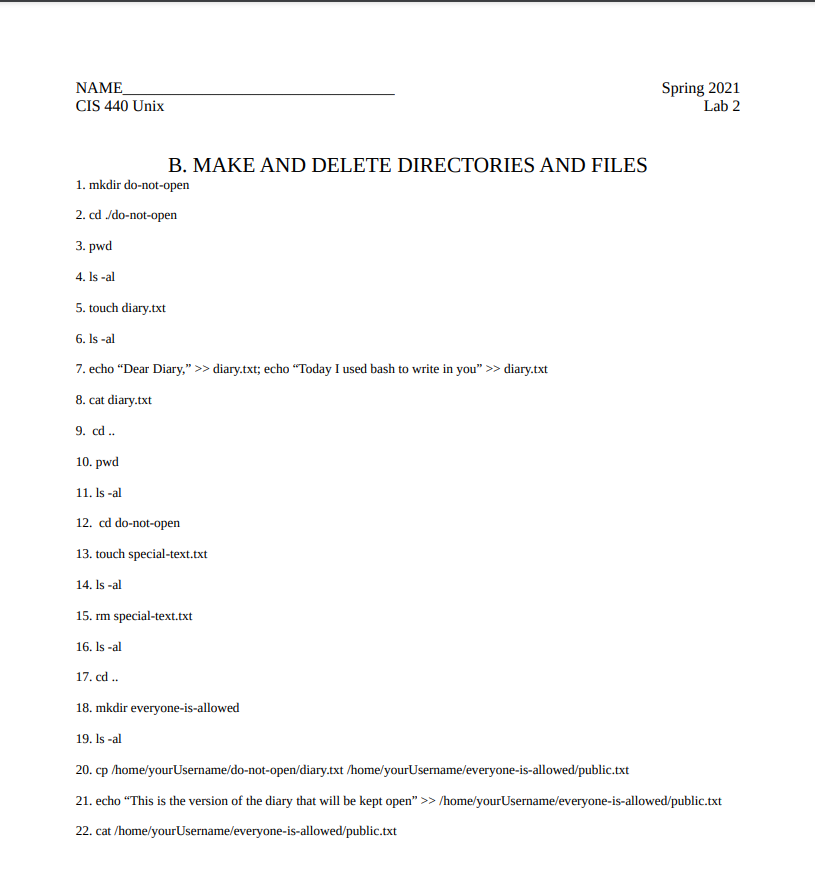
Lab 2: Exploring the UNIX/Linux File Systems and File Security Goals A. To get comfortable navigating the directory structure B. To make and delete directories and files and fill them with content C. Create and switch between users D. To edit permissions on folders and files E. To use the mount command Directions Follow the Instructions below and describe what you see. Save what you type inside of a separate file. Make sure you do so frequently (after each command) as your terminal will slowly forget your past work. Name the file with your terminal output output-for-lab2.txt and submit is on Blackboard. Issue each of the commands below inside your terminal and copy the result to your output file. For each section, make sure you do each command in order as the results of the next command depend on the last: NAME CIS 440 Unix Spring 2021 Lab 2 B. MAKE AND DELETE DIRECTORIES AND FILES 1. mkdir do-not-open 2. cd./do-not-open 3. pwd 4. ls -al 5. touch diary.txt 6. Is-al 7. echo Dear Diary," >> diary.txt; echo "Today I used bash to write in you" >> diary.txt 8. cat diary.txt 9. cd.. 10. pwd 11. Is-al 12. cd do-not-open 13. touch special-text.txt 14. Is-al 15. rm special-text.txt 16. Is-al 17.cd .. 18. mkdir everyone-is-allowed 19. Is-al 20. cp /home/yourUsername/do-not-open/diary.txt /home/yourUsername/everyone-is-allowed/public.txt 21. echo "This is the version of the diary that will be kept open" >> /home/yourUsername/everyone-is-allowed/public.txt 22. cat /home/yourUsername/everyone-is-allowed/public.txt
Step by Step Solution
There are 3 Steps involved in it

Get step-by-step solutions from verified subject matter experts
 Study Help