







Question: please do in c# for visual studio or this exercise you are asked to write a Windows Forms application to allow users to convert between
please do in c# for visual studio
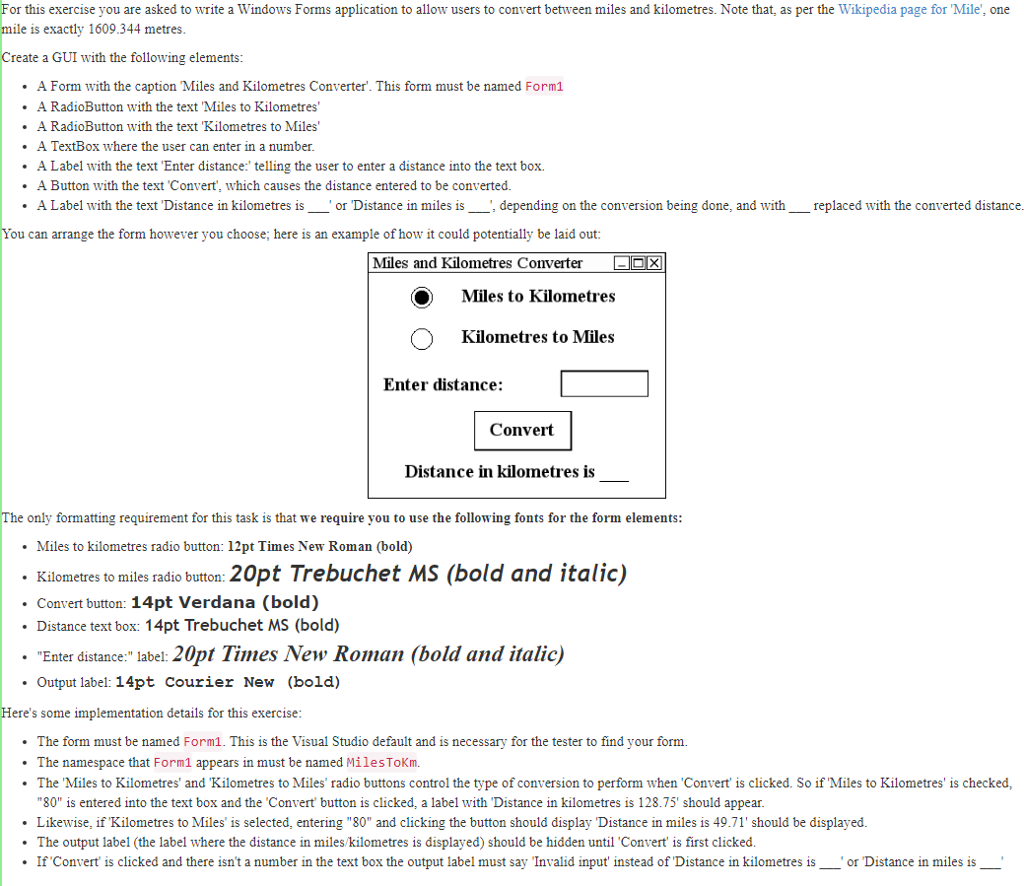
or this exercise you are asked to write a Windows Forms application to allow users to convert between miles and kilometres. Note that, as per the Wikipedia page for 'Mile', one mile is exactly 1609.344 metres Create a GUI with the following elements .A Form with the caption Miles and Kilometres Converter. This form must be named Form1 .A RadioButton with the text Miles to Kilometres .A RadioButton with the text Kilometres to Miles .A TextBox where the user can enter in a number .A Label with the text Enter distance: telling the user to enter a distance into the text box .A Button with the text Convert, which causes the distance entered to be converted. A Label with the text 'Distance in kilometres is "or Distance in miles is.depending on the conversion being done, and with replaced with the converted distance ou can arrange the form however you choose; here is an example of how it could potentially be laid out Miles and Kilometres Converter Miles to Kilometres Kilometres to Miles Enter distance: Convert Distance in kilometres is only formatting requirement for this task is that we require you to use the following fonts for the form elements Miles to kilometres radio button: 12pt Times New Roman (bold) Kilometres to miles radio button: 20pt Trebuchet MS (bold and italic) . Convert button: 14pt Verdana (bold) . Distance text box: 14pt Trebuchet MS (bold) Enter distance:" label: 20pt Times New Roman (bold and italic) Output label: 14pt Courier New (bold) ere's some implementation details for this exercise The form must be named Form1. This is the Visual Studio default and is necessary for the tester to find your form. The namespace that Form1 appears in must be named MilesToKm. The 'Miles to Kilometres' and 'Kilometres to Miles' radio buttons control the type of conversion to perform when Convert' is clicked. So if'Miles to Kilometres' is checked, "80" is entered into the text box and the 'Convert button is clicked, a label with "Distance in kilometres is 128.75' should appear Likewise, if Kilometres to Miles' is selected, entering "80" and clicking the button should display Distance in miles is 49.71' should be displayed The output label (the label where the distance in miles/kilometres is displayed) should be hidden until Convert is first clicked If Convert is clicked and there isn't a number in the text box the output label must say Invalid input instead of Distance in kilometres is__ or Distance in miles is
Step by Step Solution
There are 3 Steps involved in it

Get step-by-step solutions from verified subject matter experts
 Study Help