







Question: please draw a graph and follow the steps spreadsheet software like Microsoft Excel or Google Sheets. First, create a new spreadsheet and set up the
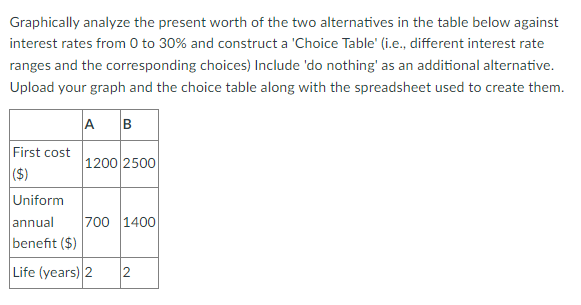
please draw a graph and follow the steps
spreadsheet software like Microsoft Excel or Google Sheets.
First, create a new spreadsheet and set up the following columns:
Column A: Interest Rate (0% to 30% in increments, e.g., 1% or 5% increments) Column B: Present Worth A Column C: Present Worth B Column D: Do Nothing (always zero)
In the "Interest Rate" column (column A), list down interest rates from 0% to 30% in increments of your choice (e.g., 1% or 5% increments).
Next, calculate the present worth for each alternative A and B for each interest rate using the formula:
PW = (Uniform annual benefit * (1 - (1 + Interest Rate)^(-Life)) / Interest Rate) - First cost
For each interest rate, fill out the respective present worth in columns B and C. The "Do Nothing" option (column D) will have a present worth of 0 at all interest rates.
Now you can create a graph:
- Select the data in columns A, B, C, and D.
- In Microsoft Excel, go to the "Insert" tab and choose "Scatter" from the "Charts" section. Select "Scatter with Straight Lines" to create a graph. In Google Sheets, go to "Insert" and choose "Chart". In the "Chart type" dropdown, select "Scatter chart".
- Adjust the chart title, axis titles, and legend as needed.
To create the choice table:
- Create a new sheet or a new section in your existing sheet.
- Create columns with the following headers: "Interest Rate Range", "Choice"
- For each interest rate range, determine which alternative has the highest present worth (including the "Do Nothing" option) and enter the corresponding choice in the "Choice" column.
Graphically analyze the present worth of the two alternatives in the table below against interest rates from 0 to 30% and construct a 'Choice Table' (i.e., different interest rate ranges and the corresponding choices) Include 'do nothing' as an additional alternative. Upload your graph and the choice table along with the spreadsheet used to create them. Graphically analyze the present worth of the two alternatives in the table below against interest rates from 0 to 30% and construct a 'Choice Table' (i.e., different interest rate ranges and the corresponding choices) Include 'do nothing' as an additional alternative. Upload your graph and the choice table along with the spreadsheet used to create them
Step by Step Solution
There are 3 Steps involved in it

Get step-by-step solutions from verified subject matter experts
 Study Help