







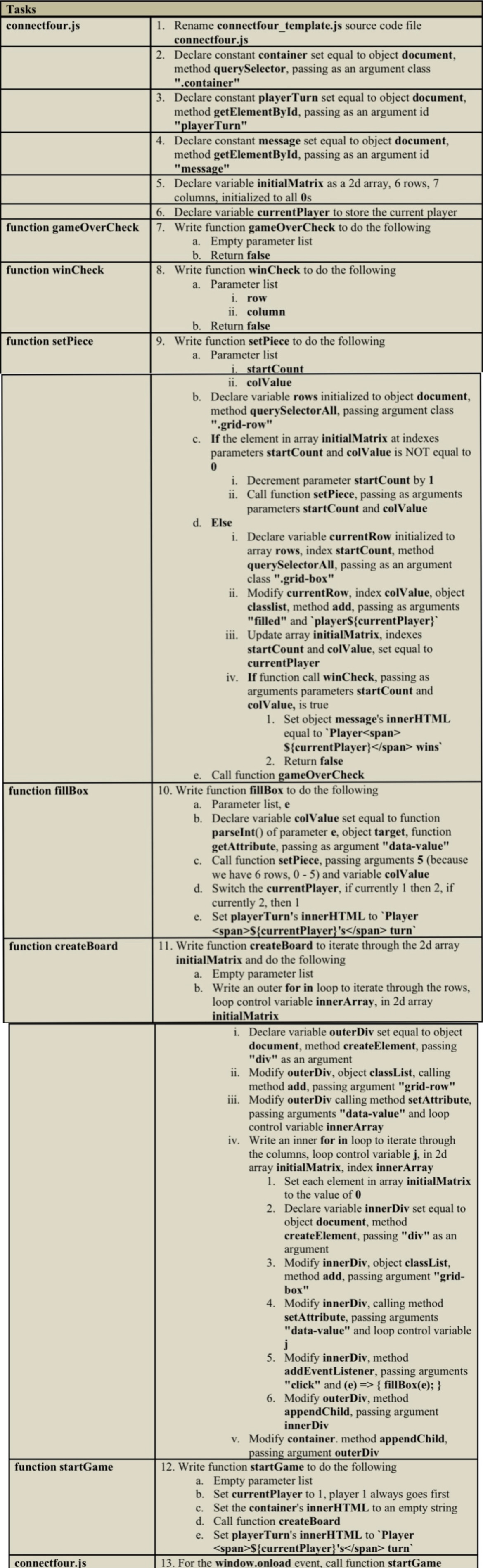
Question: Please edit the javascript file provided in the text below according to the instructions in the photo. connectfour.js: / / Initial references / / Create
Please edit the javascript file provided in the text below according to the instructions in the photo. connectfour.js:
Initial references
Create global variables for the different elements in the document
The querySelector method returns the first element that matches a CSS selector
The getElementById method returns the element that matches the ID
Declare constant container set equal to object document, method querySelector, passing as an argument class container"
Declare constant playerTurn set equal to object document, method getElementById, passing as an argument id "playerTurn"
Declare constant message set equal to object document, method getElementById, passing as an argument id "message"
Declare variable initialMatrix as a d array, rows, columns, initialized to all s
Declare variable currentPlayer to store the current player
Write function gameOverCheck
consoleloggameOverCheck;
return false
Write function winCheck
consolelogwinCheck;
return false
Write function setPiece
consolelogsetPiece;
Declare variable rows initialized to object document, method querySelectorAll, passing argument class gridrow"
let rows document.querySelectorAllgridrow";
If the element in array initialMatrix at indexes parameters startCount and colValue is NOT equal to
Decrement parameter startCount by
Call function setPiece, passing as arguments parameters startCount and colValue
Else
Declare variable currentRow initialized to array rows, index startCount, method querySelectorAll, passing as an argument class gridbox"
let currentRow rowsstartCountquerySelectorAllgridbox";
Modify currentRow, index colValue, object classlist, method add, passing as arguments "filled" and player$currentPlayer
currentRowcolValueclasslist.addfilledplayer$currentPlayer;
Update array initialMatrix, indexes startCount and colValue, set equal to currentPlayer
If function call winCheck, passing as arguments parameters startCount and colValue is true
Set object message's innerHTML equal to Player $currentPlayer wins
message.innerHTML Player $currentPlayer wins;
Return false
Call function gameOverCheck
Write function fillBox
consolelogfillBox;
Declare variable colValue set equal to function parseInt of parameter e object target, function getAttribute, passing as argument "datavalue"
Call function setPiece, passing arguments because we have rows, and variable colValue
Switch the currentPlayer, if currently then if currently then
Set playerTurn's innerHTML to Player $currentPlayers turn
Write function createBoard
consolelogcreateBoard;
Iterate through the d array initialMatrix
Write an outer for in loop to iterate through the rows, loop control variable innerArray, in d array initialMatrix
Declare variable outerDiv set equal to object document, method createElement, passing "div" as an argument
Modify outerDiv, object classList, calling method add, passing argument "gridrow"
Modify outerDiv calling method setAttribute, passing arguments "datavalue" and loop control variable innerArray
Write an inner for in loop to iterate through the columns, loop control variable j in d array initialMatrix, index innerArray
Set each element in array initialMatrix to the value of
Declare variable innerDiv set equal to object document, method createElement, passing "div" as an argument
Modify innerDiv, object classList, method add, passing argument "gridbox"
Modify innerDiv, calling method setAttribute, passing arguments "datavalue" and loop control variable j
Modify innerDiv, method addEventListener, passing arguments "click" and e fillBoxe;
Modify outerDiv, method appendChild, passing argument innerDiv
Modify container. method appendChild, passing argument outerDiv
Write function startGame
consolelogstartGame;
Set currentPlayer to player always goes first
Set the container's innerHTML to an empty string
Call function createBoard
Set playerTurn's innerHTML to Player $currentPlayers turn
For the window.onload event, call function startGame
Step by Step Solution
There are 3 Steps involved in it
1 Expert Approved Answer
Step: 1 Unlock

Question Has Been Solved by an Expert!
Get step-by-step solutions from verified subject matter experts
Step: 2 Unlock
Step: 3 Unlock
 Study Help